Docker安装Nginx1.19.4
Docker安装Nginx1.19.4
Docker安装Nginx1.19.4
1.下载Nginx镜像
docker pull nginx:1.19.4
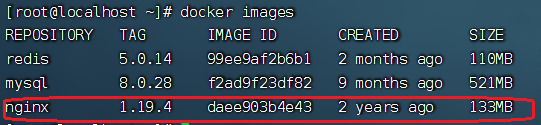
通过 docker images 命令检查一下镜像是否下载成功:
# docker images
2.运行Nginx容器
docker run -d -p 80:80 --name nginx nginx:1.19.4
参数说明:
- -p 80:80: 将容器的 80 端口映射到宿主机的 80 端口上;
- -d: 以后台方式运行镜像;
- --name: 指定容器的名称为 nginx;
3.进入nginx容器
首先查看nginx容器。
[root@localhost ~]# docker ps -a
进入nginx容器。
[root@localhost ~]# docker container exec -it nginx  /bin/bash

#也可以简写如下:

[root@localhost ~]# docker exec -it nginx bash
4.重新部署生成环境的nginx容器
以上部署的nginx容器不具备生产环境,因为容器重启会丢失内部数据,因此要将需要持久化的文件挂载到宿主机中,以防数据丢失。
首先我们在宿主主机的/usr/local下,创建nginx容器要挂载在宿主主机的目录。/usr/local/nginx
如下图所示:
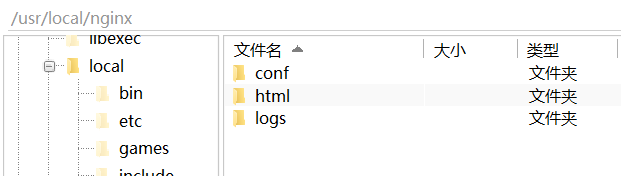
注意:在conf目录下一定要新建nginx.conf文件。(注意:一定是文件不能是目录,重要的事情说三遍!)
重新部署容器:
docker run -d -p 80:80 \
--name nginx-prod \
-v /usr/local/nginx/html:/usr/share/nginx/html \
-v /usr/local/nginx/conf/nginx.conf:/etc/nginx/nginx.conf \
-v /usr/local/nginx/logs:/var/log/nginx  nginx:1.19.4
编辑/usr/local/nginx/nginx.conf如下:
events {
  worker_connections  1024;  ## Default: 1024
}

http {
    include       mime.types;
    default_type  application/octet-stream;

    #log_format  main  '$remote_addr - $remote_user [$time_local] "$request" '
    #                  '$status $body_bytes_sent "$http_referer" '
    #                  '"$http_user_agent" "$http_x_forwarded_for"';

    #access_log  logs/access.log  main;

    sendfile        on;
    #tcp_nopush     on;

    #keepalive_timeout  0;
    keepalive_timeout  65;

    #gzip  on;

    server {
        listen       80;
        server_name  localhost;

        #charset koi8-r;

        #access_log  logs/host.access.log  main;

        location / {
            root   /usr/share/nginx/html/;
            index  index.html index.htm;
            try_files $uri $uri/ index.html;
       }


        #error_page  404              /404.html;

        # redirect server error pages to the static page /50x.html
        #
        error_page   500 502 503 504  /50x.html;
        location = /50x.html {
            root   html;
        }

        # proxy the PHP scripts to Apache listening on 127.0.0.1:80
        #
        #location ~ \.php$ {
        #    proxy_pass   http://127.0.0.1;
        #}

        # pass the PHP scripts to FastCGI server listening on 127.0.0.1:9000
        #
        #location ~ \.php$ {
        #    root           html;
        #    fastcgi_pass   127.0.0.1:9000;
        #    fastcgi_index  index.php;
        #    fastcgi_param  SCRIPT_FILENAME  /scripts$fastcgi_script_name;
        #    include        fastcgi_params;
        #}

        # deny access to .htaccess files, if Apache's document root
        # concurs with nginx's one
        #
        #location ~ /\.ht {
        #    deny  all;
        #}
    }


    # another virtual host using mix of IP-, name-, and port-based configuration
    #
    #server {
    #    listen       8000;
    #    listen       somename:8080;
    #    server_name  somename  alias  another.alias;

    #    location / {
    #        root   html;
    #        index  index.html index.htm;
    #    }
    #}


    # HTTPS server
    #
    #server {
    #    listen       443 ssl;
    #    server_name  localhost;

    #    ssl_certificate      cert.pem;
    #    ssl_certificate_key  cert.key;

    #    ssl_session_cache    shared:SSL:1m;
    #    ssl_session_timeout  5m;

    #    ssl_ciphers  HIGH:!aNULL:!MD5;
    #    ssl_prefer_server_ciphers  on;

    #    location / {
    #        root   html;
    #        index  index.html index.htm;
    #    }
    #}

}