Javascript实现公告滚动特效
Javascript实现公告滚动特效
Javascript实现公告滚动特效
1.Javascript实现公告滚动特效
<!DOCTYPE html>
<html lang="en">
<head>
<meta charset="UTF-8">
<title>Css 实现新闻滚动效果</title>
<style>
.container{
background-color: lightblue;
padding: 10px 0px;
/*overflow: hidden;*/
}
/*子元素浮动父元素高度坍塌*/
.container:after{
content: '';
display: block;
clear: both;
}
.title{
float: left;
margin-left: 20px;
height: 30px;
margin-top: 4px;
}
.right{
float: left;
margin: 0px;
padding: 0px;
height: 30px;
}
.right ul{
/*border: 1px solid #222;*/
height: 30px;
overflow: hidden ;
margin: 0px;
padding: 0px;
}
.right ul li{
list-style: none;
padding: 0px;
margin-left: 20px;
height: 30px;
line-height: 30px;
}
</style>
</head>
<body>
<h1>Javascript实现新闻滚动效果</h1>
<hr>
<div class="container">
<div class="title">最新公告 | </div>
<div class="right">
<ul>
<li>JavaSE基础教程2023版正式发布!</li>
<li>Linux基础教程2023版正式发布!</li>
<li>Springboot基础教程2023版正式发布!</li>
<li>Hadoop基础教程2023版正式发布!</li>
</ul>
</div>
</div>
<script src="https://cdn.bootcdn.net/ajax/libs/jquery/3.5.1/jquery.min.js"></script>
<script>
let duration = 2000; //滚动的间隔时间
let currentIndex = 0;
$(function(){
//克隆第一个元素,目的是当滚动到最后一项后不会立刻跳回到第一项。
cloneFirstListNode();
//开始滚动...
setInterval(scrollList,duration);
})
function cloneFirstListNode(){
let list = document.querySelector(".right ul");
let firstNode = list.children[0];
list.appendChild(firstNode.cloneNode(true));
}
function scrollList(){
let list = document.querySelector(".right ul");
//开始的位置
let from = currentIndex*30;
currentIndex++;
//结束的位置
let to = currentIndex*30;
let totalDuration = 500; //总动画时间
let duration = 10; // 变化间隔时间
let times = totalDuration/duration; //变化次数
let dis = (to-from)/times; //每次变化的偏移量
//开始动画
let timerId = setInterval(()=>{
from += dis;
if(from >= to){
clearInterval(timerId);
//如果已经滚动到最后一项,把currentIndex置回到0,from为0
if(currentIndex === list.children.length -1){
from = 0;
currentIndex = 0;
}
}
list.scrollTop = from;
},duration);
}
</script>
</body>
</html>
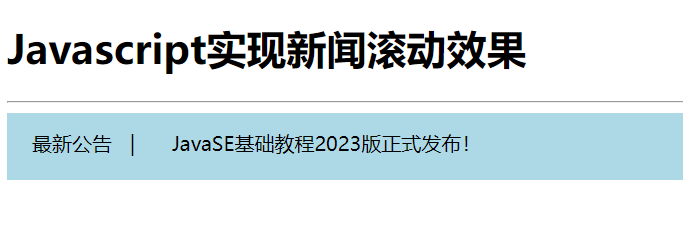
运行效果: