Css基础教程(二十六)
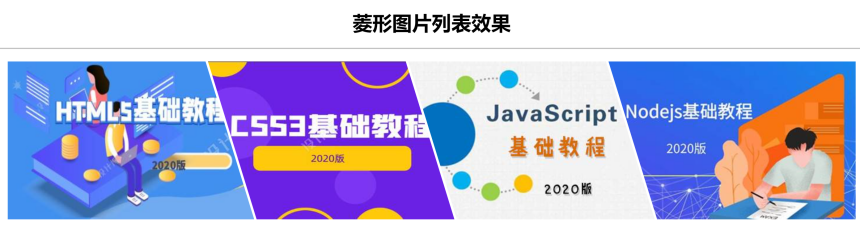
菱形图片效果
Css实现菱形图片列表效果
1.Css实现菱形图片列表效果
<!DOCTYPE html>
<html lang="en">
<head>
    <meta charset="UTF-8">
    <title>Title</title>
    <style>
        *{
            margin: 0px;
            padding: 0px;
        }
        h1{
            margin: 20px;
            text-align: center;

        }

        ul{
            width: 90%;
            margin: 20px auto;
            display: flex;
            justify-content: space-around;
            flex-flow: row nowrap;
            align-content: space-around;

        }

        ul li img{
            width: 400px;
        }

        ul li{
            list-style: none;
            clip-path: polygon(0 0, 80% 0,100% 100%,20% 100%);
            margin: 0 -80px;
        }

        ul li:first-child{
            clip-path: polygon(0 0, 80% 0,100% 100%,0 100%);
        }

        ul li:last-child{
            clip-path: polygon(0 0, 100% 0,100% 100%,20% 100%);
        }

    </style>
</head>
<body>

<h1>菱形图片列表效果</h1>
<hr>

<ul>
    <li><img src="https://img.simoniu.com/HTML%E5%9F%BA%E7%A1%80%E6%95%99%E7%A8%8B_logo.jpg"/></li>
    <li><img src="https://img.simoniu.com/css3%E5%9F%BA%E7%A1%80%E6%95%99%E7%A8%8B_logo.jpg"></li>
    <li><img src="https://img.simoniu.com/Javascript%E5%9F%BA%E7%A1%80%E6%95%99%E7%A8%8B_logo.jpg"></li>
    <li><img src="https://img.simoniu.com/Nodejs%E5%9F%BA%E7%A1%80%E6%95%99%E7%A8%8B_logo.jpg"></li>
  </ul>
</body>
</html>
运行效果: