UniApp基础教程(十六)
视频播放器
使用uni.chooseVideo()和 uni.createVideoContext() 可以轻松实现视频播放器效果。
1.实现视频播放器
<template>
    <view class="container">
        <view class="page-body">
            <view class="page-section">
                <video id="myVideo" :src="src" @error="videoErrorCallback" :danmu-list="danmuList" enable-danmu
                    danmu-btn controls>
                </video>

                <view class="uni-list">
                    <view class="uni-list-cell">
                        <view>
                            <view class="uni-label">弹幕内容</view>
                        </view>
                        <view class="uni-list-cell-db">
                            <input @blur="bindInputBlur" class="uni-input" type="text" placeholder="在此处输入弹幕内容" />
                        </view>
                    </view>
                </view>
                <view class="btn-area">
                    <button @tap="bindSendDanmu" class="page-body-button" formType="submit">发送弹幕</button>
                </view>
                <view>
                    <button @tap="chooseVideo()">选择视频</button>
                </view>
            </view>
        </view>
    </view>
</template>


<script>
    export default {
        data() {
            return {
                title: '测试视频标题',
                src: 'http://media.simoniu.com/test.mp4',
                inputValue: '',
                danmuList: [{
                        text: '第 1s 出现的弹幕',
                        color: '#55aaff',
                        time: 1
                    },
                    {
                        text: '第 3s 出现的弹幕',
                        color: '#ff00ff',
                        time: 3
                    }
                ]
            }
        },
        onLoad() {

        },
        onReady: function(res) {
            this.videoContext = uni.createVideoContext('myVideo')
        },
        methods: {

            chooseVideo: function() {
                var self = this;
                uni.chooseVideo({
                    sourceType: ['camera', 'album'],
                    success: function(res) {
                        self.src = res.tempFilePath;
                    }
                });
            },

            bindInputBlur: function(e) {
                this.inputValue = e.target.value
            },
            bindButtonTap: function() {
                var that = this
                uni.chooseVideo({
                    sourceType: ['album', 'camera'],
                    maxDuration: 60,
                    camera: ['front', 'back'],
                    success: function(res) {
                        this.src = res.tempFilePath
                    }
                })
            },
            bindSendDanmu: function() {
                this.videoContext.sendDanmu({
                    text: this.inputValue,
                    color: this.getRandomColor()
                })
            },
            videoErrorCallback: function(e) {
                console.log('视频错误信息:')
                console.log(e.target.errMsg)
            },
            getRandomColor: function() {
                const rgb = []
                for (let i = 0; i < 3; ++i) {
                    let color = Math.floor(Math.random() * 256).toString(16)
                    color = color.length == 1 ? '0' + color : color
                    rgb.push(color)
                }
                return '#' + rgb.join('')
            }
        }
    }
</script>

<style lang="scss" scoped>
    .container {
        width: 98%;
        height: auto;
        font-size: 14px;
        text-align: center;
        margin: 0rpx auto;
    }
</style>
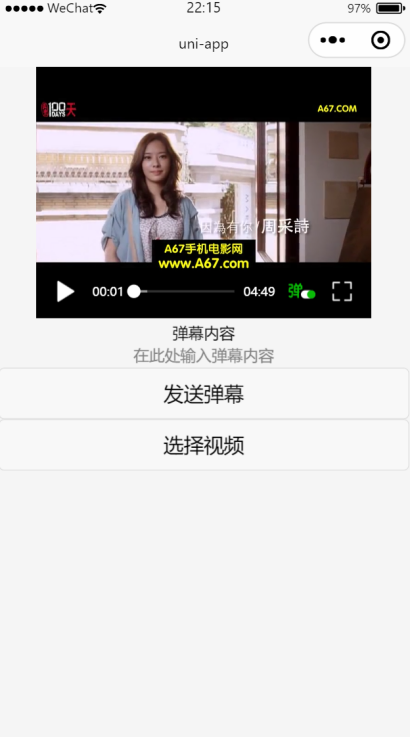
运行效果: