UniApp基础教程(十四)
uni-file-picker实现文件上传
uni-file-picker组件是文件选择上传组件,可以选择图片、视频等任意文件并上传到当前绑定的服务空间。而真正是文件上传功能必须结合uni.uploadFile API实现。
1.使用uni-file-picker和 uni.uploadFile API实现文件上传
<template>
    <view class="container">
        <view class="example-body">
            <uni-file-picker limit="3" title="最多选择3张图片" v-model="tempImageFileList" fileMediatype="image"
                file-extname="png,jpg,jpeg,bmp,psd,tif,svg" mode="grid" @select="select" @delete="handleDelete"
                @progress="progress" @success="success" @fail="fail">
            </uni-file-picker>
            <view style="width: 80%; margin: 0rpx auto; text-align: center;">
                <text>\n</text>
                <button type="default" @click="uploadImg()">开始上传</button>
                <text>\n</text>
            </view>
        </view>
        <view class="image-list">
            <view class="image-item" v-for="(item,index) in uploadSuccessImageList" :key="index">
                <view class="image-content">
                    <image style="background-color: #ddd; border: 1rpx solid #eee; border-radius: 12rpx;"
                        :mode="item.mode" :src="item.url">
                    </image>
                </view>
            </view>
        </view>
    </view>
</template>

<script>
    export default {
        data() {
            return {
                tempImageFileList: [],
                uploadSuccessImageList: []
            }
        },
        onLoad() {

        },
        methods: {
            // 获取上传状态
            async select(e) {
                console.log('选择文件:', e);
                this.tempImageFileList.push(e.tempFiles[0]);
                console.log('---------要上传的文件集合-----------');
                console.log(this.tempImageFileList);
            },

            handleDelete(e) {
                console.log('删除文件:', e);
                for (let i = 0; i < this.tempImageFileList.length; i++) {
                    if (this.tempImageFileList[i].uuid === e.tempFile.uuid) {
                        this.tempImageFileList.splice(i, 1); //删除一项
                        break;
                    }
                }
                console.log('---------要上传的文件集合-----------');
                console.log(this.tempImageFileList);
            },

            async uploadImg(tempFilePaths) {
                console.log('---------要上传的文件集合-----------');
                console.log(this.tempImageFileList);
                if (!this.tempImageFileList.length) return;
                console.log("tempFilePath's length:" + this.tempImageFileList.length);
                for (let i = this.tempImageFileList.length - 1; i >= 0; i--) {
                    console.log("-----开始上传文件信息-----");
                    console.log(this.tempImageFileList[i]);
                    let path = this.tempImageFileList[i].file.path;
                    const [err, {
                        data
                    }] = await uni.uploadFile({
                        url: 'https://www.simoniu.com/commons/qiniu/upload',
                        filePath: path,
                        name: 'file',
                        header: {
                            "Content-Type": "multipart/form-data"
                        }
                    });

                    //console.log("错误消息:", err);
                    //console.log("响应消息:", data);
                    console.log('------响应对象--------');
                    let resp = JSON.parse(data);
                    console.log(resp);
                    if (resp.code === 200) {
                        uni.showToast({
                            title:'上传成功',
                            duration:1000,
                            icon:'none'
                        });

                        let imgObj = {
                            mode: 'aspectFit', //上传成功后的图片缩放模式
                            url: resp.data.url //上传成功后的图片真实的URL
                        }
                        this.uploadSuccessImageList.push(imgObj);
                        this.tempImageFileList.splice(i, 1);
                    }
                }
            },

            // 获取上传进度
            progress(e) {
                console.log('上传进度:', e)
            },

            // 上传成功
            success(e) {
                console.log('上传成功')
            },

            // 上传失败
            fail(e) {
                console.log('上传失败:', e)
            }
        }
    }
</script>

<style lang="scss" scoped>
    .container {
        width: 98%;
        height: auto;
        font-size: 14px;
        text-align: center;
        margin: 0rpx auto;
    }

    .image-list {
        padding: 10px;
        padding-top: 0;
    }
</style>
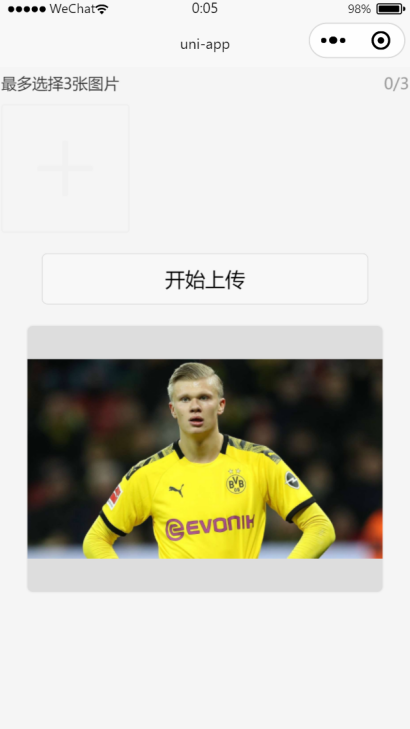
运行效果: