UniApp基础教程(十二)
加载更多效果
在小程序中如果查询数据时返回条数过多,通常使用懒加载策略,即每次加载一页数据。
1.实现懒加载效果
<template>
    <view class="container">
        <view class="new_blog_title">
            <view>
                <image src="../../static/search.png"></image>
                <span>搜索结果</span>
            </view>
        </view>
        <view class="new_blog_item">
            <view class="new_blog_items" v-for="(a,index) in articleList" :key="a.aid"
                @click="showArticleDetails(a.aid)">
                <view class="new_blog_items_flex">
                    <text class="new_blog_items_left">{{a.title}}</text>
                    <text class="new_blog_items_right">{{a.catalogName}}</text>
                </view>
                <text class="new_blog_items_left_bottom">{{a.summary}}</text>
            </view>
            <view style="text-align: center; color: darkgray;" v-if="articleList.length==0">
                <uni-icons type="info" color="#C4C4C4" size="20" class="search-icon"></uni-icons>没有任何搜索结果!
            </view>

            <view>
                <button type="default" @click="loadMore">加载更多...</button>
                <text>\n</text>
            </view>
        </view>
    </view>
</template>

<script>
    export default {

        data() {
            return {
                articleList: [],
                currentPageNum: 1,
                totalPageCounter: 0
            }
        },
        onLoad() {
            this.initArticleList();
        },
        methods: {
            initArticleList() {
                uni.request({
                    url: 'https://www.simoniu.com/blog/article/pager', //仅为示例,并非真实接口地址。
                    method: 'GET',
                    data: {
                        catalog: 'app',
                        currentPage: this.currentPageNum
                    },
                    success: (res) => {
                        console.log(res.data);
                        if (res.data.code === 200) {
                            this.articleList = [...this.articleList, ...res.data.data.smallList];
                            this.totalPageCounter = res.data.data.pageCount;
                            this.currentPageNum++;
                        }
                    },
                    fail: (err) => {
                        console.log(err);
                    }
                });
            },

            showArticleDetails(aid) {
                console.log('显示最新博文详情....,文章编号是:' + aid);
            },

            loadMore() {
                if (this.currentPageNum <= this.totalPageCounter) {
                    this.initArticleList();
                } else {
                    uni.showToast({
                        title: '没有更多数据了....',
                        duration: 2000,
                        icon: 'none'
                    })
                }
            }

        }
    }
</script>

<style lang="scss" scoped>
    .container {
        width: 98%;
        height: auto;
        font-size: 14px;
        text-align: start;
        margin: 0rpx auto;
    }

    //最新博文
    .new_blog_title {
        font-weight: bold;
        margin-top: 0.5rem;
        margin-left: 0.5rem;

        view {
            image {
                width: 1.3rem;
                height: 1.3rem;
                vertical-align: middle; //图文,水,齐
            }

            span {
                color: #646464;
                margin-left: 0.5rem;
                font-size: 13px;
            }
        }
    }

    .new_blog_item {
        width: 90%;
        height: 4.2rem;
        // background-color: #eeeeee;
        margin: 0.5rem auto;

        .new_blog_items {
            padding: 0.4rem;
            height: 2rem;
            border-top: 1px dotted #c6c6c6;

            .new_blog_items_flex {
                display: flex;
                justify-content: space-between;

                .new_blog_items_left {
                    font-size: 12px;
                    font-weight: bold;
                    color: #155293;
                }

                .new_blog_items_right {
                    font-size: 11px;
                    text-align: right;
                    color: #878787;
                }
            }

            .new_blog_items_left_bottom {
                font-size: 12px;
                color: #878787;
                margin-top: 0.7rem;
            }
        }

        .new_blog_items:last-child {
            border-bottom: 1px dotted #c6c6c6;
        }
    }
</style>
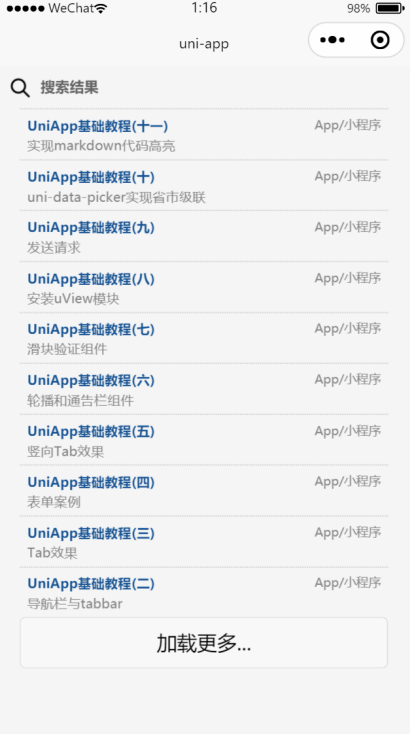
运行效果: