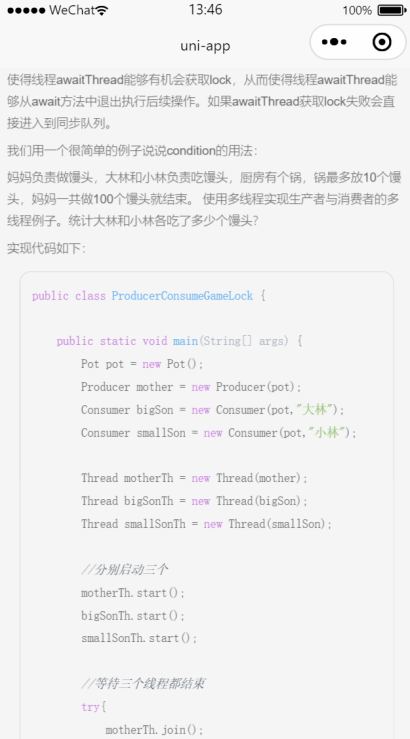
UniApp基础教程(十一)
实现markdown代码高亮
1.安装markdown代码高亮插件
在dcloud插件市场安装markdown代码高亮插件,下载地址如下:
https://ext.dcloud.net.cn/plugin?id=2903
2.编辑配置文档
修改 components/cmder-MDParserHighlight/parser/libs/config.js
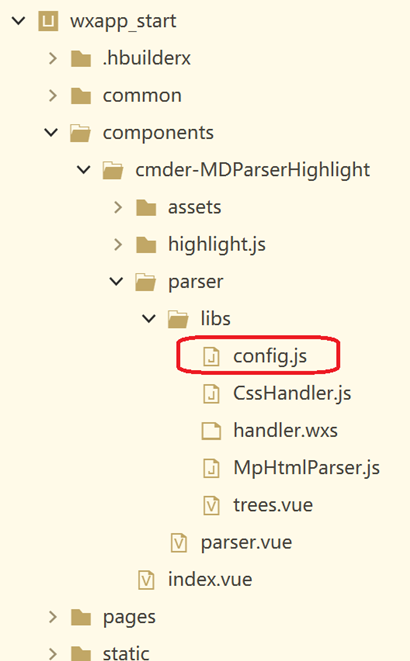
在userAgentStyles里添加自定义的样式表:
...
userAgentStyles: {
        address: 'font-style:italic',
        big: 'display:inline;font-size:1.2em',
        blockquote: 'background-color:#f6f6f6;border-left:3px solid #dbdbdb;color:#6c6c6c;padding:5px 0 5px 10px',
        caption: 'display:table-caption;text-align:center',
        center: 'text-align:center',
        cite: 'font-style:italic',
        dd: 'margin-left:40px',
        mark: 'background-color:yellow',
        /*pre自定义的代码块的样式*/
        pre: 'background:#FFFFF0; font-family:Courier New; border: 1rpx solid #ccc; border-radius: 10px; max-width:96%;  width:88%; white-space:pre; overflow:scroll;font-size: 22rpx;',
        /*code: 'background-color:#FFFFF0;',*/
        s: 'text-decoration:line-through',
        small: 'display:inline;font-size:0.8em',
        u: 'text-decoration:underline',
        /*li-th是自定义添加的*/
        li: 'font-size:22rpx',
    p: 'margin:10rpx 0; font-size:22rpx;',
    table: 'border-collapse:collapse;',
    td : "border: 1px solid #999;font-size:22rpx;",
    th: "border: 1px solid #999;background:#FFFFF0;font-size:22rpx;",
        p: 'margin:10rpx 0; font-size:22rpx;',
        ".hljs-keyword": 'color: #c678dd;',
        ".hljs-literal": 'color: #569CD6;',
        ".hljs-symbol": 'color: #569CD6;',
        ".hljs-name": 'color: #e06c75;',
        ".hljs-link": 'color: #569CD6;text-decoration: underline',
        ".hljs-built_in": 'color: #c678dd;',
        ".hljs-type": 'color: #4EC9B0;',
        ".hljs-number": 'color: #D19A66;',
        ".hljs-class": 'color: #B8D7A3;',
        ".hljs-string": 'color: #98C379;',
        ".hljs-meta-string": 'color: #D69D85;',
        ".hljs-regexp": 'color: #9A5334;',
        ".hljs-template-tag": 'color: #9A5334;',
        ".hljs-subst": 'color: #DCDCDC;',
        ".hljs-function": 'color: #c678dd;',
        ".hljs-title": 'color: #61afef;',
        ".hljs-params": 'color: #ABB2BF;',
        ".hljs-formula": 'color: #DCDCDC;',
        ".hljs-comment": 'color: #5B6370;opacity.6;font-style: italic;',
        ".hljs-quote": 'color: #57A64A;font-style: italic;',
        ".hljs-doctag": 'color: #608B4E;',
        ".hljs-meta": 'color: #abb2bf;',
        ".hljs-tag": 'color: #abb2bf;',
        ".hljs-meta-keyword": 'color: #abb2bf;',
        ".hljs-variable": 'color: #e06c75;',
        ".hljs-template-variable": 'color: #e06c75;',
        ".hljs-attr": 'color: #D19A66;',
        ".hljs-attribute": 'color: #D19A66;',
        ".hljs-builtin-name": 'color: #ABB2BF;',
        ".hljs-section": 'color: gold;',
        ".hljs-emphasis": 'font-style: italic;',
        ".hljs-strong": 'font-weight: bold;',
        ".hljs-bullet": 'color: #D7BA7D;',
        ".hljs-selector-tag": 'color: #e06c75;',
        ".hljs-selector-id": 'color: #D19A66;',
        ".hljs-selector-class": 'color: #D19A66;',
        ".hljs-selector-attr": 'color: #D19A66;',
        ".hljs-selector-pseudo": 'color: #D7BA7D;',
        '.language-html': 'color:#ABB2BF',
        '.language-css': 'color:#ABB2BF',
        '.language-javascript': 'color:#ABB2BF',
        ".hljs-addition": 'background-color: #144212;display: inline-block;width: 100%;',
        ".hljs-deletion": 'background-color: #600;display: inline-block;width: 100%;'
    }
3. pages/index/index.vue测试组件效果。
<template>
    <view class="container">
        <view class="article-header">
            <text style="margin-bottom: 12rpx;color: #444; font-size: 40rpx;">{{currentArticle.title}}</text>
            <view class="article-label">
                <view class="article-label-inner-username">
                    <!-- #ifdef MP-WEIXIN -->
                    <uni-icons type="person" color="#C4C4C4" size="18" class="search-icon"></uni-icons>
                    <!-- #endif -->
                    {{currentArticle.username}}
                </view>
                <view class="article-label-inner-date">
                    <!-- #ifdef MP-WEIXIN -->
                    <uni-icons type="info" color="#C4C4C4" size="18" class="search-icon"></uni-icons>
                    <!-- #endif -->
                    {{currentArticle.createTime.substr(0,10)}}
                </view>
                <view class="article-label-inner-catalog">
                    <!-- #ifdef MP-WEIXIN -->
                    <uni-icons type="list" color="#C4C4C4" size="18" class="search-icon"></uni-icons>
                    <!-- #endif -->
                    {{currentArticle.catalogName}}
                </view>
                <view class="article-label-inner-favorites">
                    <!-- #ifdef MP-WEIXIN -->
                    <uni-icons type="heart-filled" color="#C4C4C4" size="18" class="search-icon"></uni-icons>
                    <!-- #endif -->
                </view>
            </view>
            <u-divider customStyle="margin-top: 2rpx;" lineColor="#2d5d8a" :dashed="true"></u-divider>
            <!--文章摘要部分开始-->
            <view
                style="text-align: start;  background-color: #EEE; border:0px solid #ddd;border-radius: 10px;padding:20px 20px;display:block;color:#666;font-size: 10pt">
                {{currentArticle.summary}}
            </view>
            <!----文章内容部分开始------>
            <view>
                <MDParserHighlight class="u-content" :resource="currentArticle.mdcontent"></MDParserHighlight>
            </view>
            <!--文章内容部分结束-->
            <u-divider customStyle="margin-top: 2rpx;" lineColor="#2d5d8a" :dashed="true"></u-divider>
            <view>
                <button type="primary" @click="addToFavorites">添加到收藏</button>
                <view>
                    <text>\n</text>
                </view>
            </view>
        </view>
    </view>
</template>

<script>
    import MDParserHighlight from '../../components/cmder-MDParserHighlight/index.vue'
    export default {
        components: {
            MDParserHighlight
        },
        data() {
            return {
                currentArticle: {

                }
            }
        },
        onLoad() {
            this.initCurrentArticle();
        },
        methods: {
            initCurrentArticle() {

                uni.request({
                    url: 'https://www.simoniu.com/blog/article/111', //仅为示例,并非真实接口地址。
                    method: 'GET',
                    success: (res) => {
                        console.log(res.data);
                        if (res.data.code === 200) {
                            this.currentArticle = res.data.data;

                        }
                    },
                    fail: (err) => {
                        console.log(err);
                    }
                });
            },

            addToFavorites() {

            }
        }
    }
</script>

<style lang="scss" scoped>
    .container {
        width: 98%;
        height: auto;
        font-size: 14px;
        text-align: center;
        margin: 0rpx auto;
    }

    .btn {
        margin: 40rpx 0 40rpx 0;
        width: 100%;

    }

    .article-header {
        margin: 0px auto;
        padding: 12rpx;
    }

    .article-label {
        display: flex;
        padding: 0px;
        font-size: 12px;
        font-family: 楷体;
        color: #6b6b6b;
        align-content: space-around;
    }

    .article-label-inner-username {
        width: 20%;
    }

    .article-label-inner-date {
        width: 30%;
    }

    .article-label-inner-catalog {
        width: 30%;
    }

    .article-label-inner-favorites {
        width: 20%;
    }

    .u-content {
        text-align: start;
        padding: 12rpx;
        font-weight: 200;
    }

</style>
运行效果: