UniApp基础教程(九)
发送请求
uni.request 方法用来发起网络请求。
1.uni.request 实例
<template>
    <view class="container">
        <button class="btn" type="default" @click="doGetRequest">发送Get请求</button>
        <button class="btn" type="default" @click="doPostRequest">发送Post请求</button>
        <view class="text-box" scroll-y="true">
            <text>{{JSON.stringify(data)}}</text>
        </view>
    </view>
</template>

<script>
    export default {
        data() {
            return {
               data: {}
            }
        },
        onLoad() {

        },
        methods: {
            doGetRequest() {
                uni.request({
                    url: 'https://www.simoniu.com/commons/users/auth', //仅为示例,并非真实接口地址。
                    method: 'GET',
                    data: {
                        identify: 'tester',
                        password: '123456'
                    },
                    success: (res) => {
                        console.log(res.data);
                        if (res.data.code === 200) {
                            this.data = res.data.data;

                            uni.showToast({
                                title: 'Get请求成功!',
                                duration: 2000
                            })
                        }
                    },
                    fail: (err) => {
                        console.log(err);
                    }
                });
            },

            doPostRequest() {
                uni.request({
                    url: 'https://www.simoniu.com/commons/address/', //仅为示例,并非真实接口地址。
                    method: 'POST',
                    data: {
                        uid: 69,
                        realname: "张三",
                        mobile: "13772653149",
                        province: "陕西省",
                        city: "西安市",
                        zone: "碑林区",
                        street: "张家村街道166号"
                    },
                    success: (res) => {
                        console.log(res.data);
                        if (res.data.code === 200) {
                            this.data = res.data.data;
                            uni.showToast({
                                title: 'Post请求成功!',
                                duration: 2000
                            })
                        }
                    },
                    fail: (err) => {
                        console.log(err);
                    }
                });
            }
        }
    }
</script>

<style>
    .container {
        width: 80%;
        height: auto;
        padding: 20px;
        font-size: 14px;
        line-height: 24px;
        text-align: center;
        margin: 0rpx auto;
    }

    .btn {
        margin: 40rpx 0 40rpx 0;
        width: 100%;

    }
    .text-box{
        text-align: start;
        width: 100%;
        word-break: break-all;
    }
</style>
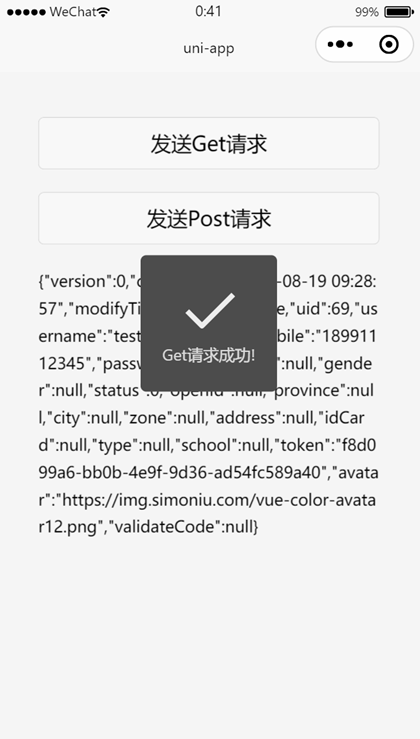
运行效果: