UniApp基础教程(七)
滑块验证组件
uniapp的uni-ui并不提供滑块验证组件,需要自己封装。
1.滑块验证组件代码
<template>
    <view class="index">
        <view class="image">
            <!-- 背景 -->
            <image class="bgimg" :src="bgsrc"></image>
            <!-- 刷新按钮 -->
            <text class="iconfont icon-shuaxin" @click="init" v-if="!isSuccess">刷新</text>
            <!-- 成功位置 -->
            <view class="success-img" :style="{top:startTop + 'px', left: successLeft + 'px'}"></view>
            <!-- 拖动图片 -->
            <view class="start-img" :style="{top:startTop + 'px', left: startLeft + 'px'}">
                <image :src="bgsrc" :style="{top: -startTop + 'px', left: -successLeft - 30 + 'px'}"></image>
            </view>
        </view>
        <!-- 滑块 -->
        <movable-area :style="{backgroundColor: isSuccess ? '#50BBAC':'#F7F8F9'}">
            <!-- 遮罩 -->
            <view class="success" v-show="isSuccess"></view>
            <!-- 滑块内文字 -->
            <view class="tips" :style="{opacity:isSlider ? '0' : '1'}">
                <view @click="restart" :style="{color:isSuccess ? '#FFF' : ''}">
                    <text class="iconfont icon-guanbi" v-show="errorNum >= 5"></text>
                    {{ tipText || '滑动滑块完成拼图' }}
                </view>
            </view>
            <!-- 滑动的背景色 -->
            <view class="bgc" :style="{
                    width:errorNum >= 5 ? '100%' : sliderX < 1 ? '0px' : sliderX + 30 + 'px',
                    backgroundColor: sliderStyle.backgroundColor,
                    borderRadius: errorNum >= 5 ? '50rpx' : ''
                }">
            </view>
            <!-- 滑块 -->
            <movable-view class="slider-box" direction="all" @change="changePath" @touchend="endTouch" :x="sliderX2"
                @touchstart="touchstart()" :style="sliderStyle" v-show="errorNum < 5">
                <!-- 滑块内icon -->
                <text class="iconfont" :class="icon.name" :style="{color:icon.color}"></text>
            </movable-view>
        </movable-area>
    </view>
</template>

<script>
    export default {
        data() {
            return {
                // 滑块样式
                sliderStyle: {
                    backgroundColor: '#fff'
                },
                // 滑块 icon 样式
                icon: {
                    color: '#000',
                    name: 'icon-arrowRight'
                },
                sliderX: 0,
                sliderX2: 0,
                isSlider: false, // 是否在滑动状态
                errorNum: 0, // 记录失败次数
                tipText: '', // 滑块区域文字
                isSuccess: false, // 是否成功
                // 随机背景图
                bgList: [
                    '../../static/slider/huakuai01.jpg',
                    '../../static/slider/huakuai02.jpg',
                    '../../static/slider/huakuai03.jpg',
                    '../../static/slider/huakuai04.jpg',
                    '../../static/slider/huakuai05.jpg'
                ],
                bgsrc: '', // 背景图

                startTop: 0, // 滑动图片的 top 定位值
                startLeft: 0, // 滑动图片的 left 定位值
                infoLeft: 0, // 初始滑动图的位置
                successLeft: 0 // 成功位置的 left 定位值
            }
        },
        watch: {
            // 监听滑块的位置 在失败的时候不能立即点击 需等滑块归位后继续滑动
            sliderX(val) {
                if (this.icon.name === 'icon-arrowRight') {
                    if (val < 1) {
                        this.isSuccess = false
                    } else {
                        this.isSuccess = true
                    }
                }
            }
        },
        methods: {
            // 初始化
            init() {
                // top 20 - 100 相对于父元素的定位位置 控制边界
                // left 20 - 70
                // 20:滑动图距离大背景图上边和左边 20px 距离,避免出界不好看 (左右边界)
                // 100:大背景盒子的高减 20px 再减 滑动图片的高 (下边界)
                // 70:同理,因为图片开始的位置只能在左边,所以将图片位置控制在左边

                // startTop 的值左边开始滑动的图片和右边成功位置的高一致
                this.startTop = this.randomNumBoth(20, 100) // 获取 20 - 100 之间的随机数
                this.startLeft = this.randomNumBoth(20, 70) // 获取 20 - 70 之间的随机数
                this.successLeft = this.startLeft + 200 // 成功位置的 left 位置
                this.infoLeft = this.startLeft // 将初始的左位置存起来

                // 随机取背景图
                const index = this.randomNumBoth(0, this.bgList.length)
                this.bgsrc = this.bgList[index]
            },
            // 获取随机数 两数之间
            randomNumBoth(min, max) {
                const range = max - min
                const rand = Math.random()
                return min + Math.round(rand * range)
            },
            // 开始滑动
            touchstart() {
                console.log('开始')
                this.isSlider = true // 滑动状态改为 true
                this.sliderStyle.backgroundColor = '#2782E8'
                this.icon.color = '#fff'
                this.sliderStyle.transition = 'all 0.2s'
                setTimeout(() => {
                    this.sliderStyle.transition = 'all 0s'
                }, 200)
            },
            // 滑动滑块
            changePath(e) {
                // console.log('滑动', e.target.x)
                this.canvasX = e.target.x // 记录滑动距离
                this.startLeft = this.infoLeft + e.target.x // 将滑动距离重新赋值给滑动图片
                // console.log(this.infoLeft + e.target.x, '图片滑动')
                if (e.target.x < 1) {
                    this.sliderStyle.backgroundColor = ''
                    this.icon.name = 'icon-arrowRight'
                    this.icon.color = '#000'
                }
            },
            // 结束滑动
            endTouch() {
                console.log('结束')
                this.isSlider = false // 滑动结束状态
                this.sliderStyle.backgroundColor = ''
                this.sliderStyle.transition = 'all 0.2s'
                // this.icon.color = '#fff'
                setTimeout(() => {
                    this.sliderStyle.transition = 'all 0s'
                }, 200)
                console.log(this.startLeft, 'startLeft')
                console.log(this.successLeft, 'successLeft')
                // 判断偏移量 +-5 之内都算成功
                if (this.startLeft >= this.successLeft - 5 && this.startLeft <= this.successLeft + 5) {
                    console.log('成功')
                    this.tipText = '验证成功'
                    this.sliderStyle.backgroundColor = '#50BBAC'
                    this.icon.name = 'icon-xihuan'
                    this.isSuccess = true // 记录验证成功状态,成功之后就禁止滑动
                } else {
                    console.log('失败了')
                    this.tipText = '验证失败'

                    // 失败后样式归位
                    if (this.sliderX < 1) {
                        console.log(this.sliderX2, 'sliderX2')
                        this.sliderX2 = 0
                        this.sliderStyle.backgroundColor = ''
                        this.icon.name = 'icon-arrowRight'
                        this.icon.color = '#000'
                    } else {
                        console.log('失败了111')
                        // 记录失败次数,失败五次之后需点击重新开始
                        this.errorNum++
                        if (this.errorNum >= 5) {
                            console.log('五次了')
                            this.tipText = '失败过多点击重试'
                            this.sliderStyle.backgroundColor = '#ED7C7E'
                            this.isSuccess = false
                        } else {
                            // 失败次数不到五次,自行归位
                            this.sliderStyle.backgroundColor = '#ED7C7E'
                            this.icon.name = 'icon-guanbi'
                            this.sliderStyle.transition = 'all 0s'
                            this.canvasX2--
                        }
                    }
                }
            },
            // 重新开始
            restart() {
                console.log(this.errorNum)
                // 样式归位,失败次数归位
                if (this.errorNum >= 5) {
                    this.errorNum = 0
                    this.sliderStyle = {
                        backgroundColor: '#fff'
                    }
                    this.icon = {
                        color: '#000',
                        name: 'icon-arrowRight'
                    }
                    // 滑动距离归位
                    this.sliderX = 0
                    this.sliderX2 = 0
                    this.tipText = null
                }
            }
        },
        onLoad() {
            this.init()
        }
    }
</script>
<style lang="scss" scoped>
    .index {
        padding: 40rpx;
        box-sizing: border-box;

        .image {
            width: 100%;
            height: 300rpx;
            border-radius: 10rpx;
            overflow: hidden;
            position: relative;

            canvas {
                width: 100%;
                height: 100%;
                border: 1px solid red;
                border-radius: 10rpx;
            }

            .bgimg {
                width: 100%;
                height: 100%;
            }

            .iconfont {
                position: absolute;
                z-index: 10;
                color: #fff;
                bottom: 20rpx;
                right: 20rpx;
            }

            .success-img {
                position: absolute;
                left: 10px;
                top: 0;
                width: 80rpx;
                height: 80rpx;
                background: rgba(221, 221, 221, 0.5);
                box-shadow: inset 0 0 10rpx rgba(0, 0, 0, 0.3);
            }

            .start-img {
                position: absolute;
                z-index: 2;
                left: 0;
                top: 0;
                width: 80rpx;
                height: 80rpx;
                overflow: hidden;
                box-shadow: 0 0 10rpx rgba(0, 0, 0, 0.3);

                image {
                    position: absolute;
                    width: 100vw;
                    height: 300rpx;
                }
            }
        }

        movable-area {
            margin: 30rpx auto;
            width: 99%;
            height: 80rpx;
            line-height: 80rpx;
            text-align: center;
            font-size: 28rpx;
            border: 2rpx solid #E1E3E9;
            background-color: #F7F8F9;
            position: relative;
            border-radius: 50rpx;

            .tips,
            .bgc {
                width: 100%;
                height: 100%;
                position: absolute;
                top: 0;
                left: 0;
                color: #424649;
                z-index: 2;
                text-align: center;
                opacity: 0.3;
                transition: all 0.3s;
                display: flex;
                align-items: center;
                justify-content: center;

                text {
                    font-size: 28rpx;
                    margin-top: 2rpx;
                }
            }

            .tips {
                z-index: 20;
            }

            .success {
                width: 100%;
                height: 100%;
                position: absolute;
                top: 0;
                left: 0;
                z-index: 99;
            }

            .bgc {
                width: 0px;
                // z-index: 10;
                border-radius: 50rpx 0 0 50rpx;
                transition: all 0s;
            }

            .slider-box {
                width: 80rpx;
                height: 80rpx;
                position: absolute;
                z-index: 50;
                background-color: #fff;
                box-shadow: 0 0 10rpx 0rpx rgba(0, 0, 0, .2);

                .iconfont {
                    transition: all 0.2s;
                }
            }
        }
    }
</style>
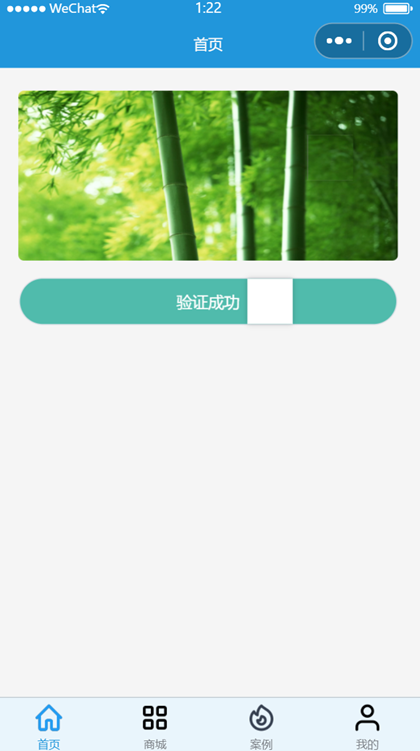
运行效果: