UniApp基础教程(二)
导航栏与tabbar
pages.json 文件用来对 uni-app 进行全局配置,决定页面文件的路径、窗口样式、原生的导航栏、底部的原生tabbar 等。
1.创建导航栏对应的页面
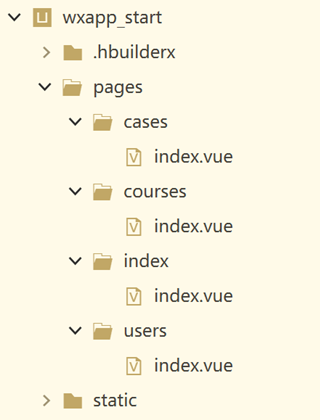
2.配置pages.json
{
    "pages": [{
            "path": "pages/index/index",
            "style": {
                "navigationBarTitleText": "首页"
            }
        },
        {
            "path": "pages/courses/index",
            "style": {
                "navigationBarTitleText": "课程中心"
            }
        },
        {
            "path": "pages/cases/index",
            "style": {
                "navigationBarTitleText": "案例中心"
            }
        },
        {
            "path": "pages/users/index",
            "style": {
                "navigationBarTitleText": "用户中心"
            }
        }
    ],
    "globalStyle": {
        //自定义导航栏背景色和字体颜色
        "navigationBarTextStyle": "white",
        "navigationBarTitleText": "uni-app",
        "navigationBarBackgroundColor": "#2196DB",
        "backgroundColor": "#2196DB",
        "app-plus": {
            "background": "#efeff4"
        }
    },
    "tabBar": {
        "color": "#7A7E83",
        "selectedColor": "#3cc51f",
        "borderStyle": "black",
        "backgroundColor": "#e9f5fc",
        "height": "50px",
        "fontSize": "10px",
        "iconWidth": "24px",
        "spacing": "3px",
        "iconfontSrc": "static/iconfont.ttf", // app tabbar 字体.ttf文件路径 app 3.4.4+
        "selectedColor": "#2196DB",
        "list": [{
                "pagePath": "pages/index/index",
                "iconPath": "static/tabbar/home.png",
                "selectedIconPath": "static/tabbar/home_selected.png",
                "text": "首页"
            },
            {
                "pagePath": "pages/courses/index",
                "iconPath": "static/tabbar/course.png",
                "selectedIconPath": "static/tabbar/course_selected.png",
                "text": "教程"
            },
            {
                "pagePath": "pages/cases/index",
                "iconPath": "static/tabbar/fire.png",
                "selectedIconPath": "static/tabbar/fire_selected.png",
                "text": "案例"
            },
            {
                "pagePath": "pages/users/index",
                "iconPath": "static/tabbar/user.png",
                "selectedIconPath": "static/tabbar/user_selected.png",
                "text": "我的"
            }
        ]
    }

}
==注意:iconPath与selectedIconPath里不允许引用在线的CDN资源。==
3.首页添加uni-ui组件
<template>
    <view class="container">
        <!--以uni开头的都是uni-ui内置组件,这里测试插入一个日历组件-->
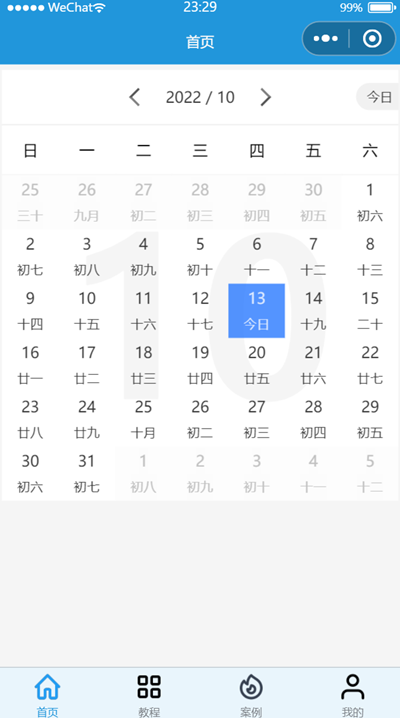
        <uni-calendar :insert="true" :lunar="true" @change="change" />
    </view>
</template>

<script>
    export default {
        data() {
            return {
            }
        },
        methods: {
            open() {
                this.$refs.calendar.open();
            },
            confirm(e) {
                console.log(e);
            }
        }
    }
</script>

<style>
    .container {
        padding: 5px;
        font-size: 14px;
        line-height: 24px;
    }
</style>
运行效果: