Python3基础教程(八十四)
路由
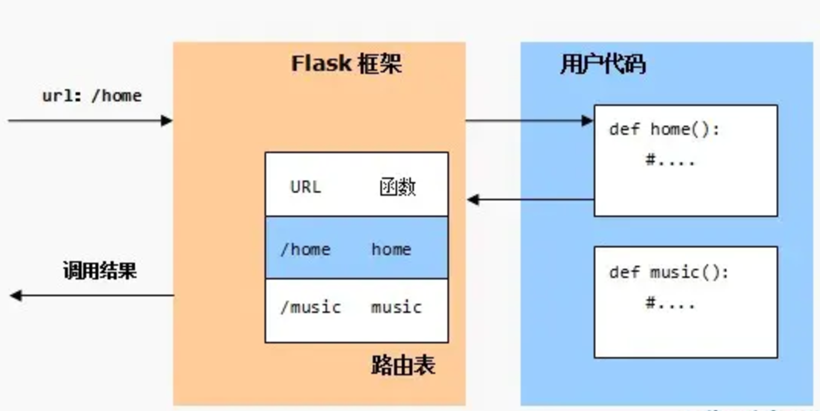
在flask应用中,路由是指用户请求的URL和视图函数之间的映射。flask框架会根据http请求的URL在路由表当中,匹配预定义的URL规则,找到对应的视图函数,并将视图函数的执行结果返回WSGI服务器
1.route装饰器
route装饰器 :route装饰器,它的作用就是将处理请求的函数绑定到URL上(URL必须以反斜杠开头),这种设计体现了解耦的思想。
下面是简单的示例。
from flask import Flask

app = Flask(__name__)

@app.route('/')
def hello_world():  # put application's code here
    return 'Hello World!'

@app.route('/books')
def hello():
    return 'books'

@app.route('/users')
def books():
    return 'users'

if __name__ == '__main__':
    app.run(host="127.0.0.1", port=8080, debug=True)
2.视图与装饰器的关系
不同视图函数有着相同装饰器的情况,最先匹配的视图会覆盖后面的视图。例如:
@app.route('/')
def hello_world():  # put application's code here
    return 'Hello World!'

@app.route('/welcome')
def welcome_to_china():
    return 'welcome to china'

//会被覆盖
@app.route('/welcome')
def welcome_to_japan():
    return 'welcome to japan'
同一视图函数有不同装饰器。每个装饰器的路由都会返回相同的视图。
@app.route('/')
@app.route('/hello')
def hello_world():  # put application's code here
    return 'Hello World!'
3.请求重定向
可以使用redirct或者url_for实现重定向。
from flask import Flask,redirect,url_for

app = Flask(__name__)

@app.route('/')
def hello_world():
    return 'Hello World!'

@app.route('/login')
def login():
    # url = '/welcome'
    url = url_for('welcome') #注意这里是视图名字。
    return redirect(url)

@app.route('/welcome')
def welcome():
    return 'welcome to my home!'

if __name__ == '__main__':
    app.run(host="127.0.0.1", port=8080, debug=True)
4.路由参数提取
from flask import Flask,redirect,url_for

app = Flask(__name__)

# 不指定转换器
@app.route('/book/<name>/<author>')
def author(name,author):
    return "书名:"+name+",作者:"+author


# 转换器为int
@app.route('/book/<int:id>/price')
def price(id):
    return "图书编号:"+ str(id)


# 转换器为float
@app.route('/book/price-ge/<float:price>')
def books_by_price(price):
    return "图书价格:"+ str(price)


# 转换器为path
@app.route('/book/<path:book_info>')
def books_by_path(book_info):
    return "图书信息:"+ book_info


if __name__ == '__main__':
    app.run(host="127.0.0.1", port=8080, debug=True)
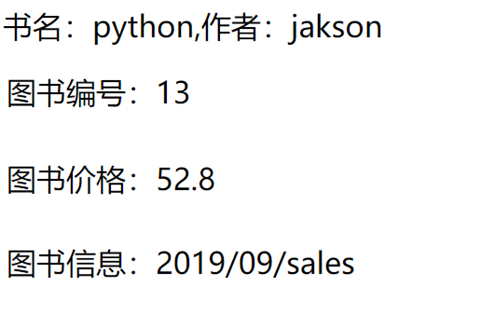
地址栏分别输入以下URL测试:
http://127.0.0.1:8080/book/python/jakson
http://127.0.0.1:8080/book/13/price
http://127.0.0.1:8080/book/price-ge/52.8
http://127.0.0.1:8080/book/2019/09/sales
5.设置method
在创建路由规则时,我们可以指定这个URL支持哪些请求方法。
from flask import Flask, request
app = Flask(__name__)


@app.route('/users', methods=['GET', 'POST'])
def users():
    if request.method == 'GET':
        return '执行get请求'
    if request.method == 'POST':
        return '执行post请求'

    return 'ok'


if __name__ == '__main__':
    app.run(debug=True)