Vue-cli3基础教程(十八)
子路由
子路由也称为路由嵌套,就是点击一个路由地址后,继续点击,进入到另外一个路由地址下,即第二个路由就是第一个路由的子路由。
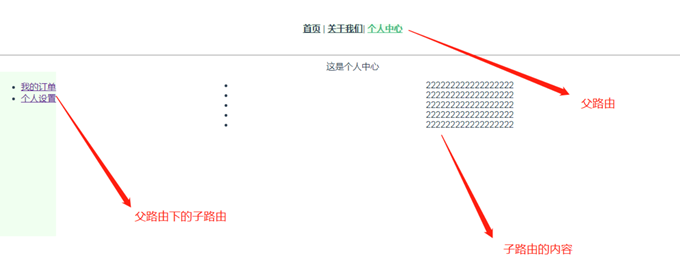
实例
在我们的商城项目中,后台管理页 Admin 涉及到很多操作页面,比如: - /admin 主页面 - /admin/add 添加新信息 - /admin/edit 编辑信息
让我们通过嵌套路由的方式将它们组织在一起。
1)创建Admin页面
在src/views下创建 Admin.vue,并创建admin目录,以用来存放admin的子页面( 使用vue-router的子路由,需要在父组件利用 router-view占位 )。
<template>
  <div class="title">
    <h1>{{ msg }}</h1>
    <!-- 路由插槽 -->
    <router-view></router-view>
  </div>
</template>

<script>
export default {
  name: "home",
  data() {
    return {
      msg: "This is the Admin Page",
    };
  },
};
</script>

<style scoped>
</style>
2)创建子页面
在src/views下创建admin目录用来存放admin的子页面,在admin目录下新建Add.vue 和 Edit.vue 来实现/create 创建新的商品/edit 编辑商品信息。
Add.vue
<template>
  <div>
    <div class="title">
      <h1>This is Admin/Add</h1>
    </div>
  </div>
</template>
Edit.vue
<template>
  <div>
    <div class="title">
      <h1>This is Admin/Edit</h1>
    </div>
  </div>
</template>
3)修改router/index.js代码
import Vue from 'vue'
import VueRouter from 'vue-router'
import Admin from '@/views/Admin.vue'

// 导入admin子路由
import Add from '@/views/admin/Add';
import Edit from '@/views/admin/Edit';

Vue.use(VueRouter)

const routes = [
  {
    path: '/admin',
    name: 'Admin',
    component: Admin,
    children: [
      {
        path: 'add',
        component: Add,
      },
      {
        path: 'edit',
        component: Edit,
      }
    ]
  }
]

const router = new VueRouter({
  routes
})

export default router
==注意: children里面的path 不要加 / ,加了就表示是根目录下的路由。==