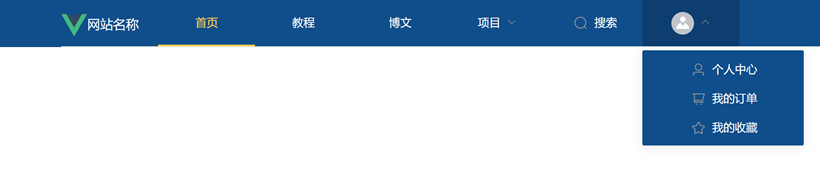
ElementUI的导航栏最佳实践方案
ElementUI的导航栏最佳实践方案
1.配置全局样式表
assets/css/global.css
/*解决微信浏览器背景默认灰色问题*/
body,html {
    background: #ffffff
}
/******************************/
/*解决vue组件页面布局body默认边距问题*/
body {
    margin: 0;
    padding: 0;
    border: 0;
}
#app {
    margin-top: 0px;
}
在main.js中引入全局样式表
import Vue from 'vue'
import App from './App.vue'
import router from './router'
import store from './store'
//引入全局样式表
import '@/assets/css/global.css'
//以下是完整引入elementui组件
import ElementUI from 'element-ui';
import 'element-ui/lib/theme-chalk/index.css';

Vue.config.productionTip = false

//使用elementui组件
Vue.use(ElementUI);
new Vue({
  router,
  store,
  render: h => h(App)
}).$mount('#app')
2.自定义MyNavBar组件
<template>
  <div class="mynavbar_container">
    <el-row>
      <el-col :span="16" :offset="4">
        <el-menu
            :default-active="activeIndex"
            class="el-menu-demo"
            mode="horizontal"
            @select="handleSelect"
            background-color="#104E8B"
            text-color="#fff"
            active-text-color="#ffd04b">
          <div class="mynavbar_logo_div">
            <img class="mynavbar_logo_img" src="https://img.simoniu.com/vue_logo_200px.png"/>网站名称
          </div>
          <el-menu-item index="1">首页</el-menu-item>
          <el-menu-item index="2">教程</el-menu-item>
          <el-menu-item index="3">博文</el-menu-item>
          <el-submenu index="4">
            <template slot="title">项目</template>
            <el-menu-item index="4-1">选项1</el-menu-item>
            <el-menu-item index="4-2">选项2</el-menu-item>
            <el-menu-item index="4-3">选项3</el-menu-item>
          </el-submenu>
          <el-menu-item index="5"><i class="el-icon-search"></i>搜索</el-menu-item>
          <el-submenu index="6" v-if="isLogin">
            <template slot="title"><el-avatar :size="28" :src="circleUrl"></el-avatar></template>
            <el-menu-item index="6-1"><i class="el-icon-user"></i>个人中心</el-menu-item>
            <el-menu-item index="6-2"><i class="el-icon-shopping-cart-1"></i>我的订单</el-menu-item>
            <el-menu-item index="6-3"><i class="el-icon-star-off"></i>我的收藏</el-menu-item>
          </el-submenu>
          <div class="mynavbar_login_div"  v-if="!isLogin"><a href="#">登录</a></div>

        </el-menu>
      </el-col>
    </el-row>
  </div>
</template>

<script>
export default {
  name: "MyNavBar",

  data() {
    return {
      activeIndex: '1',
      circleUrl: "https://cube.elemecdn.com/3/7c/3ea6beec64369c2642b92c6726f1epng.png",
      isLogin: true
    };
  },

  methods: {
    handleSelect(key, keyPath) {
      console.log(key, keyPath);
    }
  }
}
</script>

<style scoped>
.mynavbar_container {
  width: 100%;
  margin: 0px auto;
  background-color: #104E8B;

  /*导航栏固定在页面顶部*/
  top: 0;
  left: 0;
  z-index: 200; /*这个值不要设置太大,否则会遮盖messagebox*/
  position: fixed;
}

.mynavbar_logo_div {
  float: left;
  width: 120px;
  height: 60px;
  vertical-align: middle;
  color: #ffffff;
}

.mynavbar_login_div{
  float: right;
  width: 120px;
  height: 60px;
  line-height: 60px;
  vertical-align: middle;
  color: #ffffff;
  text-align: left;
}

.mynavbar_login_div a{
  color: #ffffff;
  text-decoration: none;
  font-size: 10pt;
}

.mynavbar_logo_img {
  margin: 18px 0px;
  width: 32px;
  height: 32px;
  display: inline;
  vertical-align: middle;
}

.el-menu-item , .el-submenu {
  width: 120px;
  text-align: center;
}

.el-menu--horizontal .el-menu .el-menu-item{
  width: 200px;
  text-align: center;
}
</style>
导航栏运行效果: