React基础教程(二十)
redux实现TodoList
react-redux实现TodoList。
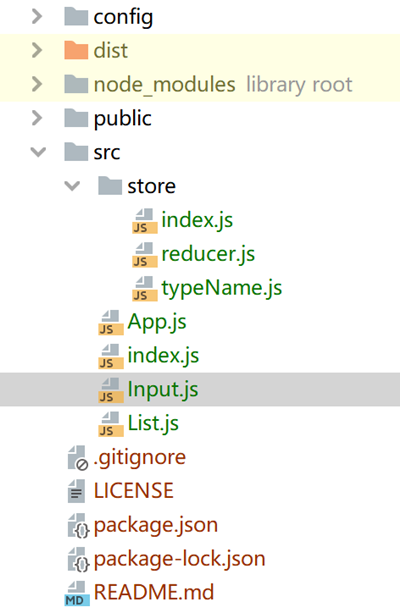
项目结构图如下:
package.json
"devDependencies": {
    "@babel/core": "^7.18.5",
    "@babel/plugin-transform-runtime": "^7.18.5",
    "@babel/preset-env": "^7.18.2",
    "@babel/preset-react": "^7.17.12",
    "babel-loader": "^8.2.5",
    "css-loader": "^6.7.1",
    "css-minimizer-webpack-plugin": "^4.0.0",
    "html-webpack-plugin": "^5.5.0",
    "mini-css-extract-plugin": "^2.6.1",
    "sass": "^1.52.3",
    "sass-loader": "^13.0.0",
    "style-loader": "^3.3.1",
    "terser-webpack-plugin": "^5.3.3",
    "webpack": "^5.73.0",
    "webpack-cli": "^4.10.0",
    "webpack-dev-server": "^4.9.2",
    "webpack-merge": "^5.8.0"
  },
  "dependencies": {
    "@babel/runtime": "^7.18.3",
    "react": "^16.8.0",
    "react-dom": "^16.8.0",
    "react-router-dom": "^5.2.1",
    "redux": "^4.2.0",
    "redux-thunk": "^2.4.0",
    "axios": "^0.27.2"
  }
Input.js
import React, { Component } from 'react'

export default class Input extends Component {
    render() {
        let {width,height,size,defaultValue} = this.props
        return (
            <input style={{
                        width: width,
                        height: height,
                        fontSize: size
                    }}
                    value={defaultValue}
                    onInput={this.handleInput.bind(this)}
                    onKeyPress={this.handleEnter.bind(this)}
            />
        )
    }

    //输入事件
    handleInput(e){
        this.props.onInput(e.target.value)
    }
    //回车事件
    handleEnter(e){
        if(e.key === 'Enter'){
            this.props.onEnter(e.target.value)
        }
    }
}
List.js
import React, { Component } from 'react'

export default class List extends Component {
    render() {
        return (
            <ul>
                { this.showList() }
            </ul>
        )
    }

    //用于渲染li
    showList(){
        if(!this.props.data || this.props.data.length === 0) return <li>暂无数据</li>

        return this.props.data.map((item,index)=>{
            return (
                <li key={index}>
                    {item}
                    <button onClick={this.handleUpdateClick.bind(this,index,item)}>修改</button>
                    <button onClick={this.handleDelClick.bind(this,index,item)}>删除</button>
                </li>
            )
        })

    }

    //删除按钮点击事件
    handleDelClick(index,item){
        this.props.onDelete(index,item)
    }

    //修改按钮点击事件
    handleUpdateClick(index,item){
        this.props.onUpdate(index,item)
    }
}
store/typeName.js
const CHANGE_VALUE = 'change_value'
const ADD_LIST = 'add_list'
const UPDATE_LIST = 'update_list'
const DELETE_LIST = 'delete_list'

const typeName = {
    CHANGE_VALUE,
    ADD_LIST,
    UPDATE_LIST,
    DELETE_LIST
}

export default typeName
store/reducer.js
import typeName from './typeName'

const defaultState = {
    inputValue: '',
    list: []
}

let reducre = (state = defaultState, action)=>{
    //更新inputValue
    if(action.type === typeName.CHANGE_VALUE){
        let tempState = JSON.parse(JSON.stringify(state))
        tempState.inputValue = action.inputValue
        return tempState
    }
    //添加数据
    if(action.type === typeName.ADD_LIST){
        let tempState = JSON.parse(JSON.stringify(state))
        tempState.list.push(action.inputValue)
        tempState.inputValue = ''
        return tempState
    }

    //修改数据
    if(action.type === typeName.UPDATE_LIST){
        let tempState = JSON.parse(JSON.stringify(state))
        tempState.list.splice(action.index,1,action.inputValue)
        return tempState
    }

    //删除数据
    if(action.type === typeName.DELETE_LIST){
        let tempState = JSON.parse(JSON.stringify(state))
        tempState.list.splice(action.index,1)
        return tempState
    }
    return state
}

export default reducre
store/index.js
import {legacy_createStore as createStore} from 'redux'
import reducr from './reducer'

let store = createStore(reducr)

export default store
App.js
import React, { Component } from 'react'
import Input from './Input'
import List from './List'
import store from './store'
import typeName from './store/typeName'

export default class App extends Component {
    constructor(){
        super()
        //初始化state状态
        this.state = store.getState()

        //监听store的改变
        store.subscribe(()=>{
            this.setState(store.getState())
        })
    }

    render() {
        return (
            <div>
                <Input defaultValue={this.state.inputValue}
                       onInput={this.changeValue.bind(this)}
                       onEnter={this.submit.bind(this)}
                        />

                <List data={this.state.list}
                      onUpdate={this.update.bind(this)}
                      onDelete={this.del.bind(this)}
                        />
            </div>
        )
    }

    //改变输入框的值
    changeValue(val){
        store.dispatch({
            type: typeName.CHANGE_VALUE,
            inputValue: val
        })
    }

    //输入框回车事件
    submit(val){
        if(!val) return

        store.dispatch({
            type: typeName.ADD_LIST,
            inputValue: val
        })
    }

    //修改
    update(index){
        let val = prompt('请输入:')
        if(!val) return

        store.dispatch({
            type: typeName.UPDATE_LIST,
            index,
            inputValue: val
        })
    }

    //删除
    del(index){
        store.dispatch({
            type: typeName.DELETE_LIST,
            index
        })
    }

}
index.js
import React from 'react';
import ReactDOM from 'react-dom';
import App from './App'

ReactDOM.render(<App />,document.getElementById('root'));
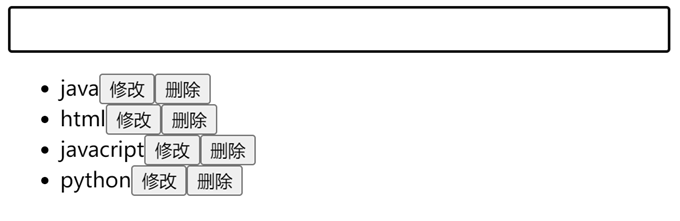
运行效果: