React基础教程(十七)
Redux
redux是一个专门用于做状态管理的js库它本身不是react插件库。
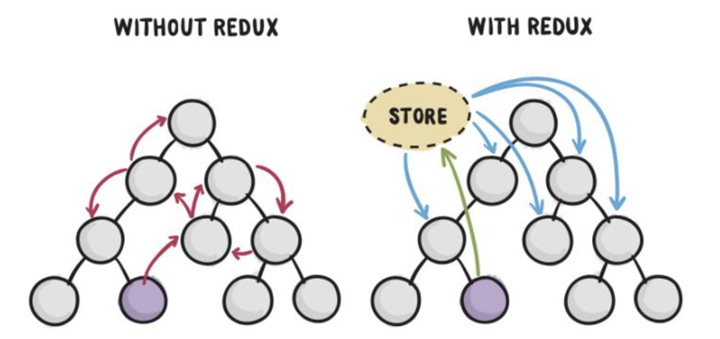
1.redux简介 - redux是一个专门用于做状态管理的js库(不是react插件库)。 - redux以用在react,angular,vue等项目中,但基本与react配合使用。 - redux可以集中式管理recat应用中多个组件共享的状态。
2.三个基本原则
- 整个应用只有唯一一个可信数据源,也就是只有一个 Store。
- State 只能通过触发 Action 来更改。
- State 的更改必须写成纯函数,也就是每次更改总是返回一个新的 State,在 Redux 里这种函数称为 Reducer。
3.redux运行原理
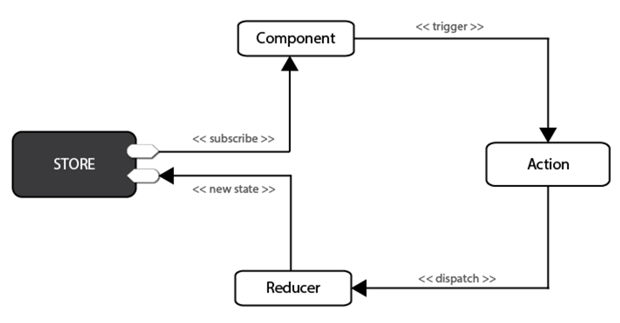
在Redux中,所有的数据(比如state)被保存在一个被称为store的容器中 → 在一个应用程序中只能有一个。store本质上是一个状态树,保存了所有对象的状态。任何UI组件都可以直接从store访问特定对象的状态。要通过本地或远程组件更改状态,需要分发一个action。分发在这里意味着将可执行信息发送到store。当一个store接收到一个action,它将把这个action代理给相关的reducer。reducer是一个纯函数,它可以查看之前的状态,执行一个action并且返回一个新的状态。
4.实例
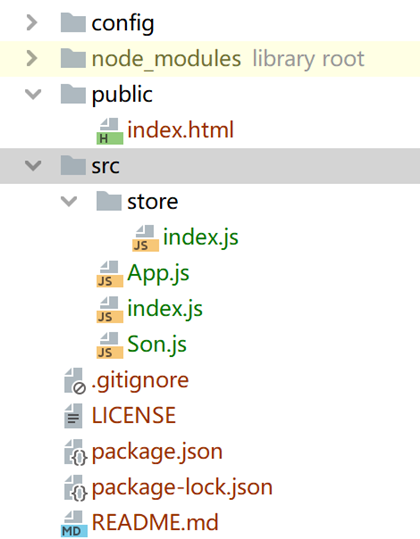
项目结构图
package.json
"devDependencies": {
    "@babel/core": "^7.18.5",
    "@babel/plugin-transform-runtime": "^7.18.5",
    "@babel/preset-env": "^7.18.2",
    "@babel/preset-react": "^7.17.12",
    "babel-loader": "^8.2.5",
    "css-loader": "^6.7.1",
    "css-minimizer-webpack-plugin": "^4.0.0",
    "html-webpack-plugin": "^5.5.0",
    "mini-css-extract-plugin": "^2.6.1",
    "sass": "^1.52.3",
    "sass-loader": "^13.0.0",
    "style-loader": "^3.3.1",
    "terser-webpack-plugin": "^5.3.3",
    "webpack": "^5.73.0",
    "webpack-cli": "^4.10.0",
    "webpack-dev-server": "^4.9.2",
    "webpack-merge": "^5.8.0"
  },
  "dependencies": {
    "@babel/runtime": "^7.18.3",
    "react": "^16.8.0",
    "react-dom": "^16.8.0",
    "react-router-dom": "^5.2.1",
    "redux": "^4.2.0"
  }
在store目录下,新建index.js
import { legacy_createStore as createStore }  from 'redux'

//原始数据
const defaultState = {
    msg: 'hello',
    i: 0
}

//纯函数:返回值依赖于参数,执行过程中没有副作用
let reducre = (state = defaultState, action)=>{

    //增加i
    if(action.type === 'change_i'){
        let tempState = JSON.parse(JSON.stringify(state))
        tempState.i = action.i
        return tempState
    }

    //改变msg的值
    if(action.type === 'change_msg'){
        let tempState = JSON.parse(JSON.stringify(state))
        tempState.msg = action.msg
        return tempState
    }

    return state
}

let store = createStore(reducre)
export default store
Son.js
import React, { Component } from 'react'
import store from './store'

export default class Son extends Component {

    constructor(){
        super()

        this.state = store.getState()

        store.subscribe(()=>{
            this.setState(store.getState())
        })
    }

    render() {
        return (
            <div>
                <h3>Son.js</h3>
                <div>msg: {this.state.msg}</div>
                <div>i: {this.state.i}</div>
            </div>
        )
    }
}
App.js
import React, { Component } from 'react'
import store from './store'
import Son from './Son'

export default class App extends Component {

    constructor(){
        super()

        // this.state= {
        //     msg: store.getState().msg,
        //     i: store.getState().i
        // }
        this.state = store.getState()
        this.state.inputMsg=''
        store.subscribe(()=>{
            this.setState(store.getState())
        })
    }

    render() {
        return (
            <div>
                {this.state.i}
                <button onClick={this.add.bind(this)}>+</button>
                <br></br>
                <input type={'text'} value={this.state.inputMsg} onChange={(event)=>{this.setState({inputMsg: event.target.value});}}></input>
                <button onClick={this.changeMsg.bind(this)}>更新Msg</button>
                <hr></hr>
                <Son></Son>
            </div>
        )
    }

    add(){
        let action = {
            type: 'change_i',
            i: this.state.i + 1
        }
        store.dispatch(action)
    }

    changeMsg(){
        //console.log('changeMsg...');
        let action = {
            type: 'change_msg',
            msg: this.state.inputMsg
        }
        store.dispatch(action)
    }
}
index.js
import React from 'react';
import ReactDOM from 'react-dom';
import App from './App'

ReactDOM.render(<App />,document.getElementById('root'));

// let a = 3
function add(obj,b){
    //let newObj = JSON.parse(JSON.stringify(obj))
    let newObj = obj;
    newObj.i += 2
    return newObj.i + b
}

const obj = {
    i: 1
}

console.log('前:',obj)
console.log(add(obj,2))
console.log('后:',obj)
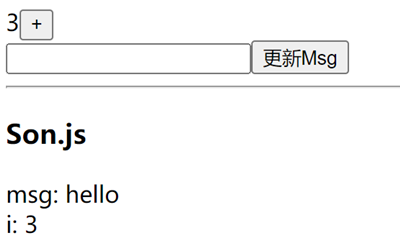
运行效果: