SpringBoot基础教程(三十三)
热部署
对于一个java后端开发来说,在开发中,每次修改代码就得将项目重新重启,对于一些大型应用来说,重启过程需要花费大量的时间成本,这个过程比较难受,因此有时开发我们进行热部署。对于热部署他只加载重启(Restart)部分:自定义开发代码,包括类、页面、配置文件等,加载位置restart类加载器。不加载重载(ReLoad):jar包,加载位置base类加载器。
在Springboot中最常用的实现热部署方式是自动启动热部署。
实现步骤如下:
1)先在pom.xml中添加依赖
<!--springboot的热部署依赖-->
<dependency>
     <groupId>org.springframework.boot</groupId>
     <artifactId>spring-boot-devtools</artifactId>
</dependency>
2)选择File-Settings-Compiler-Build Project automatically
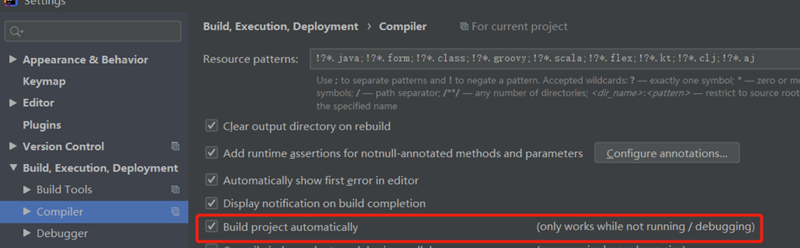
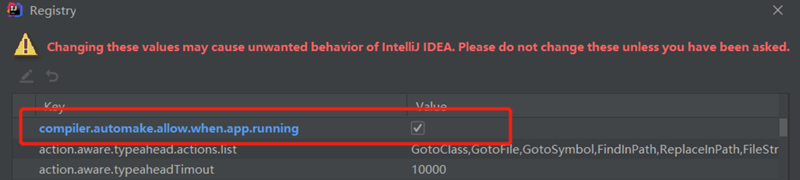
3)快捷键ctrl + shift + alt + / ,选择Registry,勾上 Compiler autoMake allow when app running。
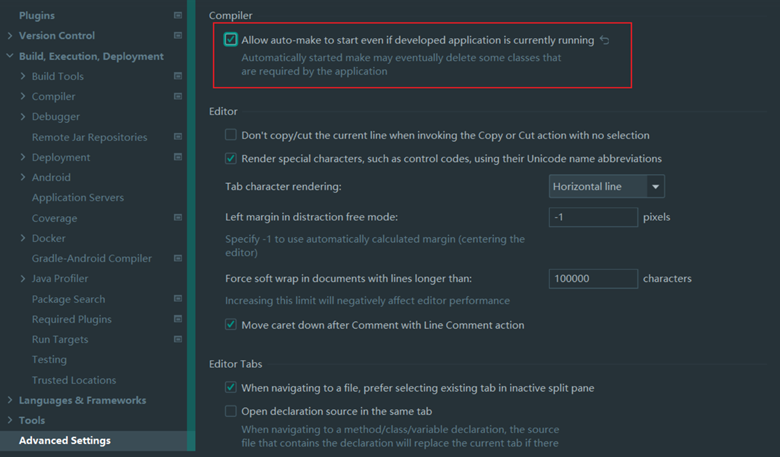
对于idea2021以上的版本,该选项已经移至advanced setting选项中。如下图所示:
4)在application.yml中添加热部署配置
spring:
  #开启热部署
  devtools:
    restart:
      enabled: true
      #让静态页面也能热部署
      additional-paths: resources/**,static/**,templates/**