react的组件生命周期分为:初始化、更新、销毁、捕获错误四个阶段。
1.react组件的生命周期
初始化 - constructor - static getDerivedStateFromProps() - componentWillMount() / UNSAFE_componentWillMount() - render() - componentDidMount()
更新 props或state的改变可能会引起组件的更新,组件重新渲染的过程中会调用以下方法: - componentWillReceiveProps() / UNSAFE_componentWillReceiveProps() - static getDerivedStateFromProps() - shouldComponentUpdate() - componentWillUpdate() / UNSAFE_componentWillUpdate() - render() - getSnapshotBeforeUpdate() - componentDidUpdate()
销毁 - componentWillUnmount()
捕获错误 - componentDidCatch()
初始化阶段方法详解:
| 方法 | 详解 |
|---|---|
| constructor | React组件的构造函数在挂在之前被调用。调用super(props),用来将父组件传来的props绑定到这个类中,使用this.props将会得到。使用场景:初始化state数据,定义函数修改this指向。 |
| getDerivedStateFromProps(nextProps, prevState) | 使用场景:无条件的根据prop来更新内部 state,也就是只要有传入prop值, 就更新state,只有prop值和state值不同时才更新state值。 |
| componentWillMount()/UNSAFE_componentWillMount() | componentWillMount()将在React未来版本(官方说法 17.0)中被弃用。UNSAFE_componentWillMount()在组件挂载前被调用,在这个方法中调用setState()不会起作用,是由于他在render()前被调用。 |
| render() | 他将计算this.props和this.state,并返回以下一种类型:React元素、字符串或数字、Portals、null、布尔值。注意:返回null,false,ReactDOM.findDOMNode(this)将会返回null,什么都不会渲染。render()方法必须是一个纯函数,他不应该改变state,也不能直接和浏览器进行交互,应该将事件放在其他生命周期函数中。如果shouldComponentUpdate()返回false,render()不会被调用。 |
| componentDidMount() | 组件被装配后立即调用。应用场景:通常在这里进行ajax请求,初始化第三方的dom库。 |
更新阶段方法详解: |方法|详解| |-|-| |componentWillReceiveProps()/UNSAFE_componentWillReceiveProps(nextProps)|建议使用getDerivedStateFromProps函数代替。| |shouldComponentUpdate(nextProps, nextState)|渲染新的props或state前,shouldComponentUpdate会被调用默认为true。这个方法不会在初始化时被调用,也不会在forceUpdate()时被调用。返回false不会阻止子组件在state更改时重新渲染。如果shouldComponentUpdate()返回false,componentWillUpdate,render和componentDidUpdate不会被调用。| |UNSAFE_componentWillUpdate(nextProps, nextState)|渲染新的state或props时,UNSAFE_componentWillUpdate会被调用。不能在这里使用this.setState(),也不能做会触发视图更新的操作。如果需要更新state或props,调用getDerivedStateFromProps。| |getSnapshotBeforeUpdate()|render()后的输出被渲染到DOM之前被调用。它使您的组件能够在它们被潜在更改之前捕获当前值(如滚动位置)。这个生命周期返回的任何值都将作为参数传递给componentDidUpdate()。| |componentDidUpdate(prevProps, prevState, snapshot)|在更新发生后立即调用componentDidUpdate()。此方法不用于初始渲染。当组件更新时,将此作为一个机会来操作DOM。只要您将当前的props与以前的props进行比较(例如,如果props没有改变,则可能不需要网络请求),这也是做网络请求的好地方。如果组件实现getSnapshotBeforeUpdate()生命周期,则它返回的值将作为第三个“快照”参数传递给componentDidUpdate()。否则,这个参数是undefined。|
销毁阶段方法详解:
| 方法 | 详解 |
|---|---|
| componentWillUnmount() | 在组件被卸载并销毁之前立即被调用。在此方法中执行任何必要的清理,例如使定时器无效,取消网络请求或清理在componentDidMount中创建的任何监听。 |
捕获异常阶段方法详解:
| 方法 | 详解 |
|---|---|
| componentDidCatch(error, info) | 错误边界是React组件,可以在其子组件树中的任何位置捕获JavaScript错误,记录这些错误并显示回退UI,而不是崩溃的组件树。错误边界在渲染期间,生命周期方法以及整个树下的构造函数中捕获错误。如果类组件定义了此生命周期方法,则它将成错误边界。在它中调用setState()可以让你在下面的树中捕获未处理的JavaScript错误,并显示一个后备UI。只能使用错误边界从意外异常中恢复; 不要试图将它们用于控制流程。错误边界只会捕获树中下面组件中的错误。错误边界本身不能捕获错误。 |
2.实例
<!DOCTYPE html>
<html lang="en">
<head>
    <meta charset="UTF-8">
    <title>Title</title>
    <script src="https://lf3-cdn-tos.bytecdntp.com/cdn/expire-1-M/react/18.0.0-rc.1-next-629036a9c-20220224/umd/react.production.min.js"></script>
    <script src="https://lf6-cdn-tos.bytecdntp.com/cdn/expire-1-M/react-dom/18.0.0-rc.1-next-629036a9c-20220224/umd/react-dom.production.min.js"></script>
    <!-- 引入babel,用于将jsx转为js -->
    <script src="https://lf3-cdn-tos.bytecdntp.com/cdn/expire-1-M/babel-standalone/7.0.0-alpha.20/babel.min.js"></script>
    <!--React.PropTypes 在 React v15.5 版本后已经移到了prop-types 库。-->
    <script src="https://lf3-cdn-tos.bytecdntp.com/cdn/expire-1-M/prop-types/15.8.1/prop-types.min.js"></script>
    <style>

    </style>
</head>
<body>
<div id="app">

</div>
<script type="text/babel">


    class MyComponent extends React.Component {
        constructor(props) {
            super(props)
            this.state = { error: false }
        }
        render() {
            //throw new Error('render时发生了错误...') //报错信息
            return (
                <div>
                    <div>你已经正确显示了MyComponent</div>
                </div>
            )
        }
    }

    //创建组件
    class Count extends React.Component{
        /*
          1. 初始化阶段: 由ReactDOM.render()触发---初次渲染
                  1.    constructor()
                  2.    getDerivedStateFromProps
                  3.    render()
                  4.    componentDidMount() =====> 常用
                        一般在这个钩子中做一些初始化的事,例如:开启定时器、发送网络请求、订阅消息
          2. 更新阶段: 由组件内部this.setSate()或父组件重新render触发
                  1.    getDerivedStateFromProps
                  2.    shouldComponentUpdate()
                  3.    render()
                  4.    getSnapshotBeforeUpdate
                  5.    componentDidUpdate()
          3. 卸载组件: 由ReactDOM.unmountComponentAtNode()触发
                  1.    componentWillUnmount()  =====> 常用
                        一般在这个钩子中做一些收尾的事,例如:关闭定时器、取消订阅消息
        */
        //构造器
        constructor(props){
            console.log('Count---constructor');
            super(props)
            //初始化状态
            this.state = {count:0}
        }

        //加1按钮的回调
        add = ()=>{
            //获取原状态
            const {count} = this.state
            //更新状态
            this.setState({count:count+1})
        }

        //卸载组件按钮的回调
        death = ()=>{
            ReactDOM.unmountComponentAtNode(document.getElementById('app'))

        }

        //强制更新按钮的回调
        force = ()=>{
            this.forceUpdate()
        }

        //若state的值在任何时候都取决于props,那么可以使用getDerivedStateFromProps
        static getDerivedStateFromProps(props,state){
            console.log('getDerivedStateFromProps',props,state);
            return null
        }

        //在更新之前获取快照
        getSnapshotBeforeUpdate(){
            console.log('getSnapshotBeforeUpdate');
            return 'www.simoniu.com'
        }

        //组件挂载完毕的钩子
        componentDidMount(){
            console.log('Count---componentDidMount');
        }

        //组件将要卸载的钩子
        componentWillUnmount(){
            console.log('Count---componentWillUnmount');
        }

        //控制组件更新的“阀门”
        shouldComponentUpdate(){
            console.log('Count---shouldComponentUpdate');
            return true
        }

        //组件更新完毕的钩子
        componentDidUpdate(preProps,preState,snapshotValue){
            console.log('Count---componentDidUpdate',preProps,preState,snapshotValue);
        }

        componentDidCatch(error, errorInfo) {
            console.log('Count---componentDidCatch');
            console.log(error, errorInfo)
        }

        render(){
            console.log('Count---render');
            const {count} = this.state

            return(
                <div>
                    <h2>当前求和为:{count}</h2>
                    <button onClick={this.add}>点我+1</button>
                    <button onClick={this.death}>卸载组件</button>
                    <button onClick={this.force}>不更改任何状态中的数据,强制更新一下</button>
                    <MyComponent/>
                </div>

            )
        }
    }

    //渲染组件
    ReactDOM.render(<Count count={199}/>,document.getElementById('app'))
</script>
</body>
</html>
运行结果如下:
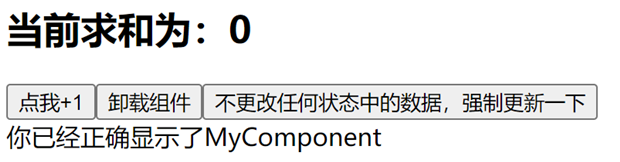
组件第一次加载,输出结果如下:
Count---constructor
getDerivedStateFromProps {count: 199} {count: 0}
Count---render
Count---componentDidMount
点击'点我+1'按钮后,输出结果如下:
getDerivedStateFromProps {count: 199} {count: 1}
Count---shouldComponentUpdate
Count---render
getSnapshotBeforeUpdate
Count---componentDidUpdate {count: 199} {count: 0} www.simoniu.com
点击'卸载组件'按钮后,输出结果如下:
Count---componentWillUnmount
重新刷新页面,点击'不更改任何状态中的数据,强制更新一下'按钮,输出结果如下:
getDerivedStateFromProps {count: 199} {count: 0}
Count---render
getSnapshotBeforeUpdate
Count---componentDidUpdate {count: 199} {count: 0} www.simoniu.com
把MyComponent的render()方法里面抛出异常的注释去掉,重新刷新页面,加载组件时会抛出异常。 输出结果如下:
Count---constructor
getDerivedStateFromProps {count: 199} {count: 0}
Count---render
Count---componentDidMount
react-dom.production.min.js:120 Error: render时发生了错误...
...
Count---componentDidCatch
Error: render时发生了错误...