Mybatis基础教程(九)
条件查询
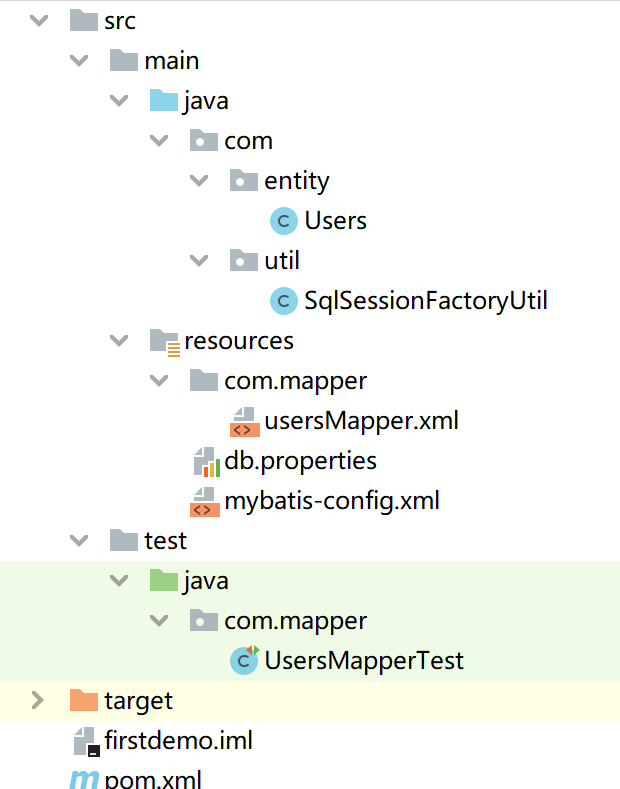
项目结构图如下:
测试数据准备
-- ----------------------------
-- Table structure for users
-- ----------------------------
DROP TABLE IF EXISTS `users`;
CREATE TABLE `users`  (
  `uid` int NOT NULL AUTO_INCREMENT,
  `username` varchar(50) CHARACTER SET utf8mb4 COLLATE utf8mb4_bin NULL DEFAULT NULL,
  `password` varchar(50) CHARACTER SET utf8mb4 COLLATE utf8mb4_bin NULL DEFAULT NULL,
  `mobile` varchar(50) CHARACTER SET utf8mb4 COLLATE utf8mb4_bin NULL DEFAULT NULL,
  `email` varchar(50) CHARACTER SET utf8mb4 COLLATE utf8mb4_bin NULL DEFAULT NULL,
  `type` varchar(50) CHARACTER SET utf8mb4 COLLATE utf8mb4_bin NULL DEFAULT NULL,
  PRIMARY KEY (`uid`) USING BTREE
) ENGINE = InnoDB CHARACTER SET = utf8mb4 COLLATE = utf8mb4_bin ROW_FORMAT = Dynamic;

-- ----------------------------
-- Records of users
-- ----------------------------
INSERT INTO `users` VALUES (1, 'zhangsan', '123456', '18991167122', '403353606@qq.com', 'teacher');
INSERT INTO `users` VALUES (2, 'lisi', '444444', '18991167122', '', 'student');
INSERT INTO `users` VALUES (3, 'admin', '123456', '', NULL, 'admin');
INSERT INTO `users` VALUES (4, '宝宝', '654321', '', '403353606@qq.com', 'student');
实体类准备
package com.entity;

//用户实体类,对应我们users表。
public class Users {

    private Integer uid; //用户编号
    private String username; //用户名
    private String password; //密码
    private String mobile; //手机号码
    private String email; //电子邮箱
    private String type; //用户类型

    public Users() {
    }

    public Users(Integer uid, String username, String password, String mobile, String email, String type) {
        this.uid = uid;
        this.username = username;
        this.password = password;
        this.mobile = mobile;
        this.email = email;
        this.type = type;
    }

    public Integer getUid() {
        return uid;
    }

    public void setUid(Integer uid) {
        this.uid = uid;
    }

    public String getUsername() {
        return username;
    }

    public void setUsername(String username) {
        this.username = username;
    }

    public String getPassword() {
        return password;
    }

    public void setPassword(String password) {
        this.password = password;
    }

    public String getMobile() {
        return mobile;
    }

    public void setMobile(String mobile) {
        this.mobile = mobile;
    }

    public String getEmail() {
        return email;
    }

    public void setEmail(String email) {
        this.email = email;
    }

    public String getType() {
        return type;
    }

    public void setType(String type) {
        this.type = type;
    }

    @Override
    public String toString() {
        return "Users{" +
                "uid=" + uid +
                ", username='" + username + '\'' +
                ", password='" + password + '\'' +
                ", mobile='" + mobile + '\'' +
                ", email='" + email + '\'' +
                ", type='" + type + '\'' +
                '}';
    }
}
1.if元素
类似Java的if语句,主要用于某些简单的条件判断。
usersMapper.xml
<?xml version="1.0" encoding="UTF-8"?>
<!DOCTYPE mapper PUBLIC "-//mybatis.org//DTD Mapper 3.0//EN"
        "http://mybatis.org/dtd/mybatis-3-mapper.dtd">
<mapper namespace="com.mapper.usersMapper">
   <select id="queryUserByMobileAndEmail" parameterType="Users" resultType="Users">
        select * from users where 1=1
        <if test="mobile !=null and mobile!=''">
            and mobile = #{mobile}
        </if>
        <if test="email !=null and email!=''">
            and email like concat('%',#{email},'%')
        </if>
    </select>
</mapper>
测试用例:
    @Test
    public void testQueryUserByMobileAndEmail(){
        SqlSession session = null;
        Users u = new Users();
        u.setMobile("18991167122");
        u.setEmail("403353606@qq.com");

        try {
            session = SqlSessionFactoryUtil.openSqlSession();
            List<Users> usersList = session.selectList("queryUserByMobileAndEmail",u);
            usersList.forEach(System.out::println);

        } catch (Exception ex) {
            ex.printStackTrace();
        } finally {
            if (session != null) {
                session.close();
            }
        }
    }
运行结果:
Users{uid=1, username='zhangsan', password='123456', mobile='18991167122', email='403353606@qq.com', type='teacher', flag=true}
2.choose/when/otherwise
一般用于多个条件判断。
usersMapper.xml
<?xml version="1.0" encoding="UTF-8"?>
<!DOCTYPE mapper PUBLIC "-//mybatis.org//DTD Mapper 3.0//EN"
        "http://mybatis.org/dtd/mybatis-3-mapper.dtd">
<mapper namespace="com.mapper.usersMapper">
   <!--多条件查询动态SQL-->
    <select id="queryUserByMobilOrEmail" parameterType="Users" resultType="Users">
        select * from users where 1=1
        <choose>
            <when test="(mobile !=null and mobile!='') and (email !=null and email!='') ">
                and mobile = #{mobile} and email like concat('%',#{email},'%')
            </when>
            <when test="mobile !=null and mobile!=''">
                and mobile = #{mobile}
            </when>
            <when test="email !=null and email!=''">
                and email like concat('%',#{email},'%')
            </when>
            <when test="type !=null and type!=''">
                and type=#{type}
            </when>
            <otherwise>
            </otherwise>
        </choose>
    </select>
</mapper>
测试用例:
    @Test
    public void testQueryUserByMobileOrEmail(){
        SqlSession session = null;
        Users u = new Users();
        u.setType("admin");
        try {
            session = SqlSessionFactoryUtil.openSqlSession();
            List<Users> usersList = session.selectList("queryUserByMobilOrEmail",u);
            usersList.forEach(System.out::println);

        } catch (Exception ex) {
            ex.printStackTrace();
        } finally {
            if (session != null) {
                session.close();
            }
        }
    }
运行结果:
Users{uid=3, username='admin', password='123456', mobile='', email='null', type='admin', flag=true}
3.where/trim 前面的例子在SQL语句后面都添加了where 1=1,这样做是为了保证后面的where条件成立。如果不添加此条件会出现where 后面直接跟着 and 的语法错误,针对此情况我们也可以使用where和trim元素进行处理。
使用where避免语法错误: usersMapper.xml
<?xml version="1.0" encoding="UTF-8"?>
<!DOCTYPE mapper PUBLIC "-//mybatis.org//DTD Mapper 3.0//EN"
        "http://mybatis.org/dtd/mybatis-3-mapper.dtd">
<mapper namespace="com.mapper.usersMapper">
   <select id="queryUserByMobileAndEmail" parameterType="Users" resultType="Users">
        select * from users
        <where>
            <if test="mobile !=null and mobile!=''">
                and mobile = #{mobile}
            </if>
            <if test="email !=null and email!=''">
                and email like concat('%',#{email},'%')
            </if>
        </where>
    </select>
</mapper>
使用trim避免语法错误:
<?xml version="1.0" encoding="UTF-8"?>
<!DOCTYPE mapper PUBLIC "-//mybatis.org//DTD Mapper 3.0//EN"
        "http://mybatis.org/dtd/mybatis-3-mapper.dtd">
<mapper namespace="com.mapper.usersMapper">
   <select id="queryUserByMobileAndEmail" parameterType="Users" resultType="Users">
        select * from users
        <trim prefix="where" prefixOverrides="and">
            <if test="mobile !=null and mobile!=''">
                and mobile = #{mobile}
            </if>
            <if test="email !=null and email!=''">
                and email like concat('%',#{email},'%')
            </if>
        </trim>
    </select>
</mapper>