Vue3基础教程(四十一)
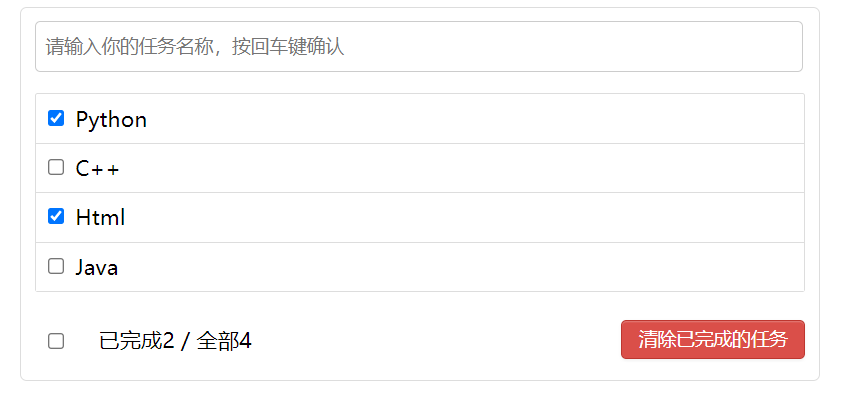
TodoList案例
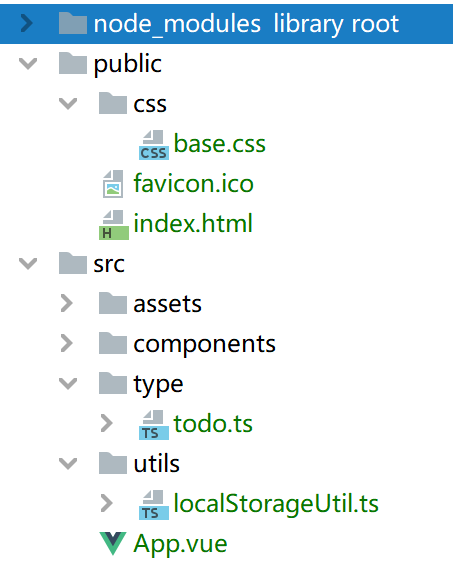
1.项目结构如下:
public/css/base.css
body {
    background: #fff;
}

.btn {
    display: inline-block;
    padding: 4px 12px;
    margin-bottom: 0;
    font-size: 14px;
    line-height: 20px;
    text-align: center;
    vertical-align: middle;
    cursor: pointer;
    box-shadow: inset 0 1px 0 rgba(255, 255, 255, 0.2), 0 1px 2px rgba(0, 0, 0 , 0.05) ;
    border-radius: 4px;
}

.btn-danger {
    color: #fff;
    background-color: #da4f49;
    border: 1px solid #bd362f;
}

.btn-danger:hover {
    color: #fff;
    background-color: #bd362f;
}

.btn:focus {
    outline: none;
}
在public/index.html中引入base.css
    <!--引入base.css-->
    <link rel="stylesheet" href="./css/base.css">
在type/todo.ts,定义接口类型。
// 定义一个接口,约束state的数据类型
export interface Todo {
    id: number,
    title: string,
    isCompleted: boolean
}
uitls/localStorageUtil.ts ,实现本地缓存的读写
// 保存数据到浏览器的缓存中
export function saveArray(key: string,value: []) {
    localStorage.setItem(key,JSON.stringify(value))
}
export function readArray(key: string){
    return JSON.parse(localStorage.getItem(key)|| '[]')
}
components/Item.vue
/* eslint-disable vue/no-mutating-props */
<template>
<li @mouseenter="mouseHandler(true)" @mouseleave="mouseHandler(false)"
:style="{backgroundColor:bgColor,color:myColor}"
>
<label >
<input type="checkbox" v-model="isComplete" />
<span> {{todo.title}}</span>
</label>
<button class="btn btn-danger" v-if="isShow" @click="del">删除</button>
</li>
</template>
<script lang='ts'>
import { computed, defineComponent, ref } from "vue";
import { Todo } from "../type/todo"
export default defineComponent({
name: "Item",
props: {
todo: {
type: Object as () => Todo,
required: true
},
delTodo: {
type: Function,
required : true
},
index: {
type: Number,
required: true
},
updateTodo: {
type: Function,
required: true
}
},
setup(props) {
const bgColor = ref('white') // 背景色
const myColor = ref('black') // 字体颜色
const isShow = ref(false) // 按钮默认不显示
const mouseHandler = (flag: boolean)=> {
if (flag) {
bgColor.value = 'pink'
myColor.value = 'green'
isShow.value = true
} else {
bgColor.value = 'white'
myColor.value = 'black'
isShow.value = false
}
}
const del = () => {
if (window.confirm("是否输出该任务")) {
props.delTodo?.(props.index)
}
}
const isComplete = computed({
get() {
return props.todo.isCompleted
},
set(val: boolean) {
props.updateTodo?.(props.todo, val)
}
}) // 利用计算属性的方式 来让当前的复选框选中/不选中
return {
bgColor,
myColor,
isShow,
mouseHandler,
del,
isComplete
}
}
});
</script>
<style scoped>
li {
list-style: none;
height: 36px;
line-height: 36px;
padding: 0 5px;
border-bottom: 1px solid #ddd;
}
li label {
float: left;
cursor: pointer;
}
li label li input {
vertical-align: middle;
margin-right: 6px;
position: relative;
top: -1px;
}
li button {
float:right;
margin-top: 3px;
}
li::before {
content: initial;
}
li:last-child {
border-bottom: none;
}
</style>
components/List.vue
<template>
    <ul class="todo-main">
        <Item v-for="(todo, index) in todos " :key="todo.id" :todo="todo" :delTodo="delTodo" :index="index" :updateTodo="updateTodo"/>
    </ul>
</template>
<script lang='ts'>
    import {defineComponent} from 'vue'
    import Item from "@/components/Item.vue";
    export default defineComponent({
        name: 'List',
        components: {
            Item
        },
        props: ['todos', 'delTodo', 'updateTodo']
    })
</script>
<style scoped>
    .todo-main {
        margin-left: 0;
        border: 1px solid #ddd;
        border-radius: 2px;
        padding: 0;
    }
    .todo-empty{
        height: 40px;
        line-height: 20px;
        border: 1px solid #ddd;
        border-radius: 2px;
        padding-left: 5px;
        margin-top: 10px;
    }
</style>
components/Header.vue
<template>
    <div class="todo-header">
        <input type="text" placeholder="请输入你的任务名称,按回车键确认" @keydown.enter="add" v-model="title">
    </div>
</template>
<script lang='ts'>
    import {defineComponent, ref} from 'vue'
    export default defineComponent({
        name: 'Header',
        props: {
            addTodo: {
                type: Function,
                require: true //必须要传
            }
        },
        setup(props) {
            const title = ref('')
            const add = () => {
                //如果输入框是空直接返回
                if (!title.value.trim()) return;
                //构造一个新的Todo对象
                const obj = {
                    id: Date.now(),
                    title: title.value,
                    isCompleted: false  //默认未选中
                }
                //props.addTodo(obj)
                /*
                props.addTodo?.({
                    id: Date.now(),
                    title: title.value,
                    isCompleted: false
                })*/
                //调用父组件的addTodo方法。
                props.addTodo?.(obj);
                //清空title
                title.value = ''
            }
            return {
                title,
                add,
            }
        }
    })
</script>
<style scoped>
    .todo-header input {
        width: 560px;
        height: 28px;
        font-size: 14px;
        border: 1px solid #ccc;
        border-radius: 4px;
        padding: 4px 7px;
    }
    .todo-header input:focus {
        outline: none;
        border-color: rgba(82, 168, 236, 0.8);
        box-shadow: inset 0 1px 1px rgba(0, 0, 0, 0.075), 0 0 8px rgba(82, 168, 236, 0.6);
    }
</style>
components/Footer.vue
<template>
    <div class="todo-footer">
        <label>
            <input type="checkbox" v-model="isCheckAll"/>
        </label>
        <span>
      <span>已完成{{count}}</span> / 全部{{todos.length}}
    </span>
        <button class="btn btn-danger" @click="delAll">清除已完成的任务</button>
    </div>
</template>
<script lang='ts'>
    import { Todo } from "@/type/todo";
    import { computed, defineComponent } from "vue";
    export default defineComponent({
        name: "Footer",
        props: {
            todos: {
                type: Array as () => Todo[],
                required: true
            },
            checkAll: {
                type: Function,
                required: true
            },
            clear: {
                type: Function,
                required: true
            }
        },
        setup(props) {
            const count = computed(()=>{
                return props.todos?.reduce((pre,todo)=>pre+(todo.isCompleted?1:0),0)
            })
            const isCheckAll = computed({
                get() {
                    return count.value>0 && props.todos.length === count.value
                },
                set(val) {
                    props.checkAll(val)
                }
            })
            const delAll = ()=>{
                if (window.confirm("是否清除已完成的任务")) {
                    props.clear()
                }
            }
            return {
                count,
                isCheckAll,
                delAll
            }
        }
    });
</script>
<style scoped>
    .todo-footer {
        height: 40px;
        line-height: 40px;
        padding-left: 6px;
        margin-top: 5px;
    }
    .todo-footer label {
        display: inline-block;
        margin-right: 20px;
        cursor: pointer;
    }
    .todo-footer label input {
        position: relative;
        top: -1px;
        vertical-align: middle;
        margin-right: 5px;
    }
    .todo-footer button {
        float: right;
        margin-top: 5px;
    }
</style>
App.vue
<template>
    <div class="todo-container">
        <div class="todo-wrap">
            <Header :addTodo="addTodo" />
            <List :todos = "todos" :delTodo = "delTodo" :updateTodo = "updateTodo" />
            <Footer :todos = "todos" :checkAll ="checkAll" :clear = "clearAllCompletedTodos"/>
        </div>
    </div>
</template>
<script lang='ts'>
    import { defineComponent, onMounted, reactive, toRefs, watch } from "vue";
    import Header from '@/components/Header.vue'
    import List from '@/components/List.vue'
    import Footer from '@/components/Footer.vue'
    import {Todo} from '@/type/todo'
    import { saveArray, readArray } from '@/utils/localStorageUtil'
    export default defineComponent({
        name: "App",
        components: {
            Header,
            List,
            Footer
        },
        setup() {
            // const state = reactive<{todos: Todo[]}>({
            //   todos: [
            //     {id:1,title: '记单词',isCompleted: false},
            //     {id:2,title: '编程',isCompleted: true}
            //   ]
            // })
            const state = reactive<{todos: Todo[]}>({
                todos: []
            })
            const key = 'todos_key'
            // 界面加载完毕后过一会后再读取数据
            onMounted(()=>{
                setTimeout(()=>{
                    state.todos = readArray(key)
                },1000)
            })
            const addTodo = (todo: Todo) => {
                state.todos.unshift(todo)
            } // 添加数组的方法,放在数组头部
            const delTodo = (index: number) => {
                state.todos.splice(index,1)
            } // 删除数据
            const updateTodo = (todo: Todo, isComplete: boolean) => {
                todo.isCompleted = isComplete
            } // 修改todo的isCompleted属性的状态,属性的修改应该让父组件来决定
            const checkAll = (isComplete: boolean)=>{
                state.todos.forEach(todo => {
                    todo.isCompleted = isComplete
                })
            }
            const clearAllCompletedTodos = ()=> {
                state.todos = state.todos.filter(todo=>!todo.isCompleted)
            }
            // 监视操作: 如果todos数组的数据变化了,直接存储到浏览器的缓存中
            // watch(()=>state.todos,(value)=>{
            //   localStorage.setItem('todos_key',JSON.stringify(value))
            // },{deep:true})
            watch(()=>state.todos,(value: Todo [])=>{
                saveArray(key, value as [])
            },{deep:true})
            return {
                ...toRefs(state),
                addTodo,
                delTodo,
                updateTodo,
                checkAll,
                clearAllCompletedTodos
            }
        }
    });
</script>
<style  scoped>
    .todo-container {
        width: 600px;
        margin: 0 auto;
    }
    .todo-container .todo-wrap {
        padding: 10px;
        border: 1px solid #ddd;
        border-radius: 5px;
    }
</style>
运行效果: