Vue3基础教程(二十五)
自定义hook
1.什么是hook
使用Vue3的组合API封装的可复用的功能函数,自定义hook的作用类似于vue2中的mixin技术,使用自定义Hook的好处是: 可以帮助我们提高代码的复用性, 让我们能在不同的组件中都利用 hooks 函数,很清楚复用功能代码的来源, 代码更清楚易懂。
实例
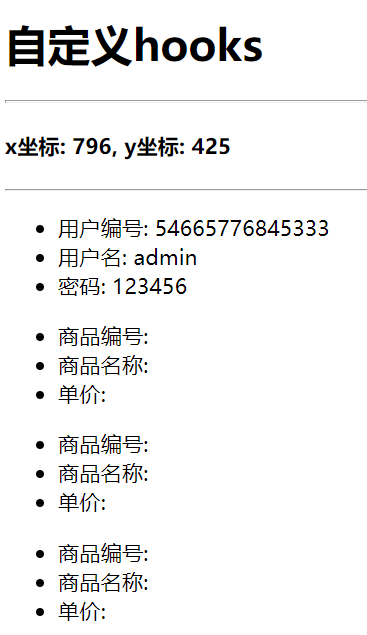
需求1:获得用户鼠标点击时页面的坐标。 需求2:封装axios发ajax请求的hook函数
项目结构图如下:
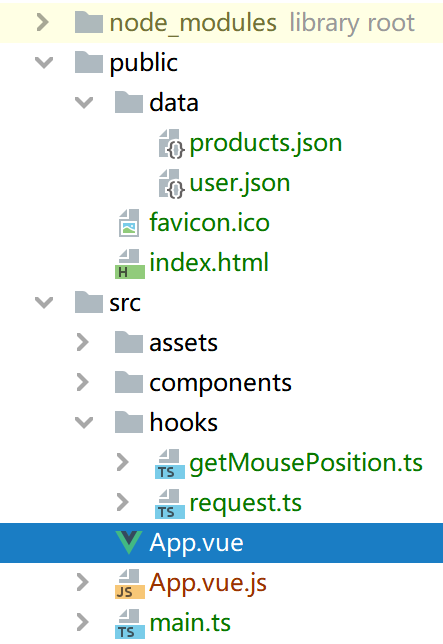
在public/data 下添加请求测试数据 user.json
{
    "uid":"54665776845333",
    "username":"admin",
    "password":"123456"
}
products.json
[
  {
    "id":"1000001",
    "name": "康师傅方便面",
    "price": 4
  },
  {
    "id":"1000002",
    "name": "清风卫生纸",
    "price": 10
  },
  {
    "id":"1000003",
    "name": "黑人牙膏",
    "price": 12
  }
]
hooks/getMousePosition.ts
import { ref, onMounted, onUnmounted } from 'vue'
/*
收集用户鼠标点击的页面坐标
*/
export default function getMousePosition () {
    // 初始化坐标数据
    const x = ref(-1)
    const y = ref(-1)

    // 用于收集点击事件坐标的函数
    const updatePosition = (e: MouseEvent) => {
        x.value = e.pageX
        y.value = e.pageY
    }
    // 挂载后绑定点击监听
    onMounted(() => {
        document.addEventListener('click', updatePosition)
    })

    // 卸载前解绑点击监听
    onUnmounted(() => {
        document.removeEventListener('click', updatePosition)
    })

    return {x, y}
}
hooks/request.ts
import { ref } from 'vue'
import axios from 'axios'

/*
使用axios发送异步ajax请求
*/
export default function useUrlLoader<T>(url: string) {

    const result = ref<T | null>(null)
    const loading = ref(true)
    const errorMsg = ref(null)

    axios.get(url)
        .then(response => {
            loading.value = false
            result.value = response.data
        })
        .catch(e => {
            loading.value = false
            errorMsg.value = e.message || 'unknown error'
        })

    return {
        loading,
        result,
        errorMsg,
    }
}
App.vue
<template>
    <h1>自定义hooks</h1>
    <hr>
    <h4>x坐标: {{x}}, y坐标: {{y}}</h4>
    <hr>
    <div class="about">
        <h2 v-if="loading">LOADING...</h2>
        <h2 v-else-if="errorMsg">{{errorMsg}}</h2>
        <ul v-else>
          <li>用户编号: {{result.uid}}</li>
          <li>用户名: {{result.username}}</li>
          <li>密码: {{result.password}}</li>
        </ul>

        <ul v-for="p in result" :key="p.id">
            <li>商品编号: {{p.id}}</li>
            <li>商品名称: {{p.title}}</li>
            <li>单价: {{p.price}}</li>
        </ul>
        <!-- <img v-if="result" :src="result[0].url" alt=""> -->
    </div>
</template>

<script lang="ts">
    import {defineComponent, ref, watch} from 'vue';
    import getMousePosition from "@/hooks/getMousePosition";
    import request from "@/hooks/request";
    // 地址数据接口
    interface AddressResult {
        id: number;
        name: string;
        distance: string;
    }
    // 产品数据接口
    interface ProductResult {
        id: string;
        title: string;
        price: number;
    }

    export default defineComponent({
        name: 'App',

        setup() {
            const {x, y} = getMousePosition();
             const {loading, result, errorMsg} = request<AddressResult>('/data/user.json')
            //const {loading, result, errorMsg} = request<ProductResult[]>('/data/products.json')
            //监视result的改变
            watch(result, () => {
                if (result.value) {
                    if (result.value instanceof Array) {
                        console.log(result.value.length) // 如果是数组类型输出长度
                    }
                }
            })
            return {
                x,
                y,
                loading,
                result,
                errorMsg
            }
        }
    });
</script>
运行效果: