Vue3基础教程(十九)
通过代理对象渲染界面
通过上小节案例,我们知道在Vue3中使用了ref和reactive来实现数据绑定。更改ref或者reactive实例化对象的值,会导致页面中的数据也发生对应更改。之所以能够实现更改ref或者reactive对应的值使得页面的值发生对应变化是因为我们实际操作的数据是经过Proxy代理过后的代理对象。
把上小节案例改写如下:
<template>
    <!--与vue2模板的区别:不需要定义一个根标签-->
    <h1>第一个Vue3案例</h1>
    <hr>
    <table class="mytab">
        <tr>
            <th>学号</th>
            <th>姓名</th>
            <th>年龄</th>
            <th>课程</th>
        </tr>
        <tr>
            <td>{{stu.sid}}</td>
            <td>{{stu.sname}}</td>
            <td>{{stu.age}}</td>
            <td>
                <li v-for="(c,index) in stu.courses" :key="index">{{c}}</li>
            </td>
        </tr>
        <tr>
            <td colspan="4">
                <button @click="changeStudentInfo">更改学生属性</button>
            </td>
        </tr>
    </table>
</template>

<script lang="ts">
    import {defineComponent, ref, reactive} from 'vue';

    export default defineComponent({
        name: 'App',
        setup() {
            //目标对象
            let stu: any = {
                sid: 'S001',
                sname: 'zhangsan',
                age: 20
            }
            //返回代理对象
            const proxyStu = reactive(stu);
            function changeStudentInfo() {
                stu.sid = 'S002';
                stu.sname = '李四';
                stu.age = 20;
                stu.courses=['英语', '物理', '化学']; //添加新的属性
                console.log(stu);
                console.log(proxyStu);
            }

            return {
                stu,
                proxyStu,
                changeStudentInfo
            }
        }
    });
</script>
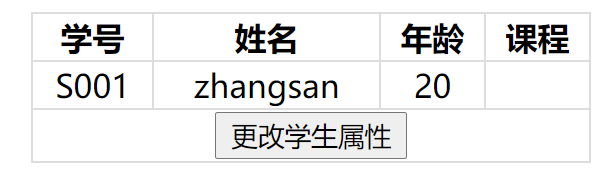
我们把stu称为被代理对象(或者:目标对象),proxyStu称为代理对象。点击更新按钮后,我们发现界面上并没有渲染更新学生的属性信息。通过控制台我们发现目标对象和代理对象的属性其实已经更新,只是界面没有渲染罢了。
{sid: "S002", sname: "李四", age: 20, courses: Array(3)}
Proxy {sid: "S002", sname: "李四", age: 20, courses: Array(3)}
我们把界面渲染代码改为通过获取代理对象的属性,如下:
<table class="mytab">
        <tr>
            <th>学号</th>
            <th>姓名</th>
            <th>年龄</th>
            <th>课程</th>
        </tr>
        <tr>
            <td>{{proxyStu.sid}}</td>
            <td>{{proxyStu.sname}}</td>
            <td>{{proxyStu.age}}</td>
            <td>
                <li v-for="(c,index) in proxyStu.courses" :key="index">{{c}}</li>
            </td>
        </tr>
        <tr>
            <td colspan="4">
                <button @click="changeStudentInfo">更改学生属性</button>
            </td>
        </tr>
    </table>
我们发现页面还是没有渲染更新,说明通过更新目标对象的属性是无法更新响应式数据进而实现渲染页面的效果。必须通过代理对象来更新属性。那么,代码改写如下:
<template>
    <!--与vue2模板的区别:不需要定义一个根标签-->
    <h1>第一个Vue3案例</h1>
    <hr>
    <table class="mytab">
        <tr>
            <th>学号</th>
            <th>姓名</th>
            <th>年龄</th>
            <th>课程</th>
        </tr>
        <tr>
            <td>{{proxyStu.sid}}</td>
            <td>{{proxyStu.sname}}</td>
            <td>{{proxyStu.age}}</td>
            <td>
                <li v-for="(c,index) in proxyStu.courses" :key="index">{{c}}</li>
            </td>
        </tr>
        <tr>
            <td colspan="4">
                <button @click="changeStudentInfo">更改学生属性</button>
            </td>
        </tr>
    </table>
</template>

<script lang="ts">
    import {defineComponent, ref, reactive} from 'vue';

    export default defineComponent({
        name: 'App',
        setup() {
            let stu: any = {
                sid: 'S001',
                sname: 'zhangsan',
                age: 20
            }
            //返回代理对象
            const proxyStu = reactive(stu);
            function changeStudentInfo() {
                proxyStu.sid = 'S002';
                proxyStu.sname = '李四';
                proxyStu.age = 20;
                proxyStu.courses=['英语', '物理', '化学'];
                console.log(stu);
                console.log(proxyStu);
            }

            return {
                stu,
                proxyStu,
                changeStudentInfo
            }
        }
    });
</script>
我们发现可以实现页面渲染效果:
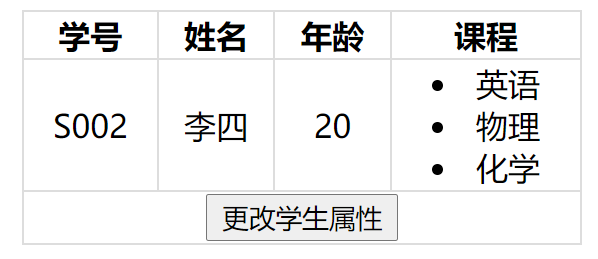
通过控制台我们发现目标对象和代理对象的属性其实已经更新。
{sid: "S002", sname: "李四", age: 20, courses: Array(3)}
Proxy {sid: "S002", sname: "李四", age: 20, courses: Array(3)}