Vue3基础教程(八)
webpack打包TS
当我们单纯用ts开发一个公有库时,没有了脚手架的帮助,我们需要借助webpack完成该ts项目的打包。 核心要点:
- 将ts编译成js
- 对打包进行自定义配置
打包所需的依赖包: - webapck(打包工具,必须) - ts-loader(将ts编译成js的loader,必须) - ts-lint(检测ts代码是否规范,非必须) - clean-webpack-plugin(每次打包时,删除上次打包的残留文件,保证打出的包整洁,非必须)
注意:ts-loader 版本 9 和 webpack 4 不兼容,所以本案例选择 ts-loader 8
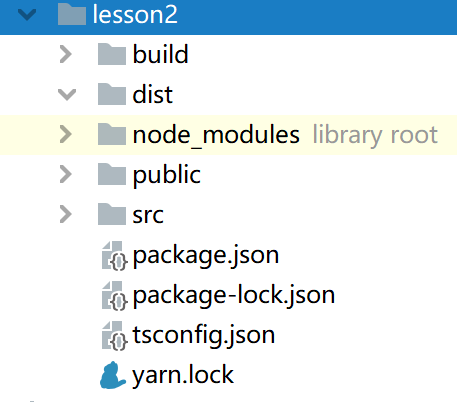
项目结构图如下:
1.入口JS: src/main.ts
document.write('<h1>Hello, Typescript!</h1>');
2.index页面: public/index.html
<!DOCTYPE html>
<html lang="en">
<head>
    <meta charset="UTF-8">
    <meta name="viewport" content="width=device-width, initial-scale=1.0">
    <meta http-equiv="X-UA-Compatible" content="ie=edge">
    <title>index</title>
</head>
<body>

</body>
</html>
3.build/webpack.config.js
const {CleanWebpackPlugin} = require('clean-webpack-plugin')
const HtmlWebpackPlugin = require('html-webpack-plugin')
const path = require('path')

const isProd = process.env.NODE_ENV === 'production' // 是否生产环境

function resolve(dir) {
    return path.resolve(__dirname, '..', dir)
}

module.exports = {
    mode: isProd ? 'production' : 'development',
    entry: {
        app: './src/main.ts'
    },

    output: {
        path: resolve('dist'),
        filename: '[name].[contenthash:8].js'
    },

    module: {
        rules: [
            {
                test: /\.tsx?$/,
                use: 'ts-loader',
                include: [resolve('src')]
            }
        ]
    },

    plugins: [
        new CleanWebpackPlugin({}),

        new HtmlWebpackPlugin({
            template: './public/index.html'
        })
    ],

    resolve: {
        extensions: ['.ts', '.tsx', '.js']
    },

    devtool: isProd ? 'cheap-module-source-map' : 'cheap-module-eval-source-map',

    devServer: {
        host: 'localhost', // 主机名
        stats: 'errors-only', // 打包日志输出输出错误信息
        port: 8081,
        open: true
    },
}
4.生成package.json
项目目录下运行:
npm init -y
在script节点添加配置打包命令:
"dev": "cross-env NODE_ENV=development webpack-dev-server --config build/webpack.config.js",
"build": "cross-env NODE_ENV=production webpack --config build/webpack.config.js"
{
  "name": "lesson2",
  "version": "1.0.0",
  "description": "",
  "main": "index.js",
  "scripts": {
    "test": "echo \"Error: no test specified\" && exit 1",
    "dev": "cross-env NODE_ENV=development webpack-dev-server --config build/webpack.config.js",
    "build": "cross-env NODE_ENV=production webpack --config build/webpack.config.js"
  },
  "keywords": [],
  "author": "",
  "license": "ISC",
  "devDependencies": {
    "clean-webpack-plugin": "^3.0.0",
    "cross-env": "^7.0.3",
    "html-webpack-plugin": "^4.5.0",
    "ts-loader": "^8.0.11",
    "typescript": "^4.3.5",
    "webpack": "^4.41.5",
    "webpack-cli": "^3.3.10",
    "webpack-dev-server": "^3.10.2"
  }
}
5.生成tsconfig.json
项目目录下运行:
tsc --init
6.测试运行和打包
yarn dev
yarn build
或者
npm run dev
npm run build
打包成功后在dist目录下的index.html会自动引入打包后的js文件,如下:
<!doctype html>
<html lang="en">
<head>
    <meta charset="UTF-8">
    <meta name="viewport" content="width=device-width,initial-scale=1">
    <meta http-equiv="X-UA-Compatible" content="ie=edge">
    <title>index</title></head>
<body>
<script src="app.398c7e61.js"></script>
</body>
</html>