Sentinel,中文翻译为哨兵,是为微服务提供流量控制、熔断降级的功能,它和Hystrix提供的功能一样,可以有效的解决微服务调用产生的“雪崩”效应,为微服务系统提供了稳定性的解决方案。随着Hytrxi进入了维护期,不再提供新功能,Sentinel是一个不错的替代方案。通常情况,Hystrix采用线程池对服务的调用进行隔离,Sentinel才用了用户线程对接口进行隔离,二者相比,Hystrxi是服务级别的隔离,Sentinel提供了接口级别的隔离,Sentinel隔离级别更加精细,另外Sentinel直接使用用户线程进行限制,相比Hystrix的线程池隔离,减少了线程切换的开销。另外Sentinel的DashBoard提供了在线更改限流规则的配置,也更加的优化。
从官方文档的介绍,Sentinel 具有以下特征:
- 丰富的应用场景: Sentinel 承接了阿里巴巴近 10 年的双十一大促流量的核心场景,例如秒杀(即突发流量控制在系统容量可以承受的范围)、消息削峰填谷、实时熔断下游不可用应用等。
- 完备的实时监控: Sentinel 同时提供实时的监控功能。您可以在控制台中看到接入应用的单台机器秒级数据,甚至 500 台以下规模的集群的汇总运行情况。
- 广泛的开源生态: Sentinel 提供开箱即用的与其它开源框架/库的整合模块,例如与 Spring Cloud、Dubbo、gRPC 的整合。您只需要引入相应的依赖并进行简单的配置即可快速地接入 Sentinel。
- 完善的 SPI 扩展点: Sentinel 提供简单易用、完善的 SPI 扩展点。您可以通过实现扩展点,快速的定制逻辑。例如定制规则管理、适配数据源等。
本小节案例上一节的案例的基础上进行改造。
1.下载sentinel dashboard
Sentinel dashboard提供一个轻量级的控制台,它提供机器发现、单机资源实时监控、集群资源汇总,以及规则管理的功能。您只需要对应用进行简单的配置,就可以使用这些功能。
注意: 集群资源汇总仅支持 500 台以下的应用集群,有大概 1 - 2 秒的延时。
下载最新的sentinel dashboard,下载地址为https://github.com/alibaba/Sentinel/releases
下载完启动, 编写以下批处理,就可以成功启动sentinel , 启动端口为8748。
java -Dserver.port=8748 -Dcsp.sentinel.dashboard.server=localhost:8748 -Dproject.name=sentinel-dashboard -jar sentinel-dashboard-1.8.1.jar
2.改造consumer
在consumer的pom文件加上spring cloud sentinel的依赖,如下:
<dependency>
      <groupId>com.alibaba.cloud</groupId>
      <artifactId>spring-cloud-starter-alibaba-sentinel</artifactId>
</dependency>
配置文件application.yml加上如下的配置:
server:
  port: 8763

spring:
  application:
    name: consumer
  cloud:
    nacos:
      discovery:
        server-addr: 127.0.0.1:8848
    sentinel:
      transport:
        port: 18763
        dashboard: localhost:8748
feign:
  sentinel:
    enabled: true
通过feign.sentinel.enable开启Feign和sentinel的自动适配。配置sentinel的dashboard的地址。
通过这样简单的配置,Feign和sentinel就配置好了。再启动三个工程provider\consumer\gateway。
在浏览器上多次访问http://localhost:5000/consumer/items/catalog
在浏览器上访问localhost:8748,登陆sentinel的控制台,登陆用户为sentinel,密码为sentinel。
consumer服务的/items/catalog接口,增加一个流控规则:
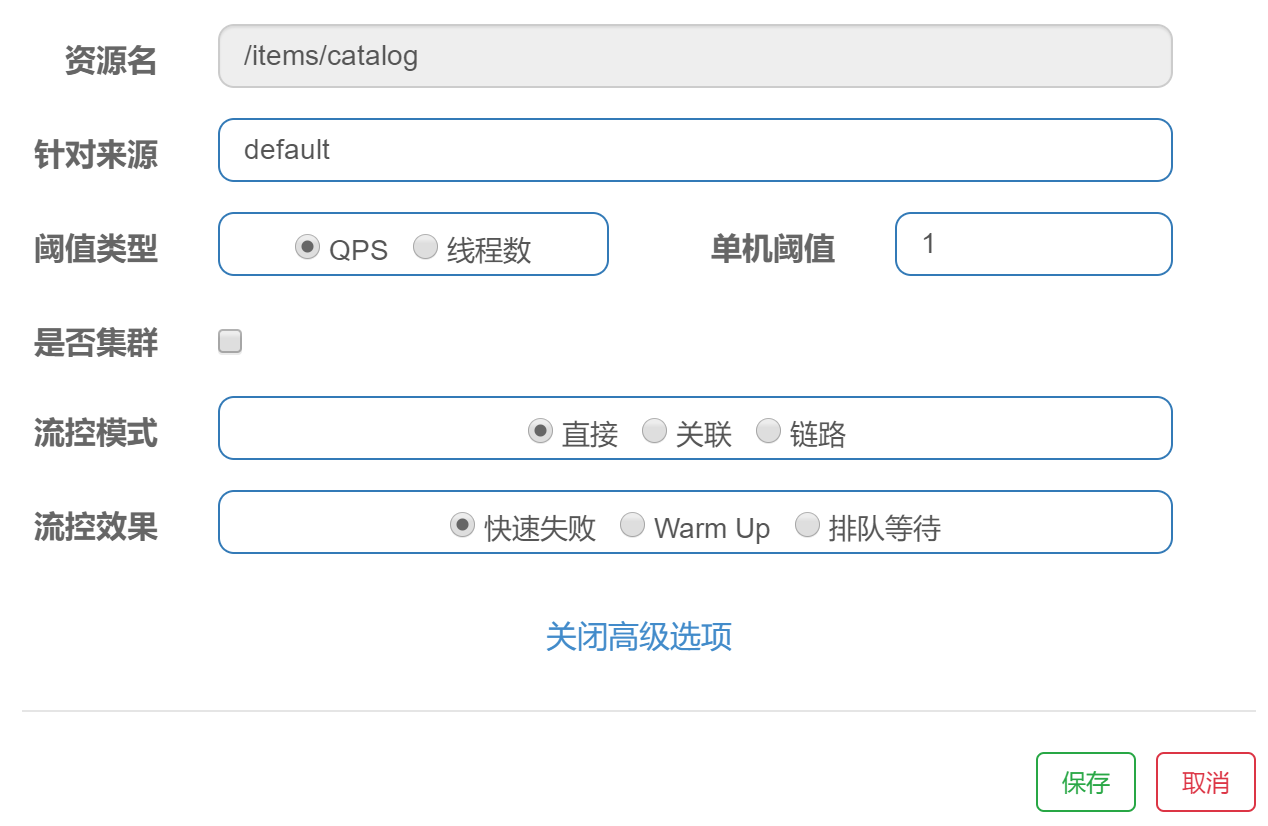
qps为1,快速访问http://localhost:5000/consumer/items/catalog,会有失败的情况。

3.在gateway上使用sentinel
Spring cloud gateway已经适配了sentinel,在gatewayg工程的pom文件加上相关依赖:
<dependency>
     <groupId>com.alibaba.cloud</groupId>
     <artifactId>spring-cloud-starter-alibaba-sentinel</artifactId>
</dependency>

<dependency>
    <groupId>com.alibaba.cloud</groupId>
    <artifactId>spring-cloud-alibaba-sentinel-gateway</artifactId>
</dependency>
在配置文件application.yml上加上sentinel dashboard的配置:
spring:
   cloud:
     sentinel:
      transport:
        port: 15000
        dashboard: localhost:8748
创建一个网关分组和网关的限流规则,代码如下,参考
https://github.com/alibaba/Sentinel/wiki/%E7%BD%91%E5%85%B3%E9%99%90%E6%B5%81
在config包下创建GatewayConfiguration 。
@Configuration
public class GatewayConfiguration {

    private final List<ViewResolver> viewResolvers;
    private final ServerCodecConfigurer serverCodecConfigurer;

    public GatewayConfiguration(ObjectProvider<List<ViewResolver>> viewResolversProvider,
                                ServerCodecConfigurer serverCodecConfigurer) {
        this.viewResolvers = viewResolversProvider.getIfAvailable(Collections::emptyList);
        this.serverCodecConfigurer = serverCodecConfigurer;
    }

    @Bean
    @Order(Ordered.HIGHEST_PRECEDENCE)
    public SentinelGatewayBlockExceptionHandler sentinelGatewayBlockExceptionHandler() {
        // Register the block exception handler for Spring Cloud Gateway.
        return new SentinelGatewayBlockExceptionHandler(viewResolvers, serverCodecConfigurer);
    }

    /*
    @Bean
    @Order(-1)
    public GlobalFilter sentinelGatewayFilter() {
        return new SentinelGatewayFilter();
    }*/

    @PostConstruct
    public void doInit() {
        initCustomizedApis();
        initGatewayRules();
    }

    private void initCustomizedApis() {
        Set<ApiDefinition> definitions = new HashSet<>();
        ApiDefinition api1 = new ApiDefinition("consumer")
                .setPredicateItems(new HashSet<ApiPredicateItem>() );
        ApiDefinition api2 = new ApiDefinition("provider")
                .setPredicateItems(new HashSet<ApiPredicateItem>() );
        definitions.add(api1);
        definitions.add(api2);
        GatewayApiDefinitionManager.loadApiDefinitions(definitions);
    }

    private void initGatewayRules() {
        Set<GatewayFlowRule> rules = new HashSet<>();
        rules.add(new GatewayFlowRule("consumer")
                .setCount(10)
                .setIntervalSec(1)
        );
        rules.add(new GatewayFlowRule("consumer")
                .setCount(2)
                .setIntervalSec(2)
                .setBurst(2)
                .setParamItem(new GatewayParamFlowItem()
                        .setParseStrategy(SentinelGatewayConstants.PARAM_PARSE_STRATEGY_CLIENT_IP)
                )
        );
        rules.add(new GatewayFlowRule("provider")
                .setCount(10)
                .setIntervalSec(1)
                .setControlBehavior(RuleConstant.CONTROL_BEHAVIOR_RATE_LIMITER)
                .setMaxQueueingTimeoutMs(600)
                .setParamItem(new GatewayParamFlowItem()
                        .setParseStrategy(SentinelGatewayConstants.PARAM_PARSE_STRATEGY_HEADER)
                        .setFieldName("X-Sentinel-Flag")
                )
        );
        rules.add(new GatewayFlowRule("provider")
                .setCount(1)
                .setIntervalSec(1)
                .setParamItem(new GatewayParamFlowItem()
                        .setParseStrategy(SentinelGatewayConstants.PARAM_PARSE_STRATEGY_URL_PARAM)
                        .setFieldName("pa")
                )
        );
        rules.add(new GatewayFlowRule("provider")
                .setCount(2)
                .setIntervalSec(30)
                .setParamItem(new GatewayParamFlowItem()
                        .setParseStrategy(SentinelGatewayConstants.PARAM_PARSE_STRATEGY_URL_PARAM)
                        .setFieldName("type")
                        .setPattern("warn")
                        .setMatchStrategy(SentinelGatewayConstants.PARAM_MATCH_STRATEGY_CONTAINS)
                )
        );

        rules.add(new GatewayFlowRule("provider")
                .setResourceMode(SentinelGatewayConstants.RESOURCE_MODE_CUSTOM_API_NAME)
                .setCount(5)
                .setIntervalSec(1)
                .setParamItem(new GatewayParamFlowItem()
                        .setParseStrategy(SentinelGatewayConstants.PARAM_PARSE_STRATEGY_URL_PARAM)
                        .setFieldName("pn")
                )
        );
        GatewayRuleManager.loadRules(rules);
    }
}
在sentinel 控制台为gateway创建一个限流规则,如下:
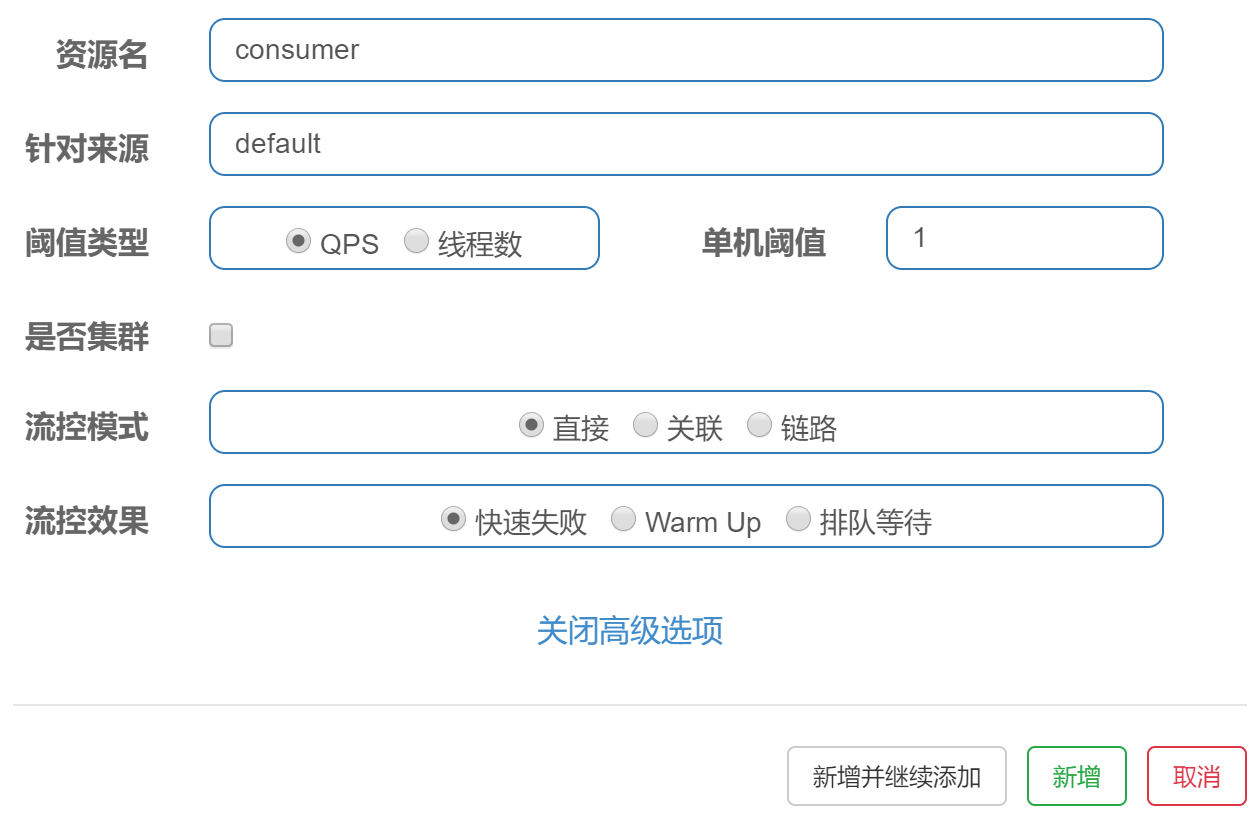
流控规则为qps=1,快速访问http://localhost:5000/consumer/items/catalog,在qps>1的情况下,会报以下的错误:

可见sentinel的配置已经生效。
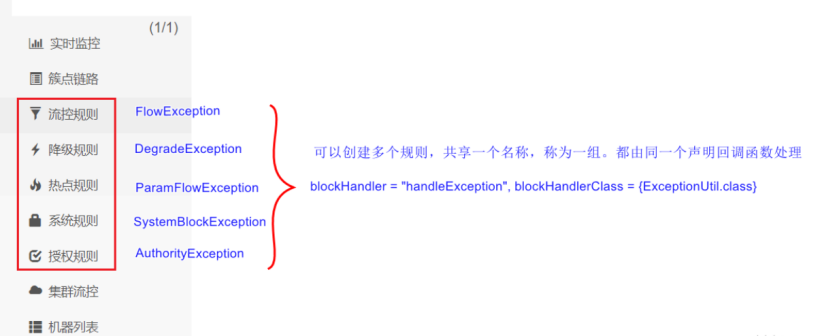
Sentinel流量规则类型:
4.关于在linux上部署sentinel的注意事项
1.确保linux的防火墙是关闭的,否则sentinel服务无法访问。
[root@slave1 sbin]# firewall-cmd --state
running
如果是running状态,需要关闭防火墙。
# 关闭防火墙
[root@slave1 sbin]# systemctl stop firewalld.service
[root@slave1 sbin]# firewall-cmd --state
not running
[root@slave1 sbin]# systemctl disable firewalld.service
2.consumer或者gateway里,sentinel的client-ip是否绑定了正确的consumer或者gateway微服务的IP地址。
spring:
  application:
    name: consumer
  cloud:
    inetutils:
      ignored-interfaces: [ 'VirtualBox.*' ]
      use-only-site-local-interfaces: true
    nacos:
      discovery:
        server-addr: 192.168.5.23:8848
    sentinel:
      transport:
        port: 18763
        dashboard: 192.168.5.23:8748
        #注意:这里一定要正确绑定客户端IP
        #因为上面已经规定了必须使用本地的IP地址
        client-ip: 192.168.5.9
feign:
  sentinel:
    enabled: true
3.sentinel作为后台进程服务启动。
为了方便sentinel作为后台进程服务启动,我们编写启动脚本如下:
cd /root/download
nohup  java -Dserver.port=8748 -Dcsp.sentinel.dashboard.server=localhost:8748 -Dproject.name=sentinel-dashboard -jar sentinel-dashboard-1.8.1.jar > sentinel.log  2> &1 &