SpringCloud基础教程(六)
gateway作为服务网关
Spring Cloud Gateway是Spring Cloud官方推出的第二代网关框架,取代Zuul网关。网关作为流量的,在微服务系统中有着非常作用,网关常见的功能有路由转发、权限校验、限流控制等作用。
在上节案例的基础上,讲述如何使用spring cloud gateway作为服务网关。
本案例的项目结构图如下:
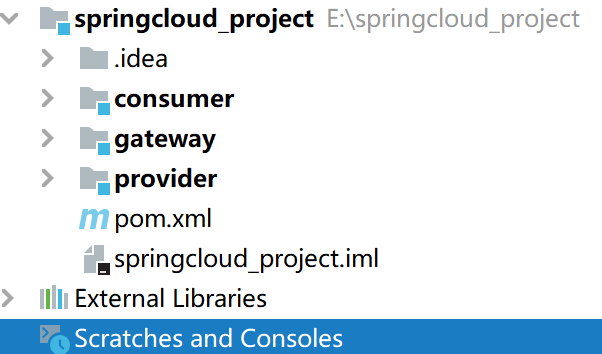
gateway需要注册到nacos中去,需要引入以下的依赖:
<dependencies>
        <dependency>
            <groupId>com.alibaba.cloud</groupId>
            <artifactId>spring-cloud-starter-alibaba-nacos-discovery</artifactId>
        </dependency>
        <dependency>
            <groupId>org.springframework.cloud</groupId>
            <artifactId>spring-cloud-starter-gateway</artifactId>
        </dependency>

        <dependency>
            <groupId>org.springframework.boot</groupId>
            <artifactId>spring-boot-starter-webflux</artifactId>
        </dependency>

        <dependency>
            <groupId>org.springframework.cloud</groupId>
            <artifactId>spring-cloud-starter-loadbalancer</artifactId>
        </dependency>

        <!--junit依赖-->
        <dependency>
            <groupId>junit</groupId>
            <artifactId>junit</artifactId>
            <version>4.12</version>
            <scope>test</scope>
        </dependency>
        <!--springboot的测试依赖-->
        <dependency>
            <groupId>org.springframework.boot</groupId>
            <artifactId>spring-boot-starter-test</artifactId>
            <scope>test</scope>
            <exclusions>
                <exclusion>
                    <groupId>org.junit.vintage</groupId>
                    <artifactId>junit-vintage-engine</artifactId>
                </exclusion>
            </exclusions>
        </dependency>
    </dependencies>
在配置文件application.yml文件:
server:
  port: 5000
spring:
  application:
    name: gateway
  cloud:
    nacos:
      discovery:
        server-addr: 127.0.0.1:8848
    gateway:
      discovery:
        locator:
          enabled: false
          lowerCaseServiceId: true
      routes:
        - id: provider
          uri: lb://provider
          predicates:
            - Path=/provider/**
          filters:
            - StripPrefix=1
        - id: consumer
          uri: lb://consumer
          predicates:
            - Path=/consumer/**
          filters:
            - StripPrefix=1
配置的解释请阅读文末的相关教程,在这里不再重复。
在工程的启动文件加上相关注解:
@SpringBootApplication
@EnableDiscoveryClient
public class GatewayApplication {

    public static void main(String[] args) {
        SpringApplication.run(GatewayApplication.class, args);
    }

}
依次启动gateway\consumer\provider三个工程,在nacos中已经成功注册:
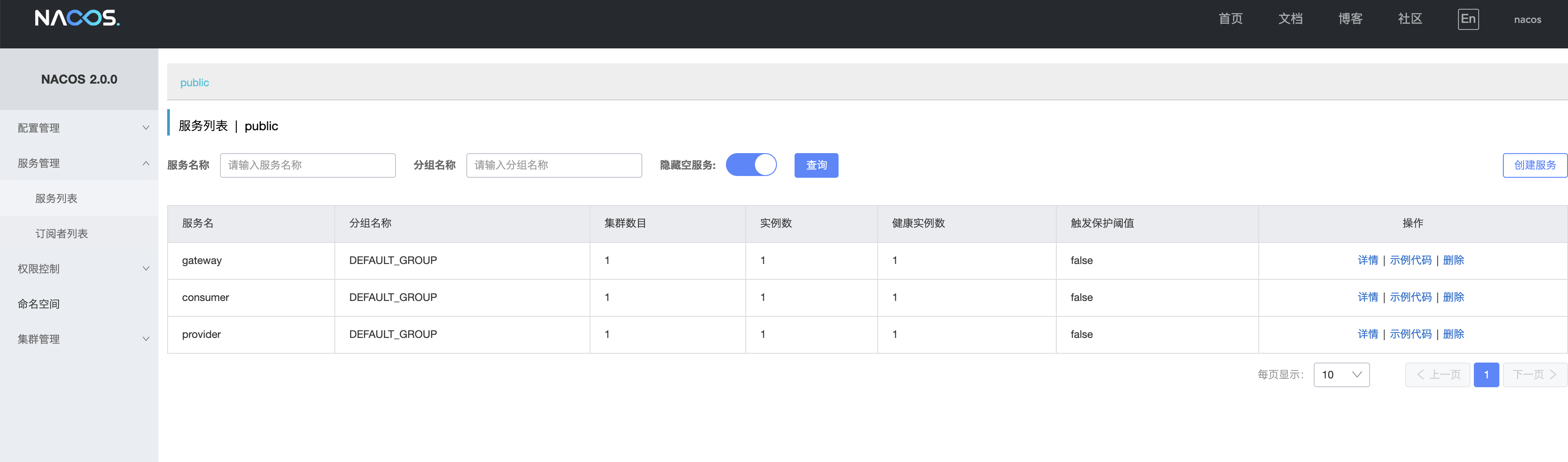
在浏览器上输入http://localhost:5000/consumer/items/catalog?catalogName=手机,浏览器返回响应:
[{"version":0,"createTime":"2021-01-22 23:53:26","modifyTime":"2021-01-22 23:53:26","flag":true,"id":108,"name":"小米11","price":2999,"pic":"http://114.67.88.176:8080/examdemo/images/api/goodList/pics_small/good_39.jpg","number":0,"catalog":"手机","city":"北京","property":null,"province":null,"shopId":0,"shopName":null,"discount":0.0,"buyCount":0,"status":0,"freePost":false},{"version":0,"createTime":"2021-01-23 00:05:55","modifyTime":"2021-01-23 00:05:55","flag":true,"id":109,"name":"vivo x60","price":1999,"pic":"http://114.67.88.176:8080/examdemo/images/api/goodList/pics_small/good_40.jpg","number":0,"catalog":"手机","city":"广州","property":null,"province":"广东","shopId":100,"shopName":null,"discount":0.0,"buyCount":0,"status":0,"freePost":false},{"version":0,"createTime":"2021-01-23 00:08:48","modifyTime":"2021-01-23 00:08:48","flag":true,"id":110,"name":"vivo Neo5","price":1999,"pic":"http://114.67.88.176:8080/examdemo/images/api/goodList/pics_small/good_41.jpg","number":0,"catalog":"手机","city":"广州","property":null,"province":"广东","shopId":100,"shopName":null,"discount":0.0,"buyCount":0,"status":0,"freePost":false},{"version":0,"createTime":"2021-05-10 14:47:45","modifyTime":"2021-05-10 14:47:45","flag":true,"id":124,"name":"vivo s9","price":1999,"pic":"http://114.67.88.176:8080/examdemo/images/api/goodList/pics_small/good_40.jpg","number":0,"catalog":"手机","city":"广州","property":null,"province":"广东","shopId":100,"shopName":null,"discount":0.0,"buyCount":0,"status":0,"freePost":false},{"version":0,"createTime":"2021-05-10 14:50:29","modifyTime":"2021-05-10 14:50:29","flag":true,"id":125,"name":"vivo iQOOZ3","price":1999,"pic":"http://114.67.88.176:8080/examdemo/images/api/goodList/pics_small/good_40.jpg","number":0,"catalog":"手机","city":"广州","property":null,"province":"广东","shopId":100,"shopName":null,"discount":0.0,"buyCount":0,"status":0,"freePost":false},{"version":0,"createTime":"2021-05-10 15:06:37","modifyTime":"2021-05-10 15:06:37","flag":true,"id":126,"name":"vivo z75","price":1999,"pic":"http://114.67.88.176:8080/examdemo/images/api/goodList/pics_small/good_41.jpg","number":0,"catalog":"手机","city":"广州","property":null,"province":"广东","shopId":100,"shopName":null,"discount":0.0,"buyCount":0,"status":0,"freePost":false},{"version":0,"createTime":"2021-05-10 15:06:57","modifyTime":"2021-05-10 15:06:57","flag":true,"id":127,"name":"vivo x60","price":2999,"pic":"http://114.67.88.176:8080/examdemo/images/api/goodList/pics_small/good_41.jpg","number":0,"catalog":"手机","city":"广州","property":null,"province":"广东","shopId":100,"shopName":null,"discount":0.0,"buyCount":0,"status":0,"freePost":false},{"version":0,"createTime":"2021-05-10 15:10:11","modifyTime":"2021-05-10 15:10:11","flag":true,"id":128,"name":"oppo k9","price":1999,"pic":"http://114.67.88.176:8080/examdemo/images/api/goodList/pics_small/good_55.jpg","number":0,"catalog":"手机","city":"广州","property":null,"province":"广东","shopId":100,"shopName":null,"discount":0.0,"buyCount":0,"status":0,"freePost":false},{"version":0,"createTime":"2021-05-11 10:44:52","modifyTime":"2021-05-11 10:44:52","flag":true,"id":129,"name":"oppo Reno5","price":2666,"pic":"http://114.67.88.176:8080/examdemo/images/api/goodList/pics_small/good_55.jpg","number":0,"catalog":"手机","city":"广州","property":null,"province":"广东","shopId":100,"shopName":null,"discount":0.0,"buyCount":0,"status":0,"freePost":false},{"version":0,"createTime":"2021-05-11 11:17:23","modifyTime":"2021-05-11 11:17:23","flag":true,"id":130,"name":"oppo A9","price":1999,"pic":"http://114.67.88.176:8080/examdemo/images/api/goodList/pics_small/good_56.jpg","number":0,"catalog":"手机","city":"广州","property":null,"province":"广东","shopId":100,"shopName":null,"discount":0.0,"buyCount":0,"status":0,"freePost":false},{"version":0,"createTime":"2021-05-11 11:18:26","modifyTime":"2021-05-11 11:18:26","flag":true,"id":131,"name":"oppo K7x","price":1800,"pic":"http://114.67.88.176:8080/examdemo/images/api/goodList/pics_small/good_56.jpg","number":0,"catalog":"手机","city":"广州","property":null,"province":"广东","shopId":100,"shopName":null,"discount":0.0,"buyCount":0,"status":0,"freePost":false}]
关于nacos部署在linux虚拟机里的相关配置
1.nacos服务注册中心会绑定虚拟机网卡IP地址的问题。
修改application.yml
spring:
  ...
  cloud:
    inetutils:
      ignored-interfaces: [ 'VirtualBox.*' ]
      use-only-site-local-interfaces: true
2.gateway 里predicates断言的正确理解
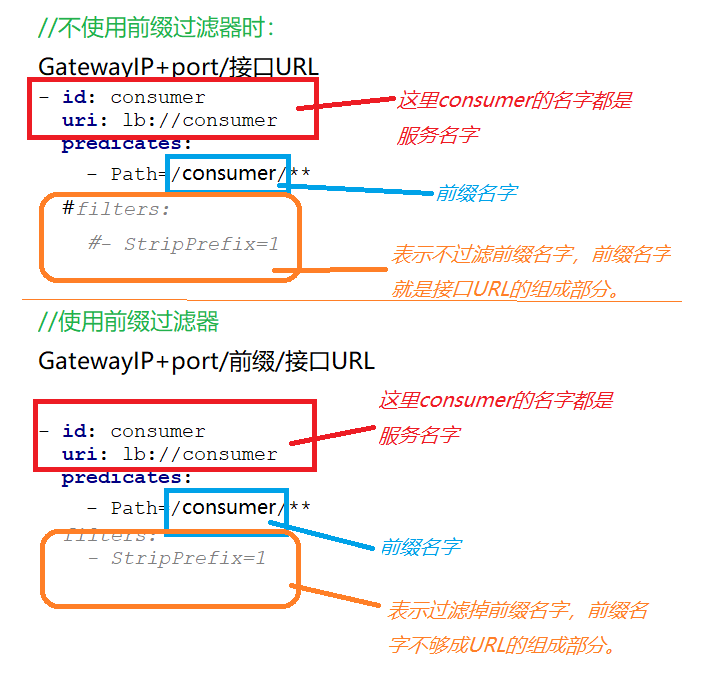
#不使用前缀时的配置。假设consumer服务的上下文路径是consumerdemo
#http://192.168.2.31:5000/consumer/consumerdemo/goods/catalog?catalogName=手机

spring:
  application:
    name: gateway
  cloud:
    inetutils:
      ignored-interfaces: [ 'VirtualBox.*' ]
      use-only-site-local-interfaces: true
    nacos:
      discovery:
        server-addr: 192.168.5.23:8848
    gateway:
      discovery:
        locator:
          enabled: false
          lowerCaseServiceId: true
      routes:
        - id: provider
          uri: lb://provider
          predicates:
            - Path=/provider/**
          #filters:
            #- StripPrefix=1
        - id: consumer
          uri: lb://consumer
          predicates:
            - Path=/consumer/**
          filters:
            - StripPrefix=1

#使用前缀时的配置。假设consumer服务的上下文路径是consumerdemo
#http://192.168.2.31:5000/consumerdemo/goods/catalog?catalogName=手机

spring:
  application:
    name: gateway
  cloud:
    inetutils:
      ignored-interfaces: [ 'VirtualBox.*' ]
      use-only-site-local-interfaces: true
    nacos:
      discovery:
        server-addr: 192.168.5.23:8848
    gateway:
      discovery:
        locator:
          enabled: false
          lowerCaseServiceId: true
      routes:
        - id: provider
          uri: lb://provider
          predicates:
            - Path=/provider/**
          #filters:
            #- StripPrefix=1
        - id: consumer
          uri: lb://consumer
          predicates:
            - Path=/consumerdemo/**
          #filters:
            #- StripPrefix=1