Javascript基础教程(四十一)
Javascript实现计算器案例
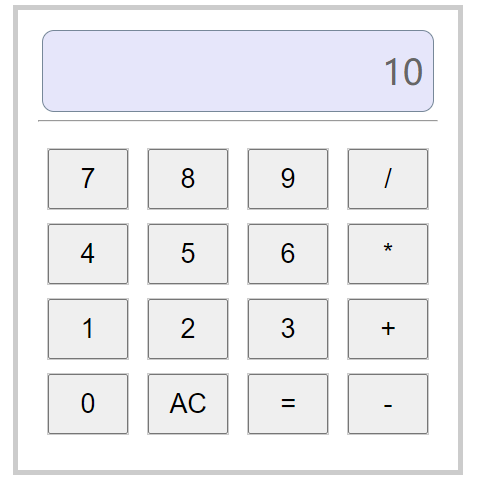
Javascript实现简易计算器效果
实现代码:
<!DOCTYPE html>
<html lang="zh">
<head>
    <meta charset="UTF-8">
    <title></title>
    <style>
        h1 {
            text-align: center;
        }
        #box {
            margin: 0px auto;
            width: 400px;
            height: 420px;
            border: 5px solid #ccc;
            padding: 20px;

        }
        #numberDiv {
            margin: 0px auto;
            width: 380px;
            height: 80px;
            /*margin: 20px;*/
            border: 1px solid lightslategray;
            border-radius: 12px;
            text-align: right;
            font-size: 26pt;
            line-height: 80px;
            padding-right: 10px;
            background: lavender;
            color: #666;
        }

        #buttonDiv{
            margin-top: 20px;
            width: 100%;
            height: 300px;
            display: flex;
            justify-content: space-around;
            flex-flow: row wrap;
            align-content: space-around;
        }
        .bt{
            width: 80px;
            height: 60px;
            border: 1px solid #ccc;
        }
        input{
            width: 100%;
            height: 100%;
            display: block;
            font-size: 20pt;
        }
    </style>
</head>
<body>
<h1>Javascript实现计算器效果</h1>
<hr>
<div id="box">
    <div id="numberDiv">
          0
    </div>
    <div>
        <hr>
    </div>
    <div id="buttonDiv">
        <div class="bt"><input type="button" value="7" onclick="pressNumber('7')"></div>
        <div class="bt"><input type="button" value="8" onclick="pressNumber('8')"></div>
        <div class="bt"><input type="button" value="9" onclick="pressNumber('9')"></div>
        <div class="bt"><input type="button" value="/" onclick="pressNumber('/')"></div>
        <div class="bt"><input type="button" value="4" onclick="pressNumber('4')"></div>
        <div class="bt"><input type="button" value="5" onclick="pressNumber('5')"></div>
        <div class="bt"><input type="button" value="6" onclick="pressNumber('6')"></div>
        <div class="bt"><input type="button" value="*" onclick="pressNumber('*')"></div>
        <div class="bt"><input type="button" value="1" onclick="pressNumber('1')"></div>
        <div class="bt"><input type="button" value="2" onclick="pressNumber('2')"></div>
        <div class="bt"><input type="button" value="3" onclick="pressNumber('3')"></div>
        <div class="bt"><input type="button" value="+" onclick="pressNumber('+')"></div>
        <div class="bt"><input type="button" value="0" onclick="pressNumber('0')"></div>
        <div class="bt"><input type="button" value="AC" onclick="clearNumber()"></div>
        <div class="bt"><input type="button" value="=" onclick="pressNumber('=')"></div>
        <div class="bt"><input type="button" value="-" onclick="pressNumber('-')"></div>
    </div>
</div>
<script>
    //var num1;
    //var num2;
    var result;

    function pressNumber(num){
        let html=document.getElementById("numberDiv").innerText;
        if(html=="0"){
            html="";
        }
        //如果是==计算结果
        if("="==num){
            result = eval(html);
            document.getElementById("numberDiv").innerText=result;
            return;
        }
        html+=num+"";
        document.getElementById("numberDiv").innerText=html;
    }

    function clearNumber(){
        document.getElementById("numberDiv").innerText="0";
    }
</script>
</body>
</html>
运行效果: