Flex综合案例2
Flex综合案例2
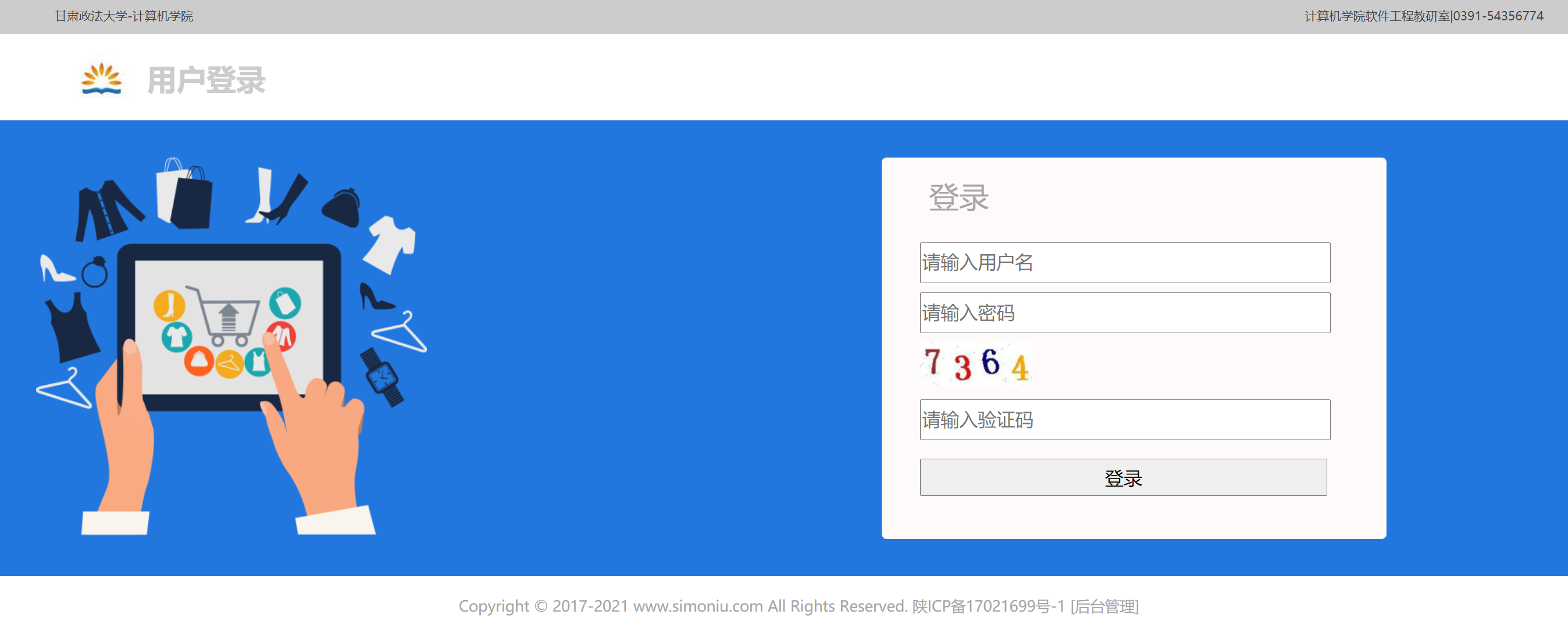
使用flex布局实现登录界面效果:
<!DOCTYPE html>
<html lang="en">
<head>
<meta charset="UTF-8">
<title>Title</title>
<style>
body {
margin: 0px;
padding: 0px;
}
#header, #logo, #main {
width: 100%;
margin: 0px auto;
}
#header {
display: flex;
justify-content: space-around;
background-color: #ccc;
height: 40px;
}
.header_left, .header_right {
width: 50%;
color: #444;
font-size: small;
line-height: 40px;
}
.header_left {
text-align: left;
padding-left: 100px;
}
.header_right {
text-align: right;
padding-right: 100px;
}
#logo {
line-height: 90px;
font-size: 24pt;
font-weight: bold;
color: #ccc;
padding-left: 0px;
}
#logo img {
position: relative;
top: 20px;
bottom: 0;
left: 0;
right: 0;
margin-left: 120px;
}
#main {
width: 100%;
height: 410px;
background: rgb(34, 119, 223);
display: flex;
justify-content: space-around;
padding: 40px 0px;
}
.main_left {
width: 40%;
}
.main_right {
width: 30%;
}
.main_left img {
width: 420px;
margin-left: 80px;
}
.main_right {
position: relative;
margin: 0px auto;
background: #FFFAFA;
border: 1px solid #EEEEEE;
border-radius: 5px;
}
.main_right #loginform {
margin: 10px 20px;
width: 90%;
height: 40px;
font-size: 15pt;
}
.main_right #loginform input {
margin: 10px 20px;
width: 90%;
height: 40px;
font-size: 15pt;
}
.main_right #login_title {
width: 50%;
color: #a6a6a6;
font-size: xx-large;
line-height: 40px;
padding: 20px 50px;
}
#footer {
text-align: center;
color: #a6a6a6;
}
</style>
</head>
<body>
<div id="header">
<div class="header_left">甘肃政法大学-计算机学院</div>
<div class="header_right">计算机学院软件工程教研室|0391-54356774</div>
</div>
<div id="logo">
<img src="https://img.simoniu.com/logo.jpg"/> 用户登录
</div>
<div id="main">
<div class="main_left">
<img id="backlogo" src="https://img.simoniu.com/login_bg.png"/>
</div>
<div class="main_right">
<div id="login_title">登录</div>
<div id="loginform">
<input style="display: block" type="text" placeholder="请输入用户名"/>
<input style="display: block" type="password" placeholder="请输入密码"/>
<div style="margin: 10px 20px;"><img style="width: 120px" src="https://img.simoniu.com/validatecode.png"/>
</div>
<input style="display: block" type="text" placeholder="请输入验证码"/>
<input type="button" value="登录"/>
</div>
</div>
</div>
<br>
<p id="footer">
Copyright © 2017-2021 www.simoniu.com All Rights Reserved. 陕ICP备17021699号-1 [后台管理]
</p>
</body>
</html>
运行效果: