jQuery基础教程(十八)
ajax
ajax() 方法用于执行 AJAX(异步 HTTP)请求。所有的 jQuery AJAX 方法都使用 ajax() 方法。该方法通常用于其他方法不能完成的请求。
语法:
$.ajax([settings])
常用参数如下:
| 参数 | 说明 |
|---|---|
| async | 是否异步,默认值: true。默认设置下,所有请求均为异步请求。如果需要发送同步请求,请将此选项设置为 false。 |
| type | 请求方式,默认值: "GET")。请求方式 ("POST" 或 "GET"), 默认为 "GET"。注意:其它 HTTP 请求方法,如 PUT 和 DELETE 也可以使用,但仅部分浏览器支持。 |
| url | 请求的 URL |
| contentType | 发送数据到服务器时所使用的内容类型。默认是:"application/x-www-form-urlencoded"。 |
| data | 发送到服务器的数据。将自动转换为请求字符串格式。 |
| dataType | 服务器响应的数据类型。 常见有:xml,json,text,script,html等等类型 |
| success | 请求成功后的回调函数 |
| error | 请求失败后的回调函数 |
| timeout | 请求超时时间(以毫秒计) |
实例:
<!DOCTYPE html>
<html lang="zh">
<head>
    <meta charset="UTF-8">
    <title>jQuery-ajax实例</title>
    <script src="https://cdn.bootcdn.net/ajax/libs/jquery/3.5.1/jquery.min.js"></script>
</head>
<body>
<div>
    <input type="button" value="发送get请求" id="sendGetBtn"/><br>
    <input type="button" value="发送post请求" id="sendPostBtn"/><br>
</div>
<script>
    let address = {
        "uid": 22,
        "realname": "tester",
        "mobile": "13772653123",
        "province": "河南省",
        "city": "南阳",
        "zone": "宛城区",
        "street": "张井村188号"
    }

    $(function () {
        //发送get请求
        $("#sendGetBtn").click(function () {

            $.ajax({
                //请求方式
                type: "GET",
                //请求地址
                url: "https://www.simoniu.com/commons/items/130",
                //请求成功
                success: function (result) {
                    console.log(result.data);
                },
                //请求失败,包含具体的错误信息
                error: function (e) {
                    console.log(e.status);
                    console.log(e.responseText);
                }
            })
        })

        //发送post请求
        $("#sendPostBtn").click(function () {
            $.ajax({
                //请求方式
                type: "POST",
                //请求的媒体类型
                contentType: "application/json;charset=UTF-8",
                //请求地址
                url: "https://www.simoniu.com/commons/address/",
                //数据,json字符串
                data: JSON.stringify(address),
                //请求成功
                success: function (result) {
                    console.log(result);
                },
                //请求失败,包含具体的错误信息
                error: function (e) {
                    console.log(e.status);
                    console.log(e.responseText);
                }
            })
        })
    })

</script>
</body>
</html>
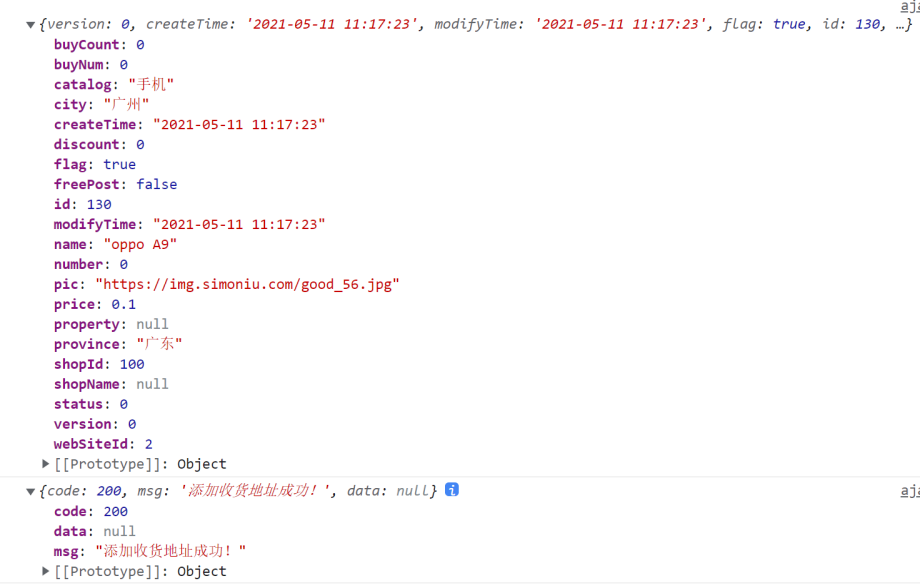
运行效果: