jQuery基础教程(十七)
类型转换与noConflict
1.jQuery对象与dom对象的相互转换
| 方法 | 说明 |
|---|---|
| get(0) | jQuery对象转dom对象 |
| $(obj) | dom对象转jQuery对象 |
实例:
<!DOCTYPE html>
<html lang="zh">
<head>
    <meta charset="UTF-8">
    <title>jQuery基本语法-类型转换</title>
    <script src="https://cdn.bootcdn.net/ajax/libs/jquery/3.5.1/jquery.min.js"></script>
</head>
<body>
<div id="box">
    hello,jQuery!
</div>
<script>

    let node = document.getElementById("box");
    $(function(){

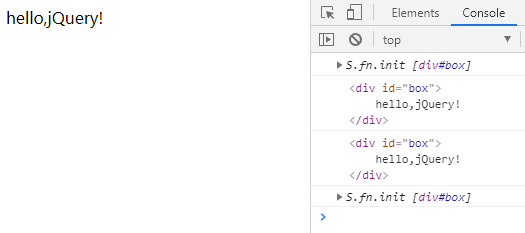
        console.log($("#box"));
        console.log(node);
        console.log($("#box").get(0)); //jQuery对象转换为dom对象
        console.log($(node)); // dom对象转换为jQuery对象
    })

</script>
</body>
</html>
运行效果:
2.noConflict解决冲突
noConflict() 方法会释放会 $ 标识符的控制,这样其他脚本就可以使用它了。当然,您仍然可以通过全名(jQuery)替代简写的方式来使用 jQuery。
实例:
<!DOCTYPE html>
<html lang="zh">
<head>
    <meta charset="UTF-8">
    <title>jQuery基本语法-类型转换</title>
    <script src="https://cdn.bootcdn.net/ajax/libs/jquery/3.5.1/jquery.min.js"></script>
</head>
<body>
<div id="box">
    hello,jQuery!
</div>
<script>

    let node = document.getElementById("box");

    $.noConflict();
    jQuery(function(){

        console.log(jQuery("#box"));
        console.log(node);
        console.log(jQuery("#box").get(0)); //jQuery对象转换为dom对象
        console.log(jQuery(node)); // dom对象转换为jQuery对象
    })

</script>
</body>
</html>