jQuery基础教程(十一)
插入/删除
通过 jQuery,可以很容易地添加(删除)元素/内容。常用方法如下:
| 方法 | 说明 |
|---|---|
| append() | 在被选元素的结尾插入内容 |
| remove() | 删除被选元素(及其子元素) |
| empty() | 删除被选元素的子元素 |
实例:
<!DOCTYPE html>
<html lang="zh">
<head>
    <meta charset="UTF-8">
    <title>jQuery基础教程之HTML-添加删除节点</title>
    <script src="https://cdn.bootcdn.net/ajax/libs/jquery/3.5.1/jquery.min.js"></script>
    <style>
        #main,#cart,#top{
            width: 780px;
            height: auto;
            margin: 0px auto;
        }
        #top input{
            width: 100px;
        }

        #cart table{
            width: 100%;
            border: 1px solid #ccc;
            border-collapse:collapse;
        }

        #cart table td{
            text-align: center;
        }

    </style>
</head>
<body>
<h1 style="text-align: center">购物车</h1>
<div id="main">
    <div id="top">
        编号:<input type="text" id="itemid" value=""/>
        名称:<input type="text" id="itemname" value=""/>
        单价:<input type="text" id="price" value=""/>
        数量:<input type="text" id="number" value=""/>
        <input type="button" value="添加" id="add"/>
    </div>
    <hr>
    <div id="cart">
        <table id="cartlist">
            <tr>
                <th>编号</th>
                <th>名称</th>
                <th>单价</th>
                <th>数量</th>
                <th>操作</th>
            </tr>
        </table>
    </div>
    <hr>
    <div style="text-align: center">
        <input type="button" value="清空购物车" id="clear"/>
    </div>
</div>
<script>

    function deleteItem(obj){
        console.log('deleting...');
        $(obj).parent().parent().remove();
    }
    $(function(){
        $("#add").click(function(){
            let id = $("#itemid").val();
            let name = $("#itemname").val();
            let price = $("#price").val();
            let number = $("#number").val();
            let html = "<tr><td>"+id+"</td><td>"+name+"</td><td>"+price+"</td><td>"+number+"</td><td><input type='button' value='删除' onclick='deleteItem(this)'></td></tr>";
            $("#cartlist").append(html)
        })

        $("#clear").click(function(){
            $("#cartlist").empty();
            let html = "<tr>\n" +
                "                <th>编号</th>\n" +
                "                <th>名称</th>\n" +
                "                <th>单价</th>\n" +
                "                <th>数量</th>\n" +
                "                <th>操作</th>\n" +
                "            </tr>"

            $("#cartlist").append(html);
        })
    })
</script>
</body>
</html>
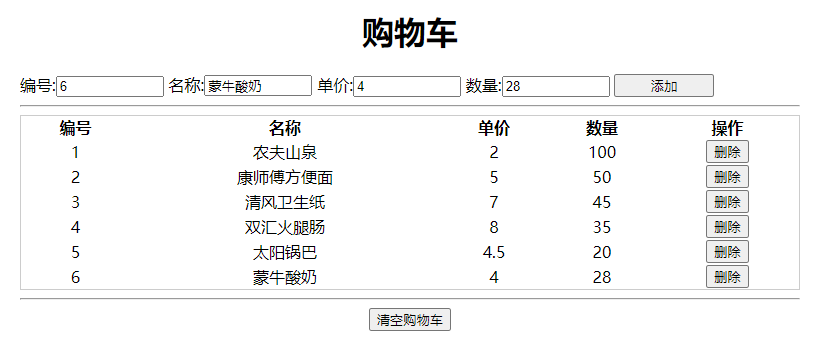
运行效果: