jQuery基础教程(九)
获取/修改节点
jQuery 中非常重要的部分,就是操作 DOM 的能力。
获取与修改节点内容常用的三个方法如下:
| 方法 | 说明 |
|---|---|
| text() | 返回所选元素的文本内容 |
| text(value) | 设置所选元素的文本内容 |
| html() | 返回所选元素的内容(包括 HTML 标记) |
| html(value) | 设置所选元素的内容(包括 HTML 标记) |
| val() | 返回所选表单字段的值 |
| val(value) | 设置所选表单字段的值 |
实例:
<!DOCTYPE html>
<html lang="zh">
<head>
    <meta charset="UTF-8">
    <title>jQuery基础教程之效果-获取修改节点</title>
    <script src="https://cdn.bootcdn.net/ajax/libs/jquery/3.5.1/jquery.min.js"></script>
    <style>
        h1 {
            text-align: center;
        }
        .form_container {
            width: 40%;
            margin: 0px auto;
            background: #EEE;
            border: 1px solid #BBB;
            border-radius: 10px;
            padding: 10px;
        }

        .form_row {
            display: flex;
            justify-content: center;
            padding: 5px;
        }

        .form_title {
            width: 30%;
            text-align: right;
        }

        .form_controller {
            width: 70%;
            text-align: left;
        }

        .form_controller input {

            width: 60%;
        }

        .form_submit {
            width: 40%;
        }
        .form_submit input {
            width: 100%;
            display: block;
            background: lightblue;
        }
    </style>
</head>
<body>
<h1>用户注册</h1>
<hr>
<div class="form_container">
    <div class="form_row" id="formlabel">
        <span>hello,jQuery!</span>
    </div>
    <div class="form_row">
        <div class="form_title">用户名:</div>
        <div class="form_controller"><input type="text" name="username" value=""/></div>
    </div>

    <div class="form_row">
        <div class="form_submit"><input type="button" value="注册"/></div>
    </div>
</div>
<hr>
<div style="text-align: center">
    <input type="button" value="获取text" id="btn1"/><input type="button" value="获取html" id="btn2"/>
    <input type="button" value="设置text" id="btn3"/><input type="button" value="设置html" id="btn4"/>
    <input type="button" value="获取value" id="btn5"/><input type="button" value="设置value" id="btn6"/>
</div>

<script>
    $(function () {
        $("#btn1").click(function () {
            console.log($("#formlabel").text());
        })
        $("#btn2").click(function () {
            console.log($("#formlabel").html());
        })
        $("#btn3").click(function () {
            console.log($("#formlabel").text('<span>hello,Javascript!</span>'));
        })
        $("#btn4").click(function () {
            console.log($("#formlabel").html('<span style="color:red">hello,Javascript!</span>'));
        })
        $("#btn5").click(function () {
            console.log($(":input[name=username]").val());
        })
        $("#btn6").click(function () {
            console.log($(":input[name=username]").val('king'));
        })
    })
</script>

</body>
</html>
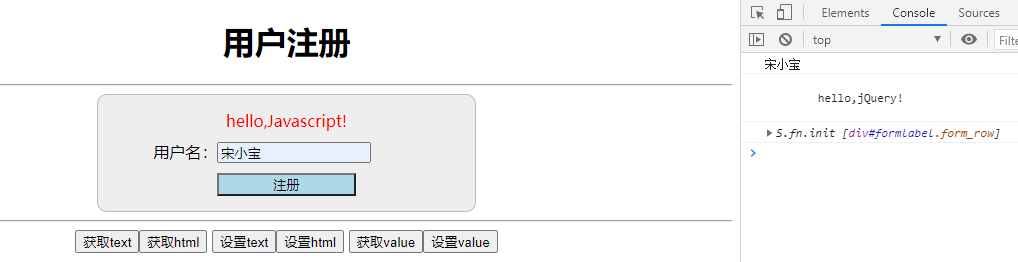
运行效果: