jQuery基础教程(八)
动画
jQuery animate() 方法允许您创建自定义的动画。
语法:
$(selector).animate({params},speed,callback);
参数说明: - params 参数定义形成动画的 CSS 属性。(必需的) - speed 参数规定效果的时长。它可以取以下值:"slow"、"fast" 或毫秒。(可选的) - callback 参数是动画完成后所执行的函数名称。(可选的)
实例:
<!DOCTYPE html>
<html lang="zh">
<head>
    <meta charset="UTF-8">
    <title>jQuery基础教程之效果-动画</title>
    <script src="https://cdn.bootcdn.net/ajax/libs/jquery/3.5.1/jquery.min.js"></script>
    <style>
        #main {
            width: 600px;
            height: 400px;
            margin: 0px auto;
            text-align: center;
            position: relative;
        }
        img {
            position: absolute;
            width: 30%;
            height: auto;
            top: 0;
            left: 0;
            right: 0;
            bottom: 0;
            margin: auto;
            opacity: 0.2;
        }
    </style>
</head>
<body>
<div id="main">
    <img src="https://img.simoniu.com/beatiful_girl01.jpg" id="girl"/><br>
</div>
<div style="text-align: center">
    <input type="button" value="显示图片动画" id="btn"/>
</div>
<script>
    $(function () {
        $("#btn").click(function(){
            $("#girl").animate({
                    height: '+=75px',
                    width: '+=100px',
                    opacity: '+=0.8'
                },
                4000
            )
        })
    })
</script>
</body>
</html>
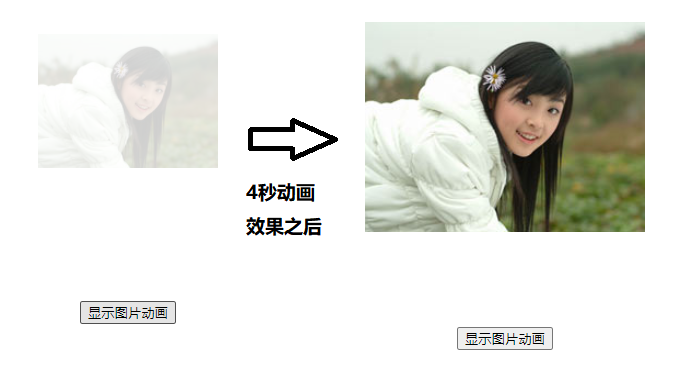
运行效果: