jQuery基础教程(四)
选择器
jQuery的选择器的用法很多,也很灵活,这里我们只列出最常用的几种选择器。
1.普通选择器
| 选择器 | 实例 | 解释 |
|---|---|---|
| * | $(*) | 选择所有元素 |
| #id | $("#lastname") | 选择id="lastname" 的元素 |
| .class | $(".intro") | 选择class="intro" 的所有元素 |
| element | $("p") | 选择所有 <p > 元素 |
| :first | $("p:first") | 选择第一个<p>元素 |
| :last | $("p:last") | 选择最后一个<p>元素 |
| :even | $("tr:even") | 索引从0开始,选择所有偶数元素 |
| :odd | $("tr:odd") | 索引从0开始,选择所有奇数元素 |
| parent descendant | $("div p") | <div> 元素的后代的所有 <p > 元素 |
实例:
<!DOCTYPE html>
<html lang="zh">
<head>
    <meta charset="UTF-8">
    <title>jQuery的选择器-普通选择器</title>
    <script src="https://cdn.bootcdn.net/ajax/libs/jquery/3.5.1/jquery.min.js"></script>
</head>
<body>

<div id="box">
    <ul>
        <li class="fruit">苹果</li>
        <li class="vg">西红柿</li>
        <li class="vg">黄瓜</li>
        <li class="fruit">草莓</li>
        <li class="vg">土豆</li>
        <li class="fruit">葡萄</li>
        <li class="vg">南瓜</li>
        <li class="vg">香菇</li>
    </ul>

    <ul>
        <li>牛奶</li>
        <li>面包</li>
        <li>香肠</li>
        <li>鸡蛋</li>
    </ul>
</div>

<script>
    $(function(){
        $("#box").css("width","600px").css("height","auto").css("background-color","#CCFFFF").css("margin","0px auto");
        $("ul li").css("list-style","none");
        $(".fruit").css("color","green").css("font-weight","bold");
        $("ul:first li:even").css("background-color","#FFFFCC");
        $("ul:first li:odd").css("background-color","#99CCCC");
    })
</script>
</body>
</html>
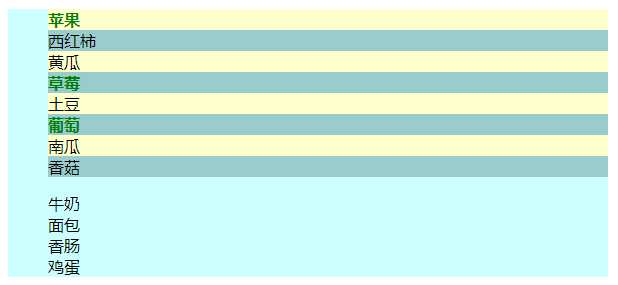
运行效果:
2.表单选择器
| 选择器 | 实例 | 解释 |
|---|---|---|
| :input | $(":input") | 匹配所有 input, textarea, select 和 button 元素 |
| [attribute=value] | $(":input[name=username]") | 选择name="username" 的表单元素 |
| :disabled | $(":disabled") | 所有禁用的 input 元素 |
| :checked | $(":checked") | 所有选中的 input 元素 |
| :submit | $(":submit") | 所有 type="submit" 的 <input> 元素 |
实例:
<!DOCTYPE html>
<html lang="zh">
<head>
    <meta charset="UTF-8">
    <title>jQuery的选择器-表单选择器</title>
    <script src="https://cdn.bootcdn.net/ajax/libs/jquery/3.5.1/jquery.min.js"></script>
</head>
<body>
<div>
    <form name="regForm" action="regok.html" method="post">
        <table>
            <tr>
                <td class="title">用户名:</td>
                <td><input type="text" name="username" value="admin"/></td>
            </tr>
            <tr>
                <td class="title">密码:</td>
                <td><input type="password" name="password" value="123456"/></td>
            </tr>
            <tr>
                <td class="title">确认密码:</td>
                <td><input type="password" name="confirmpass"/></td>
            </tr>
            <tr>
                <td class="title">电子邮箱:</td>
                <td><input type="text" name="email" disabled="disabled" value="54366325@qq.com"/></td>
            </tr>

            <tr>
                <td class="title">性别:</td>
                <td><input type="radio" value="男" name="gender" checked/>男<input type="radio" value="女" name="gender"/>女
                </td>
            </tr>
            <tr>
                <td class="title">学历:</td>
                <td>
                    <select name="education" value="">
                        <option value="-1">-----请选择-----</option>
                        <option value="文盲">文盲</option>
                        <option value="小学">小学</option>
                        <option value="初中">初中</option>
                        <option value="高中">高中</option>
                        <option value="大专">大专</option>
                        <option value="本科" selected>本科</option>
                        <option value="硕士">硕士</option>
                        <option value="博士">博士</option>
                        <option value="博士后">博士后</option>
                        <option value="圣斗士">圣斗士</option>
                    </select>
                </td>
            </tr>

            <tr>
                <td class="title">出生日期:</td>
                <td><input type="date" name="birthday" value="1997-09-10"/></td>
            </tr>
            <tr>
                <td class="title">爱好:</td>
                <td>
                    <!--复选框name名字必须一样-->
                    <input type="checkbox" name="favorites" checked value="read"/>读书
                    <input type="checkbox" name="favorites" value="music"/>音乐
                    <input type="checkbox" name="favorites" checked value="internet"/>上网
                    <input type="checkbox" name="favorites" value="nba"/>NBA
                </td>
            </tr>
            <tr>
                <td class="title">自我介绍:</td>
                <td><textarea rows="10" cols="25">帅锅一枚</textarea></td>
            </tr>
            <tr>
                <td class="title">上传照片:</td>
                <td><input type="file" name="pic"/></td>
            </tr>
            <tr>
                <td class="title">是否接受条款:</td>
                <td><input type="checkbox" name="accept" checked/>我无条件接受霸王条款</td>
            </tr>
            <tr>
                <td colspan="2" align="center">
                    <input type="button" value="普通按钮"></input>
                    <input type="submit" value="注册"/><input type="reset" value="重置"/></td>
            </tr>
        </table>
    </form>
</div>

<script>
    $(function(){
        console.log("表单元素个数:"+$(":input").length);
        console.log("用户名:"+$(":input[name=username]").val());
        console.log("性别:"+$(":radio[name=gender]:checked").val());
        console.log("电子邮箱:"+$(":disabled").val());
        console.log("出生日期:"+$(":input[name=birthday]").val());
        console.log("学历:"+$(":input[name=education]").val());
        console.log("-----用户爱好--------");
        $(":input[name=favorites]:checked").each(function(i,e){
            console.log(e.value)
        });
        let flag =false;
        if($(":input[name=accept]").is(":checked")){
            flag = true;
        }
        console.log("是否接受条款:"+flag);
        console.log("普通按钮label:"+$(":button:first").val());
        console.log("提交按钮label:"+$(":submit:first").val());
    })
</script>
</body>
</html>
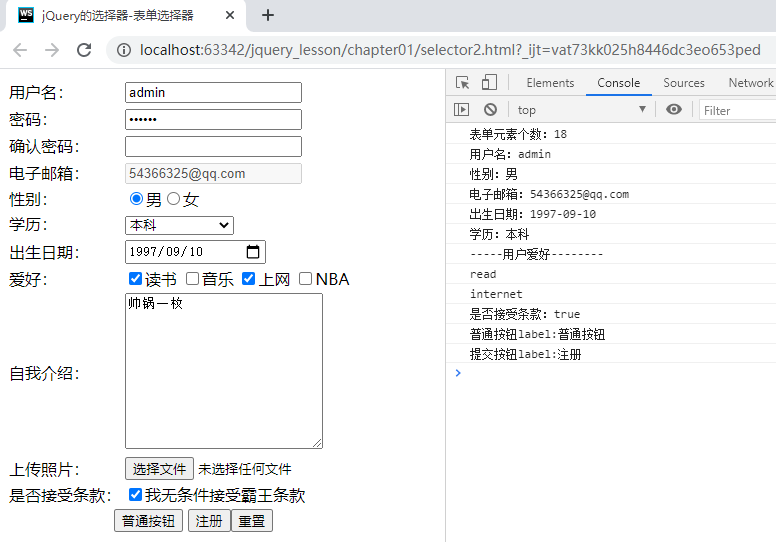
运行效果: