jQuery基础教程(二)
如何引入jQuery
在使用jQuery的时候你应该要注意的是 jQuery 2版本以上是不支持 IE6,7,8 浏览器的。那么如果使用的是 IE6,7,8 浏览器的话,你就得选择使用jQuery1.9以下的版本。
两种引入方式:1.本地引入 2.CDN引入
1.本地引入
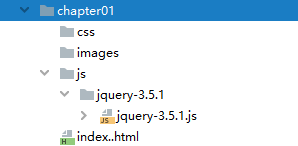
juery最新版本3.5.1下载地址:https://www.jq22.com/jquery/jquery-3.5.1.zip 解压缩后把jquery-3.5.1复制到项目的js目录下。
项目结构图如下:
编写index.html.
<!DOCTYPE html>
<html lang="zh">
<head>
    <meta charset="UTF-8">
    <title>第一个jQuery实例</title>
    <script src="js/jquery-3.5.1/jquery-3.5.1.min.js"></script>
</head>
<body>

<script>
    $(function(){
       alert('hello,jQuery!');
       console.log('hello,jQuery!');
    });
</script>
</body>
</html>
2.CDN引入
推荐使用国内知名的CDN资源库,比如:bootcdn引入jquery类库。
编写index.html.
<!DOCTYPE html>
<html lang="zh">
<head>
    <meta charset="UTF-8">
    <title>第一个jQuery实例</title>
    <script src="https://cdn.bootcdn.net/ajax/libs/jquery/3.5.1/jquery.min.js"></script>
</head>
<body>

<script>
    $(function(){
       alert('hello,jQuery!');
       console.log('hello,jQuery!');
    });
</script>
</body>
</html>
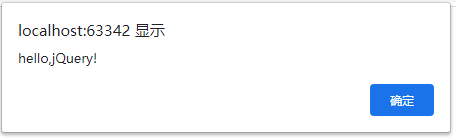
运行效果: