Nodejs基础教程(十一)
Express
Express 是一个基于 Node.js 平台的极简、灵活的 web 应用开发框架,它提供一系列强大的特性,帮助你创建各种 Web 和移动设备应用。Express 不对 Node.js 已有的特性进行二次抽象,我们只是在它之上扩展了 Web 应用所需的基本功能。
使用Express 应用生成器迅速生成Nodejs web应用框架。
1.安装express-generator
npm install express-generator -g
C:\Users\Administrator>express -h

  Usage: express [options] [dir]

  Options:

        --version        output the version number
    -e, --ejs            add ejs engine support
        --pug            add pug engine support
        --hbs            add handlebars engine support
    -H, --hogan          add hogan.js engine support
    -v, --view <engine>  add view <engine> support (dust|ejs|hbs|hjs|jade|pug|twig|vash) (defaults to jade)
        --no-view        use static html instead of view engine
    -c, --css <engine>   add stylesheet <engine> support (less|stylus|compass|sass) (defaults to plain css)
        --git            add .gitignore
    -f, --force          force on non-empty directory
    -h, --help           output usage information
2.express常用模板引擎
| 模板引擎 | 说明 |
|---|---|
| Jade | express默认的模板引擎 |
| ejs | 非常接近纯HTML,最受欢迎视图引擎之一 |
| art-template | 简约、超快的模板引擎 |
| pug | 语法与jade类似 |
3.使用ejs引擎创建web项目
使用express命令创建一个名字叫myapp的项目
express -e myapp
项目结构图如下:
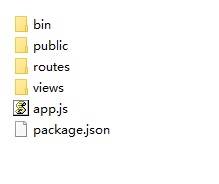
使用idea或者webstorm打开项目,选中package.json.选择 ‘Show Npm Scripts’,选择start运行。
控制台显示如下:

打开浏览器,地址栏输入:http://127.0.0.1:3000, 效果如下。