SpringBoot基础教程(三十)
SpringBoot启用https
前后端分离的项目中,前端调用后端的接口出于安全的角度要求后端接口必须使用https安全协议,那么SpringBoot开发的后端接口如何启用https呢?
1.自签名证书
使用java jdk自带的生成SSL证书的工具keytool生成自己的证书。 注意:自签名证书一般用来测试,google chromes一般无法认证自签名证书的安全性。
打开cmd
输入命令生成证书
keytool -genkeypair -alias tomcat_https -keypass 123456 -keyalg RSA -keysize 1024 -validity 365 -keystore d:/tomcat_https.keystore -storepass 123456
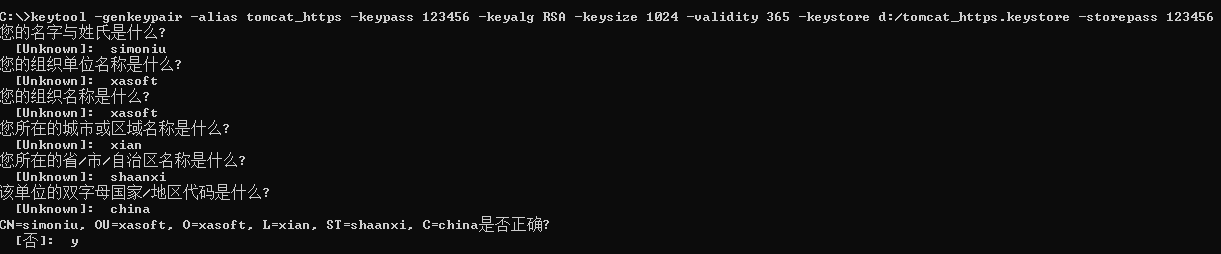
-alias 别名 -keypass 指定生成密钥的密码 -keyalg 指定密钥使用的加密算法(如 RSA) -keysize 密钥大小 -validity 过期时间,单位天 -keystore 指定存储密钥的密钥库的生成路径、名称 -storepass 指定访问密钥库的密码
把d:盘根目录下生成的tomcat_https.keystore证书文件复制到resources目录下。配置application.yml
server:
   ssl:
    key-store: classpath:tomcat_https.keystore
    key-store-password: 123456
    key-store-type: JKS
2.域名型证书
在所购买域名的云服务商申请免费的https安全证书。登录控制台下载tomcat 专业安全证书。
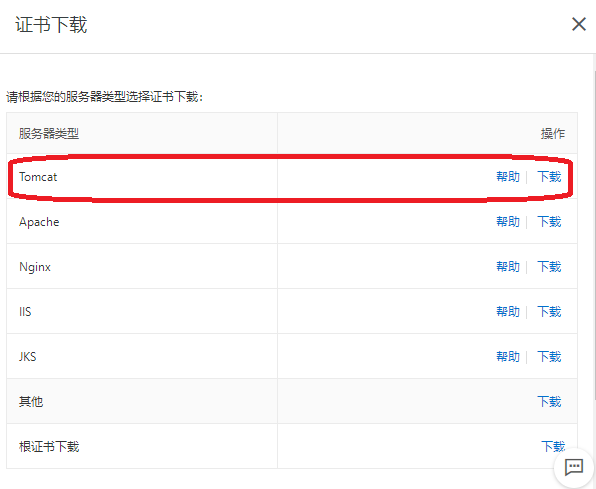
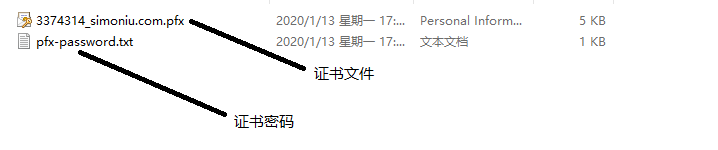
将证书文件复制到resources目录下。配置application.yml
server:
   ssl:
    key-store: classpath:3374314_simoniu.com.pfx
    key-store-password: xxxxxx
    key-store-type: PKCS12
3.http强制跳转https(可选) 注入TomcatServletWebServerFactory,监听http重定向到https
package cn.huanzi.qch.springboothttps.config;

import org.apache.catalina.Context;
import org.apache.catalina.connector.Connector;
import org.apache.tomcat.util.descriptor.web.SecurityCollection;
import org.apache.tomcat.util.descriptor.web.SecurityConstraint;
import org.springframework.beans.factory.annotation.Value;
import org.springframework.boot.web.embedded.tomcat.TomcatServletWebServerFactory;
import org.springframework.context.annotation.Bean;
import org.springframework.context.annotation.Configuration;

/**
 * http强制跳转https
 */
@Configuration
public class Http2Https {

    @Value("${server.port}")
    private int sslPort;//https的端口

    @Value("${server.http-port}")
    private int httpPort;//http的端口

    @Bean
    public TomcatServletWebServerFactory servletContainerFactory() {
        TomcatServletWebServerFactory tomcat = new TomcatServletWebServerFactory() {
            @Override
            protected void postProcessContext(Context context) {
                //设置安全性约束
                SecurityConstraint securityConstraint = new SecurityConstraint();
                securityConstraint.setUserConstraint("CONFIDENTIAL");
                //设置约束条件
                SecurityCollection collection = new SecurityCollection();
                //拦截所有请求
                collection.addPattern("/*");
                securityConstraint.addCollection(collection);
                context.addConstraint(securityConstraint);
            }
        };
        Connector connector = new Connector("org.apache.coyote.http11.Http11NioProtocol");
        //设置将分配给通过此连接器接收到的请求的方案
        connector.setScheme("http");

        //true: http使用http, https使用https;
        //false: http重定向到https;
        connector.setSecure(false);

        //设置监听请求的端口号,这个端口不能其他已经在使用的端口重复,否则会报错
        connector.setPort(httpPort);

        //重定向端口号(非SSL到SSL)
        connector.setRedirectPort(sslPort);

        tomcat.addAdditionalTomcatConnectors(connector);
        return tomcat;
    }
}