Vue-cli3基础教程(六)
父子组件传值
在vue中,父子组件的关系可以总结为prop向下传递,事件向上传递。父组件通过prop给子组件下发数据,子组件通过事件给父组件发送信息。
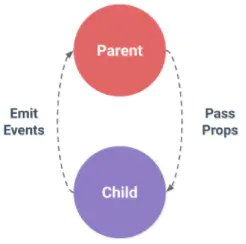
1.父组件给子组件传值/父组件调用子组件方法
父组件:
<template>
    <div>
        <myheader ref="myheader" :title="title"></myheader>
        <button @click="callSonFn">调用子组件方法fn</button>
    </div>
</template>

<script>

    import myheader from '@/views/commons/myheader'
    export default {
        name: "users",
        components:{
            myheader
        },
        data(){
            return{
                title: 'users title'
            }
        },
        methods:{
            callSonFn(){
               this.$refs.myheader.fn();
            }
        }
    }
</script>

<style scoped>
</style>
子组件:
子组件内通过props来接收父组件传递的参数,并且该参数不可修改。
<template>
    <div>
        <div>{{title}}</div>
        <br>
       <hr>
    </div>
</template>

<script>
    export default {
        name: "myheader",
        props: {
            title: {
                type: String,
                default: 'hello world'
            }
        },
        data() {
            return {}
        },
        methods: {
            fn() {
                console.log("子组件的fn()...")
            }
        }
    }
</script>

<style scoped>
</style>
2.子组件给父组件传值/子组件调用父组件方法 父组件:
<template>
    <div>
        <myheader ref="myheader" :title="title" @fatherFn="fatherFn"></myheader>
        <button @click="callSonFn">调用子组件方法fn</button>
    </div>
</template>

<script>

    import myheader from '@/views/commons/myheader'
    export default {
        name: "users",
        components:{
            myheader
        },
        data(){
            return{
                title: 'users title'
            }
        },
        methods:{
            callSonFn(){
               this.$refs.myheader.fn();
            },

            fatherFn(value){
                console.log("子组件传来的value="+value);
            }
        }
    }
</script>

<style scoped>

</style>
子组件传递的一方通过this.$emit来调用父组件方法,并且传递参数。
子组件:
<template>
    <div>
        <div>{{title}}</div>
        <br>
        <button @click="callFatherFn">给父组件传值</button>
        <hr>
    </div>
</template>

<script>
    export default {
        name: "myheader",
        props: {
            title: {
                type: String,
                default: 'hello world'
            }
        },
        data() {
            return {}
        },
        methods: {
            fn() {
                console.log("子组件的fn()...")
            },
            callFatherFn() {
                this.$emit('fatherFn', 100);
            }
        }
    }
</script>

<style scoped>
</style>