SpringBoot基础教程(二十八)
整合redis
在SpringBoot2.0之后,Spring容器是自动的生成了StringRedisTemplate和RedisTemplate
实现步骤:
1.添加springboot操作redis相关依赖。
<properties>
   <spring.version>2.3.4.RELEASE</spring.version>
   <jedis.version>3.1.0</jedis.version>
</properties>

 <dependency>
    <groupId>org.springframework.data</groupId>
    <artifactId>spring-data-redis</artifactId>
    <version>${spring.version}</version>
</dependency>

<dependency>
    <groupId>redis.clients</groupId>
    <artifactId>jedis</artifactId>
    <version>${jedis.version}</version>
</dependency>
2.在application.yml中添加redis配置
spring:
  redis:
    ## Redis数据库索引(默认为0)
    database: 0
    ## Redis服务器地址
    host: 127.0.0.1
    ## Redis服务器连接端口
    port: 6379
    ## Redis服务器连接密码(默认为空)
    password: 123456
    jedis:
      pool:
        ## 连接池最大连接数(使用负值表示没有限制)
        #spring.redis.pool.max-active=8
        max-active: 8
        ## 连接池最大阻塞等待时间(使用负值表示没有限制)
        #spring.redis.pool.max-wait=-1
        max-wait: -1
        ## 连接池中的最大空闲连接
        #spring.redis.pool.max-idle=8
        max-idle: 8
        ## 连接池中的最小空闲连接
        #spring.redis.pool.min-idle=0
        min-idle: 0
    ## 连接超时时间(毫秒)
    timeout: 3000
3.在config包下配置RedisConfiguration
package com.oracle.config;

import com.fasterxml.jackson.annotation.JsonAutoDetect;
import com.fasterxml.jackson.annotation.PropertyAccessor;
import com.fasterxml.jackson.databind.ObjectMapper;
import lombok.extern.slf4j.Slf4j;
import org.springframework.beans.factory.annotation.Autowired;
import org.springframework.cache.annotation.CachingConfigurerSupport;
import org.springframework.cache.annotation.EnableCaching;
import org.springframework.context.annotation.Bean;
import org.springframework.context.annotation.Configuration;
import org.springframework.data.redis.connection.*;
import org.springframework.data.redis.connection.jedis.JedisConnectionFactory;
import org.springframework.data.redis.core.RedisTemplate;
import org.springframework.data.redis.core.StringRedisTemplate;
import org.springframework.data.redis.serializer.Jackson2JsonRedisSerializer;
import org.springframework.data.redis.serializer.RedisSerializer;
import org.springframework.data.redis.serializer.StringRedisSerializer;

/**
 * Redis 配置类
 *
 * @author Leon
 * @version 2018/6/17 17:46
 */
@Configuration
@EnableCaching
@Slf4j
public class RedisConfiguration extends CachingConfigurerSupport {

    @Autowired
    private JedisConnectionFactory jedisConnectionFactory;


    /**
     * RedisTemplate配置
     * key 和 value 都为String类型
     * 都使用Jackson2JsonRedisSerializer进行序列化
     */
    @Bean(name = "redisStringTemplate")
    public RedisTemplate<String, String> redisTemplateForString(RedisConnectionFactory jedisConnectionFactory) {
        StringRedisTemplate template = new StringRedisTemplate(jedisConnectionFactory);
        Jackson2JsonRedisSerializer jackson2JsonRedisSerializer = new Jackson2JsonRedisSerializer<>(Object.class);
        ObjectMapper om = new ObjectMapper();
        om.setVisibility(PropertyAccessor.ALL, JsonAutoDetect.Visibility.ANY);
        om.enableDefaultTyping(ObjectMapper.DefaultTyping.NON_FINAL);
        jackson2JsonRedisSerializer.setObjectMapper(om);
        template.setValueSerializer(jackson2JsonRedisSerializer);
        template.afterPropertiesSet();
        return template;
    }

    /**
     * RedisTemplate配置
     * key 为String类型
     * value 为Object
     * 都使用Jackson2JsonRedisSerializer进行序列化
     */
    @Bean(name = "redisTemplate")
    public RedisTemplate<String, Object> redisTemplateForObject(RedisConnectionFactory jedisConnectionFactory ) {
        RedisTemplate<String, Object> redisTemplate = new RedisTemplate<>();
        redisTemplate.setConnectionFactory(jedisConnectionFactory);
        // 使用Jackson2JsonRedisSerializer来序列化/反序列化redis的value值
        Jackson2JsonRedisSerializer<Object> jackson2JsonRedisSerializer = new Jackson2JsonRedisSerializer<Object>(
                Object.class);
        ObjectMapper objectMapper = new ObjectMapper();
        objectMapper.setVisibility(PropertyAccessor.ALL,
                com.fasterxml.jackson.annotation.JsonAutoDetect.Visibility.ANY);
        objectMapper.enableDefaultTyping(ObjectMapper.DefaultTyping.NON_FINAL);
        jackson2JsonRedisSerializer.setObjectMapper(objectMapper);
        // value
        redisTemplate.setValueSerializer(jackson2JsonRedisSerializer);
        redisTemplate.setHashValueSerializer(jackson2JsonRedisSerializer);
        // 使用StringRedisSerializer来序列化/反序列化redis的key值
        RedisSerializer<?> redisSerializer = new StringRedisSerializer();
        // key
        redisTemplate.setKeySerializer(redisSerializer);
        redisTemplate.setHashKeySerializer(redisSerializer);
        redisTemplate.afterPropertiesSet();
        return redisTemplate;
    }
}
4.编写Controller测试操作redis
设计实体类Person
package com.oracle.entity;
import lombok.AllArgsConstructor;
import lombok.Data;
import lombok.NoArgsConstructor;

@Data
@AllArgsConstructor
@NoArgsConstructor
public class Person {

    String name;
    String gender;
    int age;

}
编写控制器测试操作reds
package com.oracle.controller;

import com.oracle.entity.Person;
import com.oracle.json.JsonData;
import com.oracle.json.JsonResult;
import lombok.extern.slf4j.Slf4j;
import org.springframework.web.bind.annotation.*;
import java.util.ArrayList;
import java.util.List;

@RestController
@Slf4j
@RequestMapping("redis")
public class RedisOperateController {

    //Redis缓存模板对象
    @Resource
    protected RedisTemplate redisTemplate;

    @GetMapping("persons")
    public JsonData initPersonList(){
        List<Person> personList = new ArrayList<Person>();
        personList.add(new Person("张三","男",20));
        personList.add(new Person("李四","女",21));
        personList.add(new Person("王五","男",19));
        personList.add(new Person("赵六","女",22));


        redisTemplate.opsForValue().setIfAbsent("personList",personList);

        List<Person> result = (List<Person>) redisTemplate.opsForValue().get("personList");
        log.info("长度是:"+redisTemplate.opsForValue().size("personList"));

        return JsonResult.success(result,"redisCacheSaveSuccess!");
    }

    @PostMapping("persons")
    public JsonData addPersonToRedisCache(@RequestBody Person p){
        List<Person> result = (List<Person>)redisTemplate.opsForValue().get("personList");
        result.add(p);
        redisTemplate.opsForValue().getAndSet("personList",result);
        return JsonResult.success(result,"redisCacheAddSuccess!");
    }

}
其中,RedisTemplate的最常用几个方法含义如下: |方法名字|说明| |-|-| |redisTemplate.opsForValue().set(key,value);|设置普通缓存| |redisTemplate.opsForValue().set(key,value,time);|设置普通缓存和过期时间| |redisTemplate.opsForValue().setIfAbsent(key,value);|将 key 的值设为 value ,当且仅当 key 不存在时| |redisTemplate.opsForValue().setIfPresent(key,value);|判断当前的键的值是否为v,是的话不作操作,不实的话进行替换。如果没有这个键也不会做任何操作。| |redisTemplate.opsForValue().getAndSet(key, value);|key存在设置新值,并返回旧值|
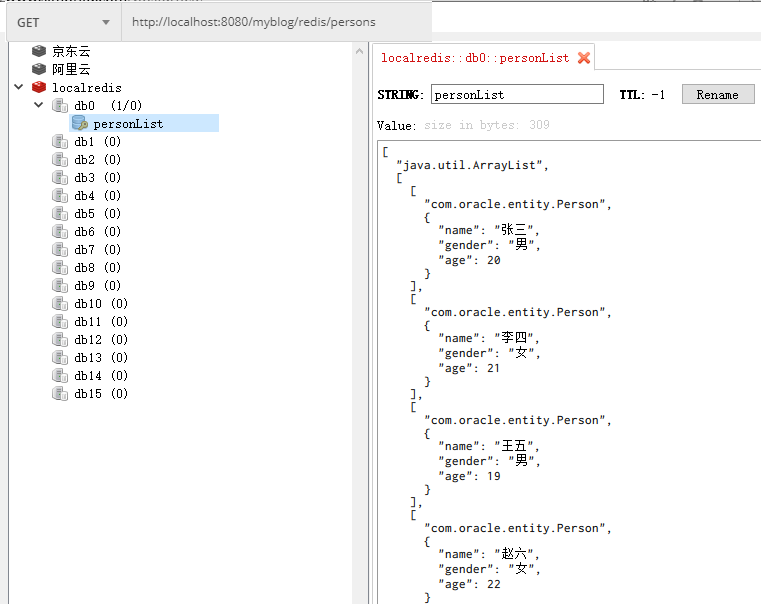
使用postman测试以上接口,效果如下: