群晖 DSM 6.2.2 安装mariadb10
群晖 DSM 6.2.2 安装mariadb10
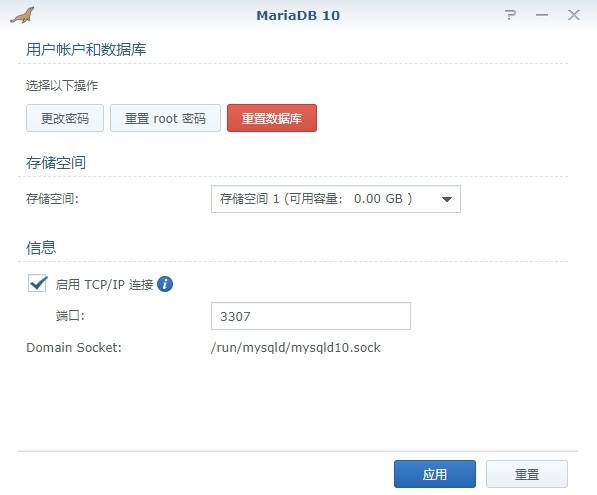
1.在套件中心选中Maria DB10安装。 在套件中心选中Maria DB10安装,自动安装完成后,开启TCP连接,开放3307端口,如下图所示。
2.开启mariadb的远程连接
#使用 ssh 登录到群晖
#进入 MariaDB 默认安装目录

cd /volume1/@appstore/MariaDB10/usr/local/mariadb10/bin

#使用 root 登录 MariaDB,然后进行修改

root@HOME-NAS:/volume1/@appstore/MariaDB10/usr/local/mariadb10/bin# ./mysql -u root -p
Enter password:
Welcome to the MariaDB monitor.  Commands end with ; or \g.
Your MariaDB connection id is 20
Server version: 10.3.7-MariaDB Source distribution

Copyright (c) 2000, 2018, Oracle, MariaDB Corporation Ab and others.

Type 'help;' or '\h' for help. Type '\c' to clear the current input statement.

MariaDB [(none)]> use mysql
Database changed
MariaDB [mysql]> update user set host = '%' where user = 'root';
ERROR 1062 (23000): Duplicate entry '%-root' for key 'PRIMARY'
MariaDB [mysql]> select host,user from user;
+-----------+------+
| host      | user |
+-----------+------+
| %         | root |
| 127.0.0.1 | root |
| ::1       | root |
+-----------+------+
3 rows in set (0.000 sec)

MariaDB [mysql]> FLUSH PRIVILEGES;
Query OK, 0 rows affected (0.053 sec)
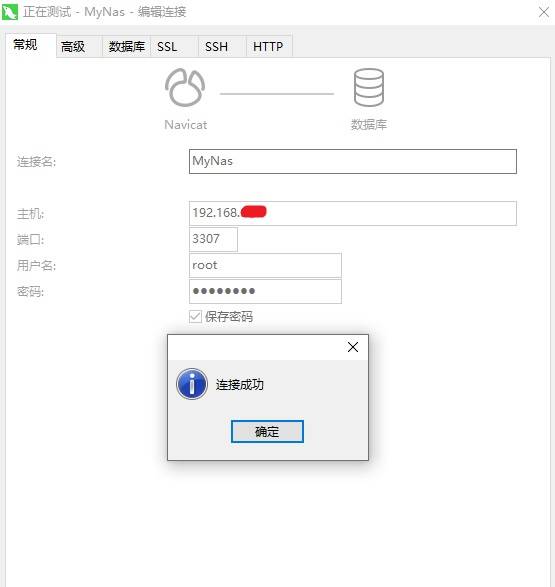
3.navicat客户端远程连接