基础的 Repository 提供了最基本的数据访问功能,其几个子接口则扩展了一些功能。它们的继承关系如下:
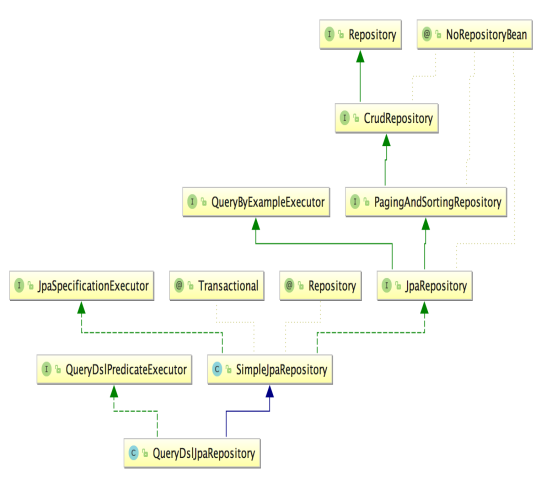
Repository:是Spring Data的一个核心接口,它不提供任何方法,开发者需要在自己定义的接口中声明需要的方法,Repository仅仅是一个标识,表明任何继承它的均为仓库接口类,方便Spring自动扫描识别。
//@Indexed是Spring5.0以后出现的新注解,它可以为Spring的模式注解添加索引,以提升应用启动性能。
@Indexed
public interface Repository<T, ID> {

}
JpaRepository: 继承PagingAndSortingRepository,实现一组 JPA 规范相关的方法,自定义的XxxxRepository 需要继承 JpaRepository,这样的 XxxxRepository 接口就具备了通用的数据访问控制层的能力。
JpaRepository常见的有两种使用方式:1.命名查询 2.@Query实现原生SQL查询。
1.使用命名查询
注意:使用命名查询等同于执行带有where查询条件的SQL语句。因此命名查询的方法一定带有参数。并且命名查询定义的方法名字,必须符合规范,其语法格式如下: 规则:findBy(关键字)+属性名称(属性名称的首字母大写)+查询条件(首字母大写) 目前支持的关键字写法如下表: |关键字|方法命名|sql语句| |-|-|-| |And|findByNameAndPwd|where name= ? and pwd =?| |Or|findByNameOrSex|where name= ? or sex=?| |Is,Equals|findById,findByIdEquals|where id= ?| |Between|findByIdBetween|where id between ? and ?| |LessThan|findByIdLessThan|where id < ?| |LessThanEquals|findByIdLessThanEquals|where id <= ?| |GreaterThan|findByIdGreaterThan|where id > ?| |GreaterThanEquals|findByIdGreaterThanEquals|where id > = ?| |After|findByIdAfter|where id > ?| |Before|findByIdBefore|where id < ?| |IsNull|findByNameIsNull|where name is null| |isNotNull,NotNull|findByNameNotNull|where name is not null| |NotLike|findByNameNotLike|where name not like ?| |Like|findByNameLike|where name like ?| |StartingWith|findByNameStartingWith|where name like '?%'| |EndingWith|findByNameEndingWith|where name like '%?'| |Containing|findByNameContaining|where name like '%?%'| |OrderBy|findByIdOrderByXDesc|where id=? order by x desc| |Not|findByNameNot|where name <> ?| |In|findByIdIn(Collection<?> c)|where id in (?)| |NotIn|findByIdNotIn(Collection<?> c)|where id not in (?)| |TRUE|findByAaaTue|where aaa = true| |FALSE|findByAaaFalse|where aaa = false| |IgnoreCase|findByNameIgnoreCase|where UPPER(name)=UPPER(?)|
命名查询实例:
接着使用上节案例的Students实体类。定义StudentsRepository如下:
package com.oracle.repository;

import com.oracle.entity.Students;
import com.oracle.view.StudentsView;
import com.oracle.view.StudentsViewInterface;
import org.springframework.data.jpa.repository.JpaRepository;
import org.springframework.data.jpa.repository.Query;
import org.springframework.data.repository.query.Param;
import java.util.List;


public interface StudentsRepository extends JpaRepository<Students,Integer> {

    //自定义根据学生的姓名和性别查询学生集合
    List<Students> findAllBySnameAndGender(String sname,String gender);

    //根据学生的性别查询并返回按照出生日期降序排序的集合
    List<Students> findByGenderOrderByBirthdayDesc(String gender);

}
在StudentsService里定义两个新方法,分别用来调用Repository层的方法。
public interface StudentsService  {

    //查询学生的姓名和性别
    List<Students> findAllBySnameAndGender(String sname,String gender);
    //根据学生的出生日期进行排序
    List<Students> findAllByGenderOderByBirthdayDesc(String gender);

}
在StudentsServiceImpl里去真正调用Repository接口里的方法。
@Service
public class StudentsServiceImpl implements StudentsService {
    @Resource
    private StudentsRepository studentsRepository;

    @Override
    public List<Students> findAllBySnameAndGender(String sname,String gender) {
        return studentsRepository.findAllBySnameAndGender(sname,gender);
    }

    @Override
    public List<Students> findAllByGenderOderByBirthdayDesc(String gender) {
        return studentsRepository.findByGenderOrderByBirthdayDesc(gender);
    }
}
编写测试类,测试StudentsService里的findAllBySnameAndGender和findAllByGenderOderByBirthdayDesc方法。
2.使用@Query原生SQL查询
接上节案例,如何使用@Query实现类似SQL内连接实现的查询学生视图的结果。
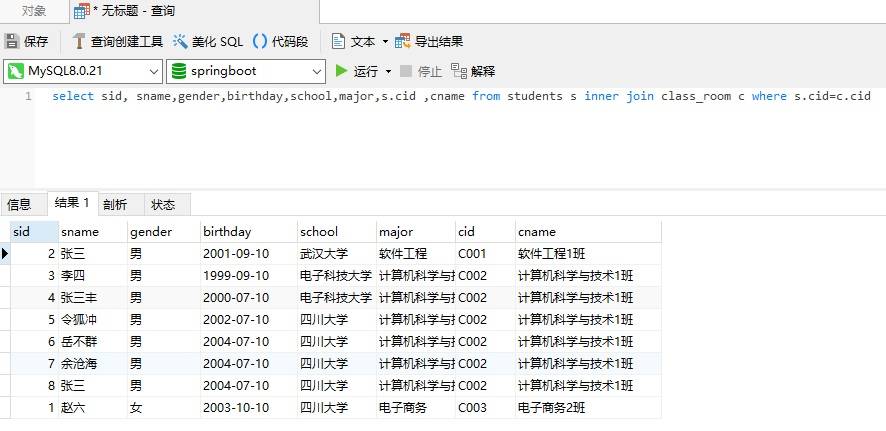
由于返回的是视图,并没有对应entity包中的任何实体类,我们需要自定义一个用来显示用户视图的视图类。 设计如下:
package com.oracle.view;

import lombok.AllArgsConstructor;
import lombok.Data;
import lombok.NoArgsConstructor;
import javax.persistence.Column;
import javax.persistence.GeneratedValue;
import javax.persistence.GenerationType;
import javax.persistence.Id;
import java.io.Serializable;

@Data
@AllArgsConstructor
@NoArgsConstructor
public class StudentsView implements Serializable,Cloneable {

    @Id
    @GeneratedValue(strategy = GenerationType.IDENTITY) //使用数据库默认的主键生成策略
    private int sid; //主键
    @Column(length = 20)  //规定学生的姓名不超过20个字符
    private String sname; //姓名,默认是占用255个字符。
    @Column(length = 2)
    private String gender; //性别
    @Column(length = 32)
    private String birthday; //出生日期
    private String school; //所在学校
    private String major; //所学的专业

    private String cid; //班级编号
    private String cname; //班级的名称
}
在StudentsRepository的queryStudentsView方法上添加@Query注解。代码如下:
public interface StudentsRepository extends JpaRepository<Students,Integer> {

    @Query(nativeQuery = true,
            value="select sid, sname,gender,birthday,school,major,s.cid ,cname from students s inner join class_room c where s.cid=c.cid")
    List<StudentsViewInterface> queryStudentsView();
}
由于@Query执行的原生SQL查询默认返回的是Object[]类型,不便于我们转换为自定义的视图类型。所有我们设计一个接口专门用来帮助原生SQL执行的视图结果封装为该接口类型。设计如下:
package com.oracle.view;

public interface StudentsViewInterface {

    Integer getSid();
    String getSname();
    String getGender();
    String getBirthday();
    String getSchool();
    String getMajor();
    String getCid();
    String getCname();
}
在StudentsService中定义查询学生视图的方法。
public interface StudentsService  {
    //查询学生的视图,这个视图包含有班级的信息。
    List<StudentsView> queryStudentsView();
}
在StudentsServiceImpl中实现。
@Service
public class StudentsServiceImpl implements StudentsService {
    @Resource
    private StudentsRepository studentsRepository;

    @Override
    public List<StudentsView> queryStudentsView() {

        List<StudentsView> studentsViewList = new ArrayList<StudentsView>();
        List<StudentsViewInterface> studentsViewInterfaceList = studentsRepository.queryStudentsView();
        for(StudentsViewInterface svf: studentsViewInterfaceList){
            StudentsView sv = new StudentsView();
            sv.setSid(svf.getSid());
            sv.setCname(svf.getCname());
            sv.setCid(svf.getCid());
            sv.setSname(svf.getSname());
            sv.setSchool(svf.getSchool());
            sv.setMajor(svf.getMajor());
            sv.setBirthday(svf.getBirthday());
            sv.setGender(svf.getGender());
            studentsViewList.add(sv);
        }
        return studentsViewList;
    }
}
编写测试类,测试StudentsService里的queryStudentsView方法。可以获得学生视图结果。
@Query如何传递参数呢?例如,要获得指定学生编号的学生视图结果。在StudentsRepository中定义新方法如下:
public interface StudentsRepository extends JpaRepository<Students,Integer> {

    @Query(nativeQuery = true,
            value="select sid, sname,gender,birthday,school,major,s.cid ,cname from students s inner join class_room c where s.cid=c.cid")
    List<StudentsViewInterface> queryStudentsView();

    @Query(nativeQuery = true,
            value="select sid, sname,gender,birthday,school,major,s.cid ,cname from students s inner join class_room c where s.cid=c.cid and s.sid = :sid")

        //查询指定学生的视图
    StudentsViewInterface queryStudentsViewBySid(@Param("sid") int sid);
}
在StudentsService中定义查询单个学生视图的方法。
public interface StudentsService  {
    //查询学生的视图,这个视图包含有班级的信息。
    List<StudentsView> queryStudentsView();
    //查询指定学生的视图
    StudentsView queryStudentsViewBySid(int sid);

}
在StudentsServiceImpl中实现。
@Service
public class StudentsServiceImpl implements StudentsService {
    @Resource
    private StudentsRepository studentsRepository;

    @Override
    public List<StudentsView> queryStudentsView() {

        List<StudentsView> studentsViewList = new ArrayList<StudentsView>();
        List<StudentsViewInterface> studentsViewInterfaceList = studentsRepository.queryStudentsView();
        for(StudentsViewInterface svf: studentsViewInterfaceList){
            StudentsView sv = new StudentsView();
            sv.setSid(svf.getSid());
            sv.setCname(svf.getCname());
            sv.setCid(svf.getCid());
            sv.setSname(svf.getSname());
            sv.setSchool(svf.getSchool());
            sv.setMajor(svf.getMajor());
            sv.setBirthday(svf.getBirthday());
            sv.setGender(svf.getGender());
            studentsViewList.add(sv);
        }
        return studentsViewList;
    }


    @Override
    public StudentsView queryStudentsViewBySid(int sid) {

        StudentsViewInterface svf = studentsRepository.queryStudentsViewBySid(sid);
        StudentsView sv = new StudentsView();
        sv.setSid(svf.getSid());
        sv.setCname(svf.getCname());
        sv.setCid(svf.getCid());
        sv.setSname(svf.getSname());
        sv.setSchool(svf.getSchool());
        sv.setMajor(svf.getMajor());
        sv.setBirthday(svf.getBirthday());
        sv.setGender(svf.getGender());
        return sv;
    }
}
编写测试类,测试StudentsService里的queryStudentsViewBySid方法。可以获得指定学生的视图结果。
小结:
JpaRepository常用的两种方式: 1).命名查询,通常用来实现带where查询条件的SQL语句。方法名字必须符合命名规范,且至少带一个参数。 2).@Query原生查询,通常会添加nativeQuery = true属性,表示执行原生SQL语句。返回结果默认是Object[],需要设计相应的视图转换接口,可以使用冒号结合@Param传递参数。