SpringBoot基础教程(四)
配置SpringBoot的父模块
实现步骤如下:
1.删除springbootparent的模块的src目录,修改pom.xml文档如下:
<?xml version="1.0" encoding="UTF-8"?>
<project xmlns="http://maven.apache.org/POM/4.0.0" xmlns:xsi="http://www.w3.org/2001/XMLSchema-instance"
         xsi:schemaLocation="http://maven.apache.org/POM/4.0.0 https://maven.apache.org/xsd/maven-4.0.0.xsd">
    <modelVersion>4.0.0</modelVersion>
    <parent>
        <!--核心依赖都是继承自spring-boot-starter-parent-->
        <groupId>org.springframework.boot</groupId>
        <artifactId>spring-boot-starter-parent</artifactId>
        <version>2.3.4.RELEASE</version>
        <relativePath/> <!-- lookup parent from repository -->
    </parent>
    <groupId>com.oracle</groupId>
    <artifactId>springbootparent</artifactId>
    <version>0.0.1-SNAPSHOT</version>
    <name>springbootparent</name>
    <description>Demo project for Spring Boot</description>
    <!--packaging pom表示仅仅是配置模块-->
    <packaging>pom</packaging>

    <properties>
        <java.version>1.8</java.version>
        <junit.version>4.12</junit.version>
        <druid.version>1.1.10</druid.version>
        <lombok.version>1.18.8</lombok.version>
        <hutool.version>5.4.4</hutool.version>
        <swagger.version>2.9.2</swagger.version>
    </properties>

    <modules>
        <!--这里添加子模块-->
    </modules>
    <dependencies>

        <!--以下是springboot的相关依赖开始-->
        <!--springboot jpa依赖-->
        <dependency>
            <groupId>org.springframework.boot</groupId>
            <artifactId>spring-boot-starter-data-jpa</artifactId>
        </dependency>
        <!--springboot的 web依赖-->
        <dependency>
            <groupId>org.springframework.boot</groupId>
            <artifactId>spring-boot-starter-web</artifactId>
        </dependency>
        <!--支持热部署的依赖-->
        <dependency>
            <groupId>org.springframework.boot</groupId>
            <artifactId>spring-boot-devtools</artifactId>
            <scope>runtime</scope>
            <optional>true</optional>
        </dependency>
        <!--springboot的测试依赖-->
        <dependency>
            <groupId>org.springframework.boot</groupId>
            <artifactId>spring-boot-starter-test</artifactId>
            <scope>test</scope>
            <exclusions>
                <exclusion>
                    <groupId>org.junit.vintage</groupId>
                    <artifactId>junit-vintage-engine</artifactId>
                </exclusion>
            </exclusions>
        </dependency>
        <!--springboot解析配置类的依赖-->
        <dependency>
            <groupId>org.springframework.boot</groupId>
            <artifactId>spring-boot-configuration-processor</artifactId>
            <optional>true</optional>
        </dependency>
        <!--以下是springboot的相关依赖结束-->

        <!--mysql驱动依赖-->
        <dependency>
            <groupId>mysql</groupId>
            <artifactId>mysql-connector-java</artifactId>
            <scope>runtime</scope>
        </dependency>
        <!--lombok依赖-->
        <dependency>
            <groupId>org.projectlombok</groupId>
            <artifactId>lombok</artifactId>
            <optional>true</optional>
            <version>${lombok.version}</version>
        </dependency>
        <!--alibaba数据连接池中间-->
        <dependency>
            <groupId>com.alibaba</groupId>
            <artifactId>druid</artifactId>
            <version>${druid.version}</version>
        </dependency>
        <!--junit依赖-->
        <dependency>
            <groupId>junit</groupId>
            <artifactId>junit</artifactId>
            <version>${junit.version}</version>
            <scope>test</scope>
        </dependency>
        <!--添加糊涂工具类-->
        <dependency>
            <groupId>cn.hutool</groupId>
            <artifactId>hutool-all</artifactId>
            <version>${hutool.version}</version>
        </dependency>

    </dependencies>
    <build>
        <plugins>
            <plugin>
                <groupId>org.springframework.boot</groupId>
                <artifactId>spring-boot-maven-plugin</artifactId>
            </plugin>
        </plugins>
    </build>
</project>
2.测试在SpringBoot父模块下创建子模块:
选中springbootparent,New->Module->Spring Initializr,创建一个新的子模块,不添加任何依赖创建成功后,修改其pom文档如下:
<?xml version="1.0" encoding="UTF-8"?>
<project xmlns="http://maven.apache.org/POM/4.0.0" xmlns:xsi="http://www.w3.org/2001/XMLSchema-instance"
         xsi:schemaLocation="http://maven.apache.org/POM/4.0.0 https://maven.apache.org/xsd/maven-4.0.0.xsd">
    <modelVersion>4.0.0</modelVersion>
    <!--以下配置表示该子模块的父模块是springbootparent-->
    <parent>
        <groupId>com.oracle</groupId>
        <artifactId>springbootparent</artifactId>
        <version>0.0.1-SNAPSHOT</version>
        <!--这里指向父模块的pom文档-->
        <relativePath>../pom.xml</relativePath>
    </parent>
    <groupId>com.oracle</groupId>
    <artifactId>firstdemo</artifactId>
    <version>0.0.1-SNAPSHOT</version>
    <name>firstdemo</name>
    <description>Demo project for Spring Boot</description>
    <dependencies>
        <!--这里添加属于子模块自己的依赖-->
    </dependencies>
    <build>
        <plugins>
            <plugin>
                <groupId>org.springframework.boot</groupId>
                <artifactId>spring-boot-maven-plugin</artifactId>
            </plugin>
        </plugins>
    </build>
</project>
在父模块的pom.xml中注册子模块。
   <modules>
      <module>firstdemo</module>
   </modules>
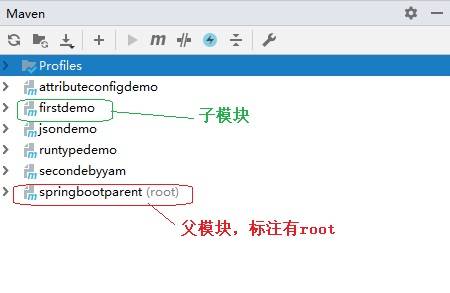
在右侧的maven视图,查看主子模块的继承结构是否正确。正确的效果如下图: