SpringBoot基础教程(三)
了解SpringBoot的项目结构
SpringBoot的项目结构如下图所示:
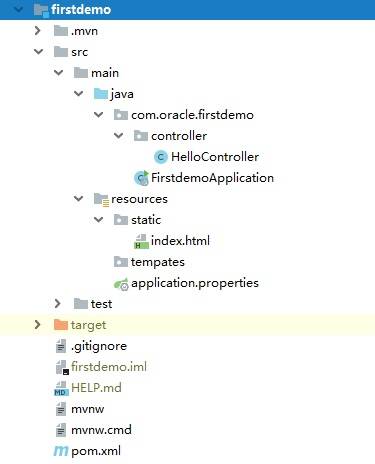
各个目录含义如下: java: 源程序目录 resources: 资源目录 resources/static: 静态资源目录,比如:html/css/js/jpg 等等 resources/templates: 模板目录,比如:Thymeleaf 等模板文件。 resources/application.properties: 配置文档。扩展名有properties和yml两种格式。 test: 测试目录。
==注意:SpringBoot项目要求包名默认和项目的groupId名字相同。运行主类的名字默认和artifactId的名字相同。==
1.测试运行静态资源文件
在static目录下,创建html静态资源文件。
<!DOCTYPE html>
<html lang="zh">
<head>
    <meta charset="UTF-8">
    <title></title>
</head>
<body>
<h1>Hello,SpringBoot</h1>

</body>
</html>
启动项目,测试以下地址访问静态资源。 http://localhost:8080/firstdemo/index.html
2.测试运行控制器
在controller包下,创建HelloController.
package com.oracle.firstdemo.controller;

import org.springframework.web.bind.annotation.GetMapping;
import org.springframework.web.bind.annotation.RestController;

import java.util.HashMap;
import java.util.Map;

@RestController
public class HelloController {

    @GetMapping("hello")
    public Map<String,Object> hello(){
        Map<String,Object> result = new HashMap<String,Object>();
        result.put("code",200);
        result.put("msg","hello,springboot!");
        return result;
    }
}
启动项目,测试以下地址访问控制器。 http://localhost:8080/firstdemo/hello