Spring基础教程(十九)
工厂模式注入bean
工厂模式(Factory Pattern)是 Java 中最常用的设计模式之一。这种类型的设计模式属于创建型模式,它提供了一种创建对象的最佳方式。在工厂模式中,我们在创建对象时不会对客户端暴露创建逻辑,并且是通过使用一个共同的接口来指向新创建的对象。
工厂模式实现思路的UML图如下:
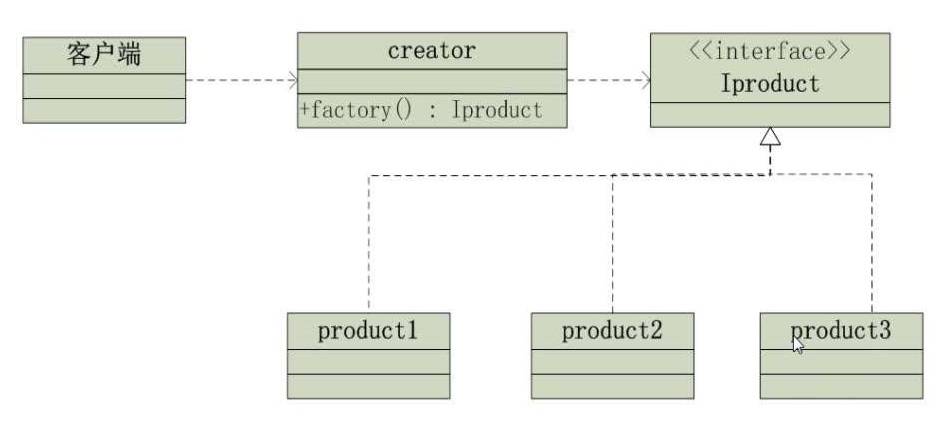
Spring可以通过工厂模式来注入bean。
实例: 项目结构图如下。
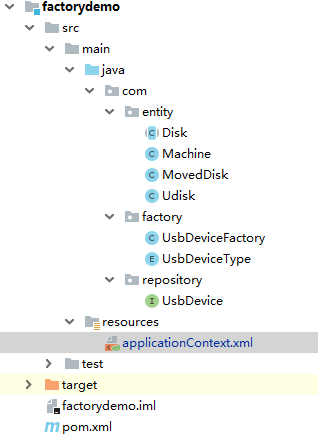
实现步骤: 1.设计接口类
package com.repository;

//usb接口,实现设备读和写两个抽象方法
public interface UsbDevice {
    void read(); //设备读
    void write(String content); //设备写
}
2.设计具体产品类
package com.entity;

import lombok.Data;
//抽象磁盘类
@Data
public abstract class Disk {

    protected String brand; //磁盘的品牌
    protected int size; //磁盘容量 1G/1T

    public Disk() {
    }

    public Disk(String brand, int size) {
        this.brand = brand;
        this.size = size;
    }
}
package com.entity;

import com.repository.UsbDevice;
import lombok.Data;
//移动硬盘类,实现了USB接口
@Data
public class MovedDisk  extends Disk implements UsbDevice {

    private MovedDisk() {
    }

    private MovedDisk(String brand, int size) {
        super(brand, size);
    }

    public void read() {
        System.out.println(this.brand+"牌,容量为:"+this.size+",移动硬盘正在读取数据...");
    }

    public void write(String content) {
        System.out.println(this.brand+"牌,容量为:"+this.size+",移动硬盘正在写入数据:"+content);
    }
}
package com.entity;

import com.repository.UsbDevice;
import lombok.Data;

//U盘,一种具体产品。实现了usb接口
@Data
public class Udisk extends Disk implements UsbDevice {

    private Udisk() {
    }

    private Udisk(String brand, int size) {
        super(brand, size);
    }

    public void read() {
        System.out.println(this.brand+"牌,容量为:"+this.size+",U盘正在读取数据...");
    }

    public void write(String content) {
        System.out.println(this.brand+"牌,容量为:"+this.size+",U硬盘正在写入数据:"+content);
    }
}
package com.entity;

import com.repository.UsbDevice;

//电器类,使用某种usb设备进行读写。
public class Machine {

    //private UsbDevice device;
    public void work(UsbDevice device,String content){
        device.read();
        device.write(content);
    }
}
3.设计USB设备枚举类型常量
package com.factory;

//定义一些常见的USB设备类型
public enum UsbDeviceType {
    UDISK,MOVEDISK,MOBILE,PRINTER; //U盘,移动硬盘,手机,打印机
}
4.设计工厂类
package com.factory;

import com.entity.Udisk;
import com.repository.UsbDevice;
import java.lang.reflect.Constructor;

//生产各个usb设备的工厂
public class UsbDeviceFactory {

    public static UsbDevice makeUsbDevice(UsbDeviceType type,String brand,int size) throws Exception {
        Class clazz ; //类对象。
        Constructor constructor;
        UsbDevice obj = null;
        switch (type) {
            case UDISK:

                clazz = Class.forName("com.entity.Udisk");
                constructor = clazz.getDeclaredConstructor(String.class,int.class);
                constructor.setAccessible(true);
                obj = (UsbDevice) constructor.newInstance(new Object[]{brand,size});
                break;

            case MOVEDISK:
                clazz = Class.forName("com.entity.MovedDisk");
                constructor = clazz.getDeclaredConstructor(String.class,int.class);
                constructor.setAccessible(true);
                obj = (UsbDevice) constructor.newInstance(new Object[]{brand,size});
                break;
            case MOBILE:
                System.out.println("准备生产手机...");
                break;
            case PRINTER:
                System.out.println("准备生产打印机...");
                break;
        }
        return obj;
    }
}
5.在applicationContext.xml中配置工厂bean.
<?xml version="1.0" encoding="UTF-8"?>
<beans xmlns="http://www.springframework.org/schema/beans"
       xmlns:xsi="http://www.w3.org/2001/XMLSchema-instance"
       xmlns:context="http://www.springframework.org/schema/context"
       xsi:schemaLocation="http://www.springframework.org/schema/beans http://www.springframework.org/schema/beans/spring-beans.xsd http://www.springframework.org/schema/context https://www.springframework.org/schema/context/spring-context.xsd">

    <!--配置工厂对象-->
    <bean id="disk" class="com.factory.UsbDeviceFactory" factory-method="makeUsbDevice" scope="prototype">
        <constructor-arg name="brand">
            <null></null>
        </constructor-arg>
        <constructor-arg name="size">
            <null></null>
        </constructor-arg>
        <constructor-arg name="type">
            <null></null>
        </constructor-arg>
    </bean>
</beans>
6.编写测试类测试
package com.factory;

import com.repository.UsbDevice;
import org.junit.BeforeClass;
import org.junit.Test;
import org.junit.runner.RunWith;
import org.springframework.context.ApplicationContext;
import org.springframework.context.support.ClassPathXmlApplicationContext;
import org.springframework.test.context.ContextConfiguration;
import org.springframework.test.context.junit4.SpringRunner;

@RunWith(SpringRunner.class)
@ContextConfiguration("classpath:applicationContext.xml")
public class UsbDeviceFactoryTest {
    private static ApplicationContext context;
    @BeforeClass
    public static void initContext(){
        context = new ClassPathXmlApplicationContext("applicationContext.xml");
    }
    @Test
    public void testGetBeanByFactory(){
       UsbDevice device = (UsbDevice) context.getBean("disk",new Object[]{UsbDeviceType.UDISK,"samsung",5000});
        device.read();
        device.write("helloworld");
    }
}

运行效果:
samsung牌,容量为:5000,U盘正在读取数据...
samsung牌,容量为:5000,U硬盘正在写入数据:helloworld