SpringMVC教程(十一)
Restful API
REST:英文representational state transfer直译为表现层状态转移,或者表述性状态转移;Rest是web服务的一种架构风格,一种设计风格,是一种思想;同时Rest不是针对某一种编程语言的。
以用户接口为例通俗解释。
非Rest设计,以往我们都会这么写:
| 业务逻辑 | 接口形式 |
|---|---|
| 用户登录 | http://localhost:8080/xxx/users/login |
| 用户注销 | http://localhost:8080/xxx/users/logout |
| 用户注册 | http://localhost:8080/xxx/users/reg |
| 查询所有用户 | http://localhost:8080/xxx/getAllUser |
| 查询单个用户 | http://localhost:8080/xxx/users/getUser?uid=100 |
| 新增用户 | http://localhost:8080/xxx/users/add |
| 更新用户 | http://localhost:8080/xxx/users/update |
| 删除用户 | http://localhost:8080/xxx/users/delete |
使用Rest风格会如何设计呢?
| 业务逻辑 | 接口形式 |
|---|---|
| 用户登录 | GET http://localhost:8080/xxx/users/auth |
| 用户注销 | GET http://localhost:8080/xxx/users/logout |
| 用户注册 | POST http://localhost:8080/xxx/users/ |
| 查询所有用户 | GET http://localhost:8080/xxx/users/ |
| 查询单个用户 | GET http://localhost:8080/xxx/users/100/ |
| 新增用户 | POST http://localhost:8080/xxx/users/ |
| 更新用户 | PUT http://localhost:8080/xxx/users/ |
| 删除用户 | DELETE http://localhost:8080/xxx/users/100 |
总之一句话:URL只指定资源,以HTTP方法动词进行不同的操作。用HTTP STATUS/CODE定义操作结果。 Restful:遵守了rest风格的web服务便可称为Restful。
实例:
以UsersController为例实现以上Restful 风格的接口设计。
1.改写Users实体类。
给Users类添加一个标识符字段uid.
package com.entity;

public class Users {

    private int uid;//用户编号
    private String username;
    private String password;

    public Users() {
    }

    public Users(int uid, String username, String password) {
        this.uid = uid;
        this.username = username;
        this.password = password;
    }

    public int getUid() {
        return uid;
    }

    public void setUid(int uid) {
        this.uid = uid;
    }

    public String getUsername() {
        return username;
    }

    public void setUsername(String username) {
        this.username = username;
    }

    public String getPassword() {
        return password;
    }

    public void setPassword(String password) {
        this.password = password;
    }

    @Override
    public String toString() {
        return "Users{" +
                "uid=" + uid +
                ", username='" + username + '\'' +
                ", password='" + password + '\'' +
                '}';
    }
}
2.设计UsersController
package com.controller;

import com.entity.Users;
import org.springframework.stereotype.Controller;
import org.springframework.ui.Model;
import org.springframework.web.bind.annotation.*;
import javax.servlet.http.HttpSession;
import java.util.ArrayList;
import java.util.List;

@RestController
@RequestMapping("users")
public class UsersController {

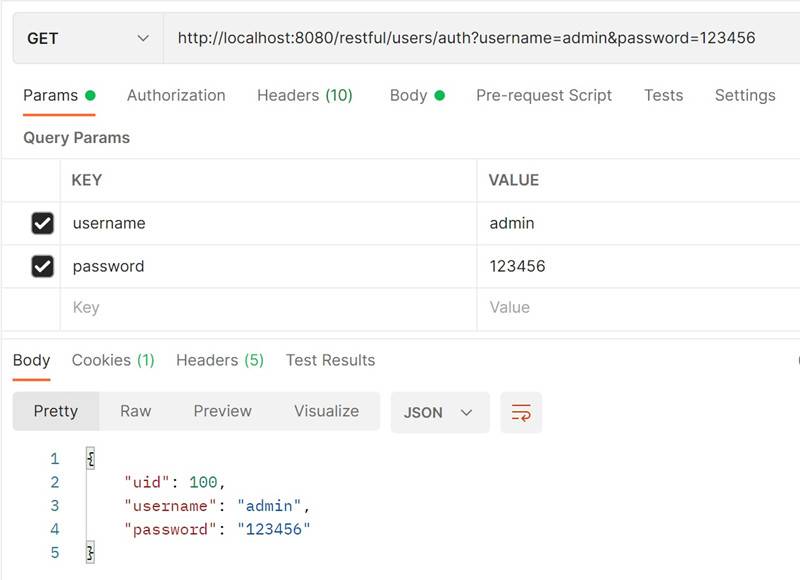
    @GetMapping(value="auth")
    public Users login(String username,String password){
        System.out.println("执行用户登录,查询用户信息....");
        System.out.println("用户名:"+username+",密码:"+password);
        Users loginUser = new Users(100,username,password);
        return loginUser;
    }


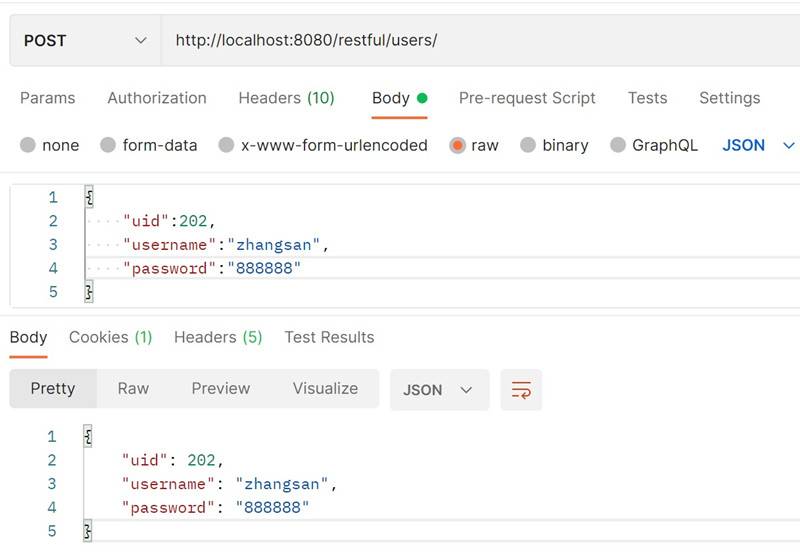
    @PostMapping(value="/")
    public Users add(@RequestBody Users user){
        System.out.println("执行用户注册或者添加新用户....");
        System.out.println("新增用户资料:"+user);
        return user;
    }

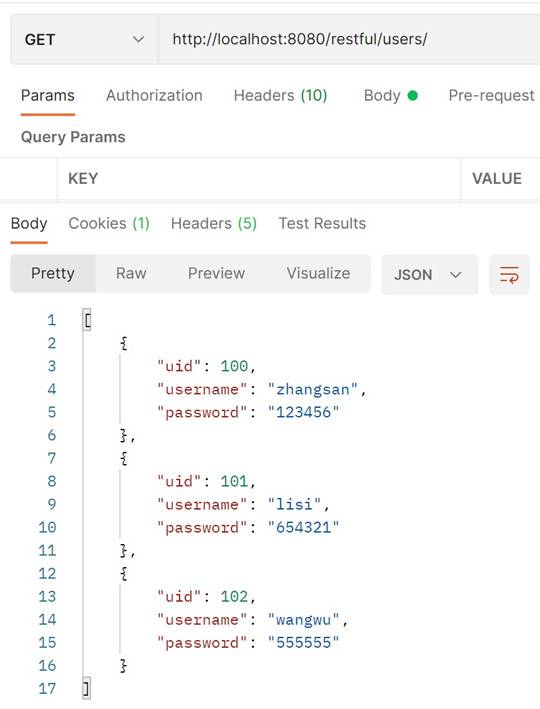
    @GetMapping(value="/")
    public List<Users> queryAll(){
        System.out.println("查询所有用户....");
        List<Users> users = new ArrayList<Users>();
        users.add(new Users(100,"zhangsan","123456"));
        users.add(new Users(101,"lisi","654321"));
        users.add(new Users(102,"wangwu","555555"));
        return users;
    }

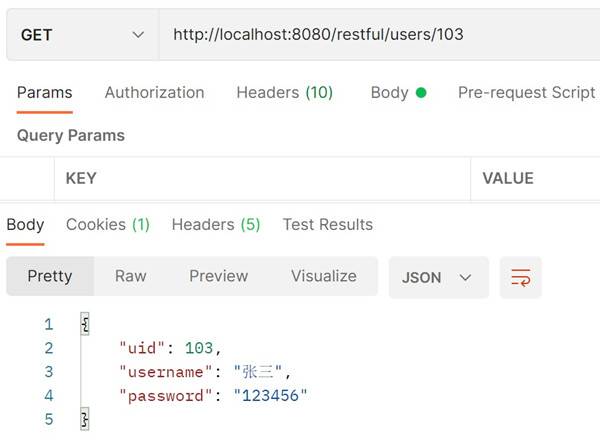
    @GetMapping(value="/{uid}")
    public Users queryAll(@PathVariable("uid") int uid){
        System.out.println("查询单个用户....");
        System.out.println("查询用户编号:"+uid);
        Users user = new Users(uid,"张三","123456");
        return user;
    }

    @PutMapping(value="/")
    public Map<String,Object> update(@RequestBody Users user){
        System.out.println("更新单个用户....");
        System.out.println("更新用户资料:"+user);
        Map<String,Object> result = new HashMap<String,Object>();
        result.put("code",200);
        result.put("msg","更新成功");
        return result;
    }

    @DeleteMapping(value="/{uid}")
    public Map<String,Object> delete(@PathVariable("uid") int uid){
        System.out.println("删除单个用户....");
        System.out.println("删除用户编号:" + uid);
        Map<String,Object> result = new HashMap<String,Object>();
        result.put("code",200);
        result.put("msg","删除成功");
        return result;
    }
}
测试用户登录接口。
测试用户注册接口。
测试查询所有用户接口
测试查询单个用户接口。
测试更新单个用户接口。
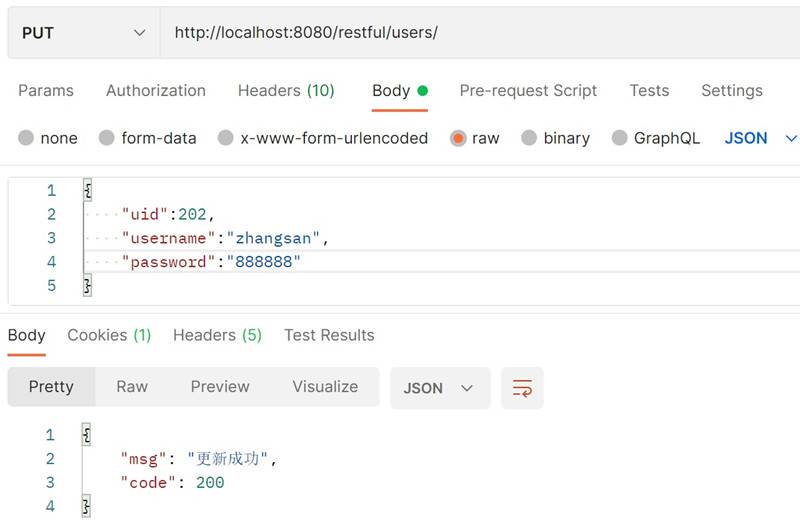
测试删除单个用户接口。
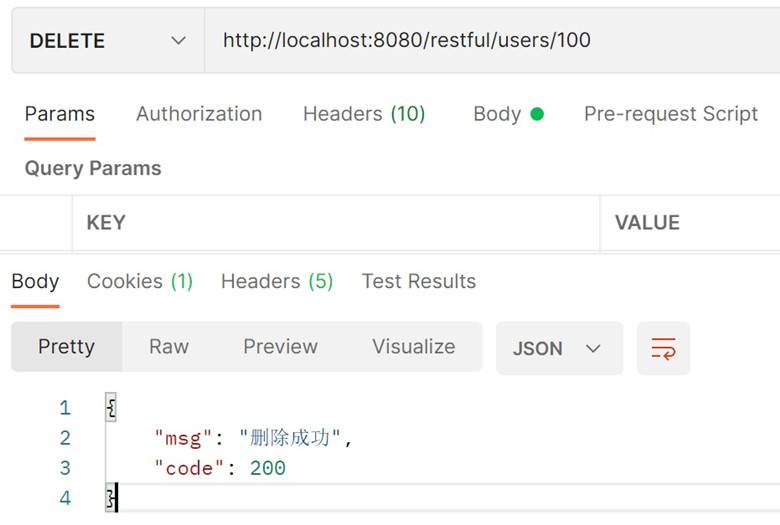
3.如何接收参数 接收参数 1.对于地址栏参数使用 @PathVariable 注解 2.GET 请求参数使用 @RequestParam 注解 3.POST、DELETE、PUT 请求参数使用 @RequestBody 注解