MariaDB 数据库管理系统是 MySQL 的一个分支,主要由开源社区在维护,采用 GPL 授权许可。开发这个分支的原因之一是:甲骨文公司收购了 MySQL 后,有将 MySQL 闭源的潜在风险,因此社区采用分支的方式来避开这个风险。MariaDB完全兼容mysql,使用方法也是一样的。
1.安装MariaDB
[root@mini ~]# yum install mariadb-server
2.配置MariaDB
[root@mini ~]# systemctl start mariadb # 开启服务 [root@mini ~]# systemctl enable mariadb # 设置为开机自启动服务
3.配置时出现的各个选项
Enter current password for root (enter for none): # 输入数据库超级管理员root的密码(注意不是系统root的密码),第一次进入还没有设置密码则直接回车
Set root password? [Y/n] # 设置密码,y
New password: # 新密码 Re-enter new password: # 再次输入密码
Remove anonymous users? [Y/n] # 移除匿名用户, y
Disallow root login remotely? [Y/n] # 拒绝root远程登录,n,不管y/n,都会拒绝root远程登录
Remove test database and access to it? [Y/n] # 删除test数据库,y:删除。n:不删除,数据库中会有一个test数据库,一般不需要
Reload privilege tables now? [Y/n] # 重新加载权限表,y。或者重启服务也许。
4.测试是否能够登录成功
[root@mini ~]# mysql -u root -p Enter password: Welcome to the MariaDB monitor. Commands end with ; or \g. Your MariaDB connection id is 8 Server version: 5.5.60-MariaDB MariaDB Server
Copyright (c) 2000, 2018, Oracle, MariaDB Corporation Ab and others.
Type 'help;' or '\h' for help. Type '\c' to clear the current input statement.
MariaDB [(none)]>
5.设置MariaDB字符集为utf-8
1)/etc/my.cnf 文件
在 [mysqld] 标签下添加
init_connect='SET collation_connection = utf8_unicode_ci'
init_connect='SET NAMES utf8'
character-set-server=utf8
collation-server=utf8_unicode_ci
skip-character-set-client-handshake
2)/etc/my.cnf.d/client.cnf 文件 在 [client] 标签下添加
default-character-set=utf8
3)/etc/my.cnf.d/mysql-clients.cnf 文件
在 [mysql] 标签下添加
default-character-set=utf8
4)重启服务
[root@mini ~]# systemctl restart mariadb
6.远程链接mariadb数据库
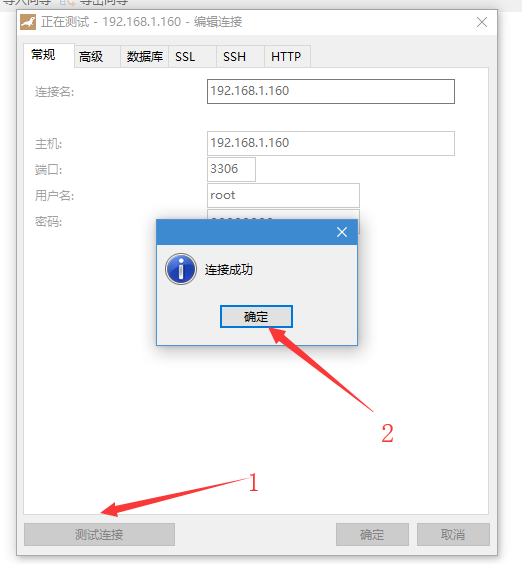
mariadb默认是拒绝 root 远程登录的。这里用的是 navicat 软件连接数据库
1)关闭防火墙
关闭防火墙 systemctl stop firewalld
[root@mini ~]# systemctl stop firewalld
2)先查看mysql数据库中的user表
[root@mini ~]# mysql -u root -p  # 先通过本地链接进入数据库

MariaDB [(none)]> use mysql;

MariaDB [mysql]> select host, user from user;
+-----------+------+
| host      | user |
+-----------+------+
| 127.0.0.1 | root |
| ::1       | root |
| mini      | root |
+-----------+------+
3 rows in set (0.00 sec)
3)将与主机名相等的字段改为 "%" ,我的主机名为mini。
MariaDB [mysql]> update user set host='%' where host='mini';
Query OK, 1 row affected (0.00 sec)
Rows matched: 1  Changed: 1  Warnings: 0

MariaDB [mysql]> select host, user from user;
+-----------+------+
| host      | user |
+-----------+------+
| %         | root |
| 127.0.0.1 | root |
| localhost | root |
+-----------+------+
3 rows in set (0.00 sec)
4)修改mariadb默认密码(默认密码为空)。
  use mysql;
  update user set password=password('新密码') where user='root';
5)刷新权限表,或重启mariadb服务,一下二选一即可
MariaDB [mysql]> flush privileges;
Query OK, 0 rows affected (0.00 sec)

或者:
[root@mini ~]# systemctl restart mariadb
5)重新远程链接mariadb.