Spring基础教程(十六)
讲解JDBCTemplate
为了使 JDBC 更加易于使用,Spring 在 JDBCAPI 上定义了一个抽象层, 以此建立一个JDBC存取框架。
作为 SpringJDBC 框架的核心, JDBC 模板的设计目的是为不同类型的JDBC操作提供模板方法. 每个模板方法都能控制整个过程,并允许覆盖过程中的特定任务.通过这种方式,可以在尽可能保留灵活性的情况下,将数据库存取的工作量降到最低。
JdbcTemplate主要提供以下五类方法:
- execute方法:可以用于执行任何SQL语句,一般用于执行DDL语句;
- update方法:update方法用于执行新增、修改、删除等语句;
- batchUpdate方法:batchUpdate方法用于执行批处理相关语句;
- query方法及queryForXXX方法:用于执行查询相关语句;
- call方法:用于执行存储过程、函数相关语句。
实例: 项目结构图如下:
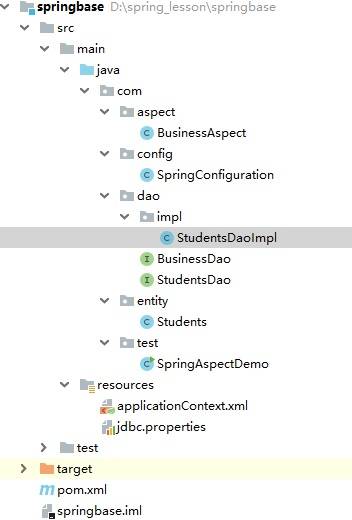
接上节案例实现。
1.在pom.xml中添加jdbc,tx,mysql,c3p0依赖
<?xml version="1.0" encoding="UTF-8"?>
<project xmlns="http://maven.apache.org/POM/4.0.0"
         xmlns:xsi="http://www.w3.org/2001/XMLSchema-instance"
         xsi:schemaLocation="http://maven.apache.org/POM/4.0.0 http://maven.apache.org/xsd/maven-4.0.0.xsd">
    <modelVersion>4.0.0</modelVersion>

    <groupId>com.simoniu</groupId>
    <artifactId>springbase</artifactId>
    <version>1.0-SNAPSHOT</version>

    <properties>
        <spring.version>5.2.5.RELEASE</spring.version>
    </properties>

    <dependencies>
        <!-- https://mvnrepository.com/artifact/org.springframework/spring-core -->
        <dependency>
            <groupId>org.springframework</groupId>
            <artifactId>spring-core</artifactId>
            <version>${spring.version}</version>
        </dependency>

        <!-- https://mvnrepository.com/artifact/org.springframework/spring-context -->
        <dependency>
            <groupId>org.springframework</groupId>
            <artifactId>spring-context</artifactId>
            <version>${spring.version}</version>
        </dependency>

        <!-- https://mvnrepository.com/artifact/org.springframework/spring-beans -->
        <dependency>
            <groupId>org.springframework</groupId>
            <artifactId>spring-beans</artifactId>
            <version>${spring.version}</version>
        </dependency>

        <!-- https://mvnrepository.com/artifact/org.springframework/spring-web -->
        <dependency>
            <groupId>org.springframework</groupId>
            <artifactId>spring-web</artifactId>
            <version>${spring.version}</version>
        </dependency>

        <!-- https://mvnrepository.com/artifact/org.springframework/spring-aop -->
        <dependency>
            <groupId>org.springframework</groupId>
            <artifactId>spring-aop</artifactId>
            <version>${spring.version}</version>
        </dependency>

        <!-- https://mvnrepository.com/artifact/org.springframework/spring-aspects -->
        <dependency>
            <groupId>org.springframework</groupId>
            <artifactId>spring-aspects</artifactId>
            <version>${spring.version}</version>
        </dependency>

        <!-- https://mvnrepository.com/artifact/org.springframework/spring-aspects -->
        <dependency>
            <groupId>org.springframework</groupId>
            <artifactId>spring-jdbc</artifactId>
            <version>${spring.version}</version>
        </dependency>

        <dependency>
            <groupId>org.springframework</groupId>
            <artifactId>spring-tx</artifactId>
            <version>${spring.version}</version>
            <scope>compile</scope>
        </dependency>

        <!-- https://mvnrepository.com/artifact/com.mchange/c3p0 -->
        <dependency>
            <groupId>com.mchange</groupId>
            <artifactId>c3p0</artifactId>
            <version>0.9.5.4</version>
        </dependency>

        <!--mysql依赖 -->
        <dependency>
            <groupId>mysql</groupId>
            <artifactId>mysql-connector-java</artifactId>
            <version>5.1.35</version>
        </dependency>
    </dependencies>

</project>
2.在resources目录下创建jdbc.properties
jdbc.user=root
jdbc.password=root
jdbc.driverClass=com.mysql.jdbc.Driver
jdbc.jdbcUrl=jdbc:mysql://localhost:3306/test

initPoolSize=5
maxPoolSize=10
3.在applicationContext.xml中配置数据源和JdbcTemplate Bean.
<?xml version="1.0" encoding="UTF-8"?>
<beans xmlns="http://www.springframework.org/schema/beans"
       xmlns:xsi="http://www.w3.org/2001/XMLSchema-instance"
       xmlns:context="http://www.springframework.org/schema/context"
       xmlns:aop="http://www.springframework.org/schema/aop"
       xsi:schemaLocation="http://www.springframework.org/schema/beans http://www.springframework.org/schema/beans/spring-beans.xsd http://www.springframework.org/schema/context https://www.springframework.org/schema/context/spring-context.xsd http://www.springframework.org/schema/aop https://www.springframework.org/schema/aop/spring-aop.xsd">

    <!-- 扫描注解类 -->
    <context:component-scan base-package="com"/>
    <!-- 确定 AOP注解生效 -->
    <aop:aspectj-autoproxy/>
    <!-- 读取配置文件 -->
    <context:property-placeholder location="classpath:jdbc.properties" />

    <bean id="dataSource" class="com.mchange.v2.c3p0.ComboPooledDataSource">
        <property name="user" value="${jdbc.user}"></property>
        <property name="password" value="${jdbc.password}"></property>
        <property name="driverClass" value="${jdbc.driverClass}"></property>
        <property name="jdbcUrl" value="${jdbc.jdbcUrl}"></property>

        <property name="initialPoolSize" value="${initPoolSize}"></property>
        <property name="maxPoolSize" value="${maxPoolSize}"></property>
    </bean>

    <bean id="jdbcTemplate" class="org.springframework.jdbc.core.JdbcTemplate">
        <property name="dataSource" ref="dataSource"></property>
    </bean>
</beans>
4.改写业务逻辑接口,增加查询所有、批量添加功能
package com.dao;

import java.util.List;

public interface BusinessDao<T> {

    public void add(T obj);
    public void query(String identify);
    public void delete(String identify);
    public void update(T obj);
    public List<T> queryAll(); //查询所有
    public void addBatch(List<T> objs); //批量添加
}
5.改写StudentsDaoImpl,注入jdbcTemplate属性,完成各个功能。
package com.dao.impl;

import com.dao.StudentsDao;
import com.entity.Students;
import org.springframework.jdbc.core.BeanPropertyRowMapper;
import org.springframework.jdbc.core.JdbcTemplate;
import org.springframework.jdbc.core.RowMapper;
import org.springframework.stereotype.Repository;
import org.springframework.util.CollectionUtils;
import javax.annotation.Resource;
import java.util.ArrayList;
import java.util.List;

@Repository
public class StudentsDaoImpl implements StudentsDao<Students> {

    @Resource
    private JdbcTemplate jdbcTemplate ;


    public void add(Students s) {
        System.out.println("新增学生:"+s);
        String sql = "INSERT INTO students VALUES(?, ?, ?, ?)";
        jdbcTemplate.update(sql, s.getSid(), s.getSname(), s.getGender(),s.getMajor());
    }

    public void query(String identify) {
        System.out.println("查询学生编号:" + identify);
        String sql = "SELECT * FROM students WHERE sid = ?";
        RowMapper<Students> rowMapper =new BeanPropertyRowMapper<>(Students.class);
        // 在将数据装入对象时需要调用set方法。
        Students s = jdbcTemplate.queryForObject(sql, rowMapper, identify);
        System.out.println(s);
    }

    public void delete(String identify) {
        System.out.println("删除学生编号:" + identify);
        String sql = "DELETE from students WHERE sid = ?";
        jdbcTemplate.update(sql, identify);
    }

    public void update(Students s) {
        System.out.println("修改学生:"+s);
        String sql = "UPDATE students SET sname = ?, gender=?,major=? WHERE sid = ?";
        jdbcTemplate.update(sql, s.getSname(),s.getGender(),s.getMajor(), s.getSid());
    }

    @Override
    public List<Students> queryAll() {
        String sql = "SELECT * from students";
        RowMapper<Students> rowMapper = new BeanPropertyRowMapper<>(Students.class);
        List<Students> userList = jdbcTemplate.query(sql, rowMapper);
        return userList;
    }

    @Override
    public void addBatch(List<Students> objs) {
        String sql = "INSERT INTO students VALUES(?, ?, ?, ?)";
        List<Object[]> batchArgs = new ArrayList<>();
        for(Students s: objs){
            batchArgs.add(new Object[] { s.getSid(), s.getSname(), s.getGender(),s.getMajor() });
        }

        jdbcTemplate.batchUpdate(sql, batchArgs);
    }
}
6.编写测试类
package com.test;

import com.dao.StudentsDao;
import com.entity.Students;
import org.springframework.context.ApplicationContext;
import org.springframework.context.support.ClassPathXmlApplicationContext;
import org.springframework.jdbc.core.JdbcTemplate;

import java.util.ArrayList;
import java.util.List;

public class SpringAspectDemo {

    public static void main(String[] args) {
        ApplicationContext context = new ClassPathXmlApplicationContext("applicationContext.xml");
        JdbcTemplate jdbcTemplate = (JdbcTemplate) context.getBean("jdbcTemplate");
        //初始化数据库。
        String sql = "CREATE TABLE IF NOT EXISTS `students`  (\n" +
                "  `sid` varchar(8) CHARACTER SET utf8mb4 COLLATE utf8mb4_bin NOT NULL,\n" +
                "  `sname` varchar(255) CHARACTER SET utf8mb4 COLLATE utf8mb4_bin NULL DEFAULT NULL,\n" +
                "  `gender` varchar(2) CHARACTER SET utf8mb4 COLLATE utf8mb4_bin NULL DEFAULT NULL,\n" +
                "  `major` varchar(255) CHARACTER SET utf8mb4 COLLATE utf8mb4_bin NULL DEFAULT NULL,\n" +
                "  PRIMARY KEY (`sid`) USING BTREE\n" +
                ") ENGINE = InnoDB CHARACTER SET = utf8mb4 COLLATE = utf8mb4_bin ROW_FORMAT = Dynamic;";
        jdbcTemplate.execute(sql);

        Students s = (Students) context.getBean("s1");
        StudentsDao studentsDaoImpl = (StudentsDao) context.getBean("studentsDaoImpl");
        studentsDaoImpl.add(s);
        studentsDaoImpl.query("S001");
        List<Students> studentsList = new ArrayList<Students>();
        studentsList.add(new Students("S002","郭靖","男","九阴真经"));
        studentsList.add(new Students("S003","黄蓉","女","打狗棒法"));
        studentsList.add(new Students("S004","段誉","男","六脉神剑"));

        studentsDaoImpl.addBatch(studentsList);
        List<Students> students = studentsDaoImpl.queryAll();
        students.forEach(System.out::println);

        s.setSname("张无忌");
        studentsDaoImpl.update(s);
        studentsDaoImpl.query("S001");
        studentsDaoImpl.delete("S001");

        students = studentsDaoImpl.queryAll();
        students.forEach(System.out::println);


    }
}

运行结果:
环绕内的前置通知
权限的校验...
新增学生:Students{sid='S001', sname='张三丰', gender='男', major='太极拳'}
环绕内的后置通知
环绕内的最终通知
最终通知...
日志记录...
环绕内的前置通知
权限的校验...
查询学生编号:S001
Students{sid='S001', sname='张三丰', gender='男', major='太极拳'}
环绕内的后置通知
环绕内的最终通知
最终通知...
日志记录...
环绕内的前置通知
权限的校验...
环绕内的后置通知
环绕内的最终通知
最终通知...
日志记录...
环绕内的前置通知
权限的校验...
环绕内的后置通知
环绕内的最终通知
最终通知...
日志记录...
Students{sid='S001', sname='张三丰', gender='男', major='太极拳'}
Students{sid='S002', sname='郭靖', gender='男', major='九阴真经'}
Students{sid='S003', sname='黄蓉', gender='女', major='打狗棒法'}
Students{sid='S004', sname='段誉', gender='男', major='六脉神剑'}
环绕内的前置通知
权限的校验...
修改学生:Students{sid='S001', sname='张无忌', gender='男', major='太极拳'}
环绕内的后置通知
环绕内的最终通知
最终通知...
日志记录...
环绕内的前置通知
权限的校验...
查询学生编号:S001
Students{sid='S001', sname='张无忌', gender='男', major='太极拳'}
环绕内的后置通知
环绕内的最终通知
最终通知...
日志记录...
环绕内的前置通知
权限的校验...
删除学生编号:S001
环绕内的后置通知
环绕内的最终通知
最终通知...
日志记录...
环绕内的前置通知
权限的校验...
环绕内的后置通知
环绕内的最终通知
最终通知...
日志记录...
Students{sid='S002', sname='郭靖', gender='男', major='九阴真经'}
Students{sid='S003', sname='黄蓉', gender='女', major='打狗棒法'}
Students{sid='S004', sname='段誉', gender='男', major='六脉神剑'}