Vue基础教程(十六)
讲解Vue获取表单数据
由于Vue是一个轻巧、高性能、可组件化的 MVVM 库,所以使得Vue更轻松的获得表单数据,实现数据的双向绑定。
1.什么是MVVM
MVVM 设计模式,是由 MVC(最早来源于后端)、MVP 等设计模式进化而来,M - 数据模型(Model),VM - 视图模型(ViewModel),V - 视图层(View)。
在 MVC 模式中,除了 Model 和 View 层以外,其他所有的逻辑都在 Controller 中,Controller 负责显示页面、响应用户操作、网络请求及与 Model 的交互,随着业务的增加和产品的迭代,Controller 中的处理逻辑越来越多、越来越复杂,难以维护。为了更好的管理代码,为了更方便的扩展业务,必须要为 Controller “瘦身”,需要更清晰的将用户界面(UI)开发从应用程序的业务逻辑与行为中分离,MVVM 为此而生。 很多 MVVM 的实现都是通过数据绑定来将 View 的逻辑从其他层分离,可以用下图来简略的表示:
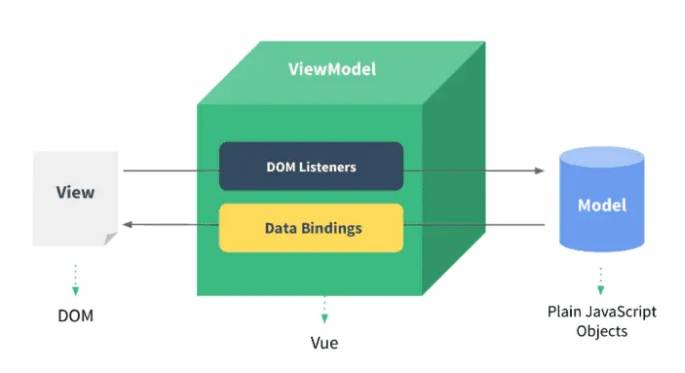
从上图我们可以看出,MVVM 将数据双向绑定(data-binding)作为核心思想,View 和 Model 之间没有联系,它们通过 ViewModel 这个桥梁进行交互。
Model 和 ViewModel 之间的交互是双向的,因此 View 的变化会自动同步到 Model,而 Model 的变化也会立即反映到 View 上显示。
当用户操作 View,ViewModel 感知到变化,然后通知 Model 发生相应改变;反之当 Model 发生改变,ViewModel 也能感知到变化,使 View 作出相应更新。
2.Vue获取表单数据
实例:
<!DOCTYPE html>
<html lang="zh">
<head>
    <meta charset="UTF-8">
    <meta name="viewport" content="width=device-width, initial-scale=1.0">
    <meta http-equiv="X-UA-Compatible" content="ie=edge">
    <title>Document Title</title>
</head>

<body>
    <div id="app">
        <form name="regForm" action="regok.html" v-on:submit.prevent="onSubmit" method="post">
            <table>
                <tr>
                    <td class="title">用户名:</td>
                    <td><input type="text" name="username" v-model="user.username"/></td>
                </tr>
                <tr>
                    <td class="title">密码:</td>
                    <td><input type="password" name="password" v-model="user.password"/></td>
                </tr>
                <tr>
                    <td class="title">确认密码:</td>
                    <td><input type="password" name="confirmpass"/></td>
                </tr>
                <tr>
                    <td class="title">电子邮箱:</td>
                    <td><input type="text" name="email" v-model="user.email"/></td>
                </tr>
                <tr>
                    <td class="title">性别:</td>
                    <td><input type="radio" value="M" name="gender" v-model="user.gender"/>男<input type="radio" value="F" name="gender" v-model="user.gender"/>女
                    </td>
                </tr>
                <tr>
                    <td class="title">学历:</td>
                    <td>
                        <select name="education" v-model="user.education">
                            <option value="-1" selected>-----请选择-----</option>
                            <option value="0">文盲</option>
                            <option value="1">小学</option>
                            <option value="2">初中</option>
                            <option value="3">高中</option>
                            <option value="4">大专</option>
                            <option value="5">本科</option>
                            <option value="6">硕士</option>
                            <option value="7">博士</option>
                            <option value="8">博士后</option>
                            <option value="9">圣斗士</option>
                        </select>
                    </td>
                </tr>
                <tr>
                    <td class="title">出生日期:</td>
                    <td><input type="date" name="birthday" value="" v-model="user.birthday"/></td>
                </tr>
                <tr>
                    <td class="title">爱好:</td>
                    <td>
                        <!--复选框name名字必须一样-->
                        <input type="checkbox" name="favorites" value="read" v-model="user.favorites"/>读书
                        <input type="checkbox" name="favorites" value="music" v-model="user.favorites"/>音乐
                        <input type="checkbox" name="favorites" value="internet" v-model="user.favorites"/>上网
                        <input type="checkbox" name="favorites" value="nba" v-model="user.favorites"/>NBA
                    </td>
                </tr>
                <tr>
                    <td class="title">自我介绍:</td>
                    <td><textarea rows="10" cols="25" v-model="user.introduce"></textarea></td>
                </tr>
                <tr>
                    <td class="title">上传照片:</td>
                    <td><input type="file" name="pic" v-on:change="getPicture()" ref="inputfile"/></td>
                </tr>
                <tr>
                    <td class="title">是否接受条款:</td>
                    <td><input type="checkbox" name="accept" v-model="user.accept"/>我无条件接受霸王条款</td>
                </tr>
                <tr>
                   <td colspan="2" style="text-align: center"><input type="submit" value="注册"/></td>
                </tr>
            </table>
        </form>
    </div>
    <script src="https://cdn.jsdelivr.net/npm/vue/dist/vue.js"></script>
    <script>
        new Vue({
            el: '#app',
            data: {
               user:{
                   username:'',
                   password:'',
                   email:'',
                   gender:'M',
                   education:'',
                   birthday:'',
                   favorites:[],
                   pic:{},
                   introduce:'',
                   accept: false
               }
            },
            methods:{
                onSubmit() {
                    if (this.user.username) {
                        console.log('*******提交表单******');
                        console.log(this.user);
                    } else {
                        alert('请输入用户名')
                    }
                },
                getPicture(){
                    let fileDom = this.$refs.inputfile;
                    this.user.pic = fileDom.files[0];
                }
            }
        })
    </script>
</body>
</html>
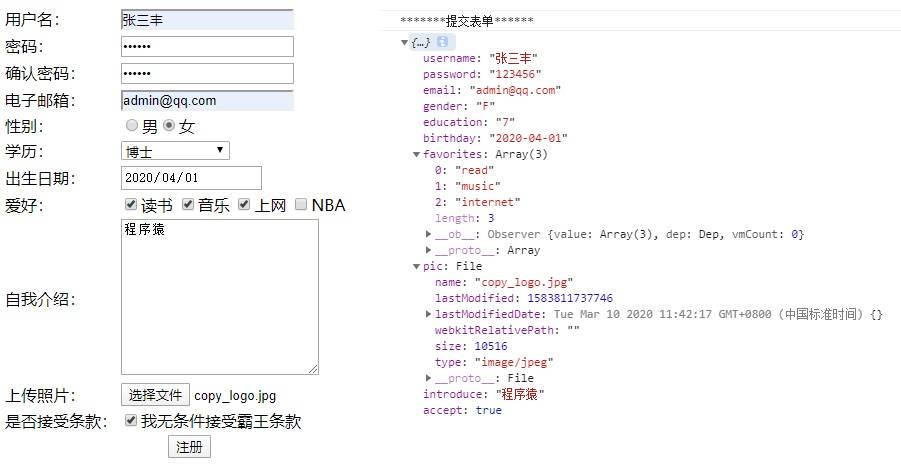
运行效果: