Vue基础教程(十五)
讲解axios
axios是独立于vue的一个项目,基于promise用于浏览器和node.js的http客户端。
1.Axios
Axios是随着Vue的兴起而被广泛使用的,目前来说,绝大多数的 Vue 项目中的网络请求都是利用 Axios 发起的。Axios是一个基于promise封装的网络请求库,它是基于XHR 进行二次封装。
axios主要有以下用途: - 在浏览器中可以帮助我们完成 ajax请求的发送。 - 在node.js中可以向远程接口发送请求。
2.实例
使用axios调用远程CRUD接口。注意:测试时需要开启后端服务器,并且后端开启跨域访问权限。
通过CRUD接口调用,分别测试了axios发送各类请求。 |方法|请求| |-|-| |queryItemsById|GET| |addItem|POST| |updateItem|PUT| |removeItem|DELETE|
<!DOCTYPE html>
<html lang="zh">
<head>
    <meta charset="UTF-8">
    <meta name="viewport" content="width=device-width, initial-scale=1.0">
    <meta http-equiv="X-UA-Compatible" content="ie=edge">
    <title>Document Title</title>
    <style>
        #app {
            width: 800px;
            margin: 0px auto;
        }
        table {
            width: 780px;
            border: 1px solid #ccc;
            border-collapse: collapse;
        }
        th, td {
            text-align: center;
            border: 1px solid #ccc;
        }

    </style>
</head>

<body>
<div id="app">
    <table>
        <tr>
            <th>编号</th>
            <th>名称</th>
            <th>价格</th>
            <th>产地</th>
        </tr>
        <tr>
            <td>{{item.id}}</td>
            <td>{{item.name}}</td>
            <td>{{item.price}}</td>
            <td>{{item.city}}</td>
        </tr>
    </table>
    <br>
    <div>
        <input type="button" value="查询商品" @click="queryItemById()"/>
        <input type="button" value="添加商品" @click="addItem()"/>
        <input type="button" value="修改商品" @click="updateItem()"/>
        <input type="button" value="删除商品" @click="removeItem()"/>

    </div>
</div>
<script src="https://cdn.jsdelivr.net/npm/vue/dist/vue.js"></script>
<!--引入axios资源-->
<script src="https://unpkg.com/axios/dist/axios.min.js"></script>


<script>
    new Vue({
        el: '#app',
        data: {
            item: {},  //要查询的商品资料
            newItem: {
                name: '康师傅红烧牛肉面' + new Date().toLocaleString(),
                price: 4,
                city: '杭州'
            }  //要添加的商品资料
        },
        methods: {
            queryItemById: function () {
                //查询商品编号为7的商品资料
                axios.get('http://www.simoniu.com:8080/examdemo/items/7')
                    .then(response => {
                        console.log(response)
                        this.item = response.data.data;
                        console.log(this.item);
                    })
                    .catch(error => {
                        console.log(error)
                    })
            },
            addItem: function () {
                //添加新商品
                axios.post('http://www.simoniu.com:8080/examdemo/items/', this.newItem)
                    .then(response => {
                        console.log(response)
                    })
                    .catch(error => {
                        console.log(error)
                    })
            },
            updateItem: function () {
                this.queryItemById(); //查询出商品资料
                this.item.name = '康师傅红烧牛肉面'+new Date().toLocaleString();
                axios.put('http://www.simoniu.com:8080/examdemo/items/'+this.item.id, this.item)
                    .then(response => {
                        console.log(response)
                    })
                    .catch(error => {
                        console.log(error)
                    })
            },
            removeItem: function () {
                //删除编号为100的商品
                axios.delete('http://www.simoniu.com:8080/examdemo/items/100')
                    .then(response => {
                        console.log(response)
                    })
                    .catch(error => {
                        console.log(error)
                    })
            }
        }
    })
</script>
</body>
</html>
运行效果:

注意:发送post请求如果想传递参数,可以采用以下写法:
addItem: function () {
      //添加新商品
   axios.post('http://www.simoniu.com:8080/examdemo/items/', this.newItem, {
       params:{
          timeout:'1000'
       }
   }).then(response => {
         console.log(response)
   }).catch(error => {
        console.log(error)
   })
}
对应后端的Controller实现如下:
@PostMapping("/")
public JsonData addItem(@RequestBody Items item, @RequestParam String timeout) {

}
3.Ajax/Fetch/Axios三者有什么区别?
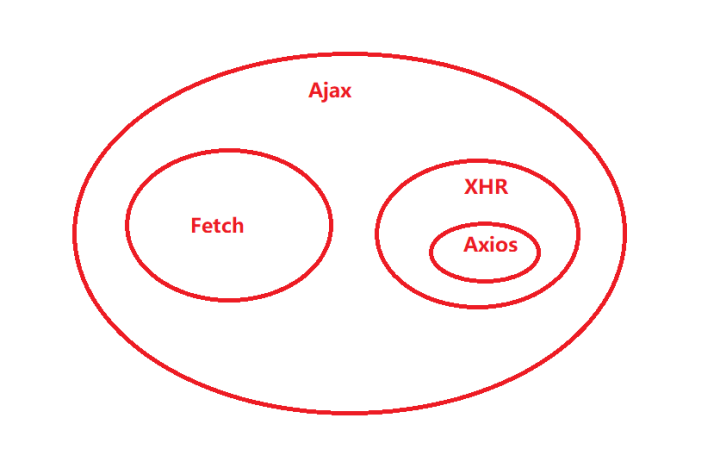
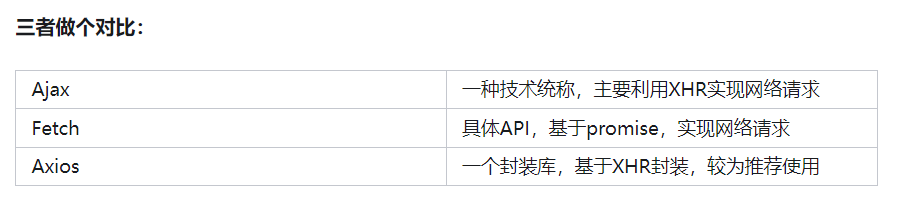
- Ajax是一种思想,XMLHttpRequest只是实现 Ajax 的一种方式。其中 XMLHttpRequest模块就是实现Ajax的一种很好的方式,这也是很多面试官喜欢让面试者手撕的代码之一。简单说就是利用XMLHttpRequest模块实现 Ajax。
- Fetch是一个H5的API,它是真实存在的,它是基于promise的。很多小伙伴会拿它与Ajax作比较,其实这是不对的,我们通常所说的Ajax是指使用XMLHttpRequest实现的Ajax,所以真正应该和XMLHttpRequest作比较。
- Axios 是一个基于 promise 封装的网络请求库,它是基于 XHR 进行二次封装。
Ajax、Fetch、axios三者之间的关系可以用一张图来清晰的表示,如图: