Vue基础教程(八)
讲解Vue的遍历
v-for 指令可以绑定数组的数据来渲染一个项目列表。
v-for指令可以用来遍历数组/对象 它可以根据data中数据的更新动态刷新视图
例如:
<!DOCTYPE html>
<html lang="zh">
<head>
    <meta charset="UTF-8">
    <meta name="viewport" content="width=device-width, initial-scale=1.0">
    <meta http-equiv="X-UA-Compatible" content="ie=edge">
    <title>Document Title</title>
    <style>
        table{
            width:240px;
            border: 1px solid #ccc;
            border-collapse:collapse;
        }
        th,td{
            text-align: center;
            border: 1px solid #ccc;
        }
    </style>
</head>

<body>
    <div id="app">
        <!-- 1、简单的列表渲染 -->
        <ul>
            <li v-for="n in 10">{{ n }} </li>
        </ul>
        <ul>
            <!-- 如果想获取索引,则使用index关键字,注意,圆括号中的index必须放在后面 -->
            <li v-for="(n, index) in 5">{{ n }}=> {{ index }} </li>
        </ul>
        <ul>
            <!--遍历对象-->
            <li v-for="(value,key,index) in user">{{ key }}:{{ value }} => {{ index }} </li>
        </ul>
        <!-- 2、遍历数据列表 -->
        <table>
            <tr>
                <th>下标</th>
                <th>编号</th>
                <th>姓名</th>
                <th>年龄</th>
            </tr>
            <tr v-for="(item, index) in userList">
                <td>{{index}}</td>
                <td>{{item.id}}</td>
                <td>{{item.username}}</td>
                <td>{{item.age}}</td>
            </tr>
        </table>
    </div>
    <!-- 引入开发环境的vue.js版本,包含了有帮助的命令行警告 ,这样使用的也是最新版本-->
    <script src="https://cdn.jsdelivr.net/npm/vue/dist/vue.js"></script>
    <script>
       // 创建一个vue对象
       let vm = new Vue({
            el: '#app',//绑定vue作用的范围,el是element的简写。
            data: {//定义页面中显示的模型数据或者说为属性
                userList: [
                    { id: 10, username: '张三', age: 18 },
                    { id: 11, username: '李四', age: 28 },
                    { id: 13, username: '王五', age: 38 }
                ],

                user:{name:'张三丰',gender:'男',addr:'湖北武当山'}
            }
        })
    </script>
</body>
</html>
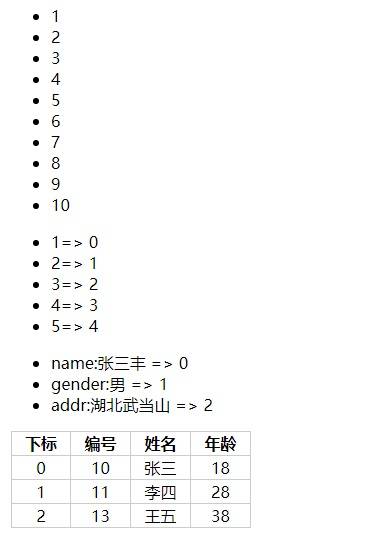
运行效果: