Javascript基础教程(三十三)
讲解Javascript的DOM获取表单元素
用JavaScript操作表单和操作DOM是类似的,因为表单本身也是DOM树。 操作表单最常用的操作就是获取表单元素。
这里我们参考《HTML5基础教程》中"的"表单标签"一节的案例,来测试各类表单元素的值。
实例:
在设计表单时,对应提交的是唯一的字段信息,推荐使用id属性。提交的是数组或者单选按钮组,推荐使用name属性.如果有多个表单,可以使用document.forms[0],document.forms[1]来区分。
<!DOCTYPE html>
<html lang="zh-CN">
<head>
    <meta charset="UTF-8">
    <title>用户注册</title>
</head>
<body>
<h1>用户注册</h1>
<hr>
<div>
    <form name="regForm" action="regok.html" method="post">
        <table>
            <tr>
                <td class="title">用户名:</td>
                <td><input type="text" name="username" id="username" value=""/></td>
            </tr>
            <tr>
                <td class="title">密码:</td>
                <td><input type="password" name="password" id="password" value=""/></td>
            </tr>
            <tr>
                <td class="title">确认密码:</td>
                <td><input type="password" name="confirmpass" id ="confirmpass" value=""/></td>
            </tr>
            <tr>
                <td class="title">电子邮箱:</td>
                <td><input type="text" name="email" disabled="disabled" value=""/></td>
            </tr>
            <tr>
                <td class="title">薪水:</td>
                <td><input type="text" name="salary" value="10000" id="salary" hidden/></td>
            </tr>
            <tr>
                <td class="title">性别:</td>
                <td><input type="radio" value="M" name="gender" checked/>男<input type="radio" value="F" name="gender"/>女
                </td>
            </tr>
            <tr>
                <td class="title">学历:</td>
                <td>
                    <select name="education" id="education" value="">
                        <option value="-1" selected>-----请选择-----</option>
                        <option value="0">文盲</option>
                        <option value="1">小学</option>
                        <option value="2">初中</option>
                        <option value="3">高中</option>
                        <option value="4">大专</option>
                        <option value="5">本科</option>
                        <option value="6">硕士</option>
                        <option value="7">博士</option>
                        <option value="8">博士后</option>
                        <option value="9">圣斗士</option>
                    </select>
                </td>
            </tr>
            <tr>
                <td class="title">籍贯:</td>
                <td>
                    <input list="provinceList" id="province" value=""/>
                    <datalist id="provinceList">
                        <option value="河北">
                        <option value="河南">
                        <option value="山东">
                        <option value="山西">
                        <option value="陕西">
                    </datalist>
                </td>
            </tr>
            <tr>
                <td class="title">出生日期:</td>
                <td><input type="date" name="birthday" id="birthday" value=""/></td>
            </tr>
            <tr>
                <td class="title">爱好:</td>
                <td>
                    <!--复选框name名字必须一样-->
                    <input type="checkbox" name="favorites" value="read"/>读书
                    <input type="checkbox" name="favorites" value="music"/>音乐
                    <input type="checkbox" name="favorites" value="internet"/>上网
                    <input type="checkbox" name="favorites" value="nba"/>NBA
                </td>
            </tr>
            <tr>
                <td class="title">自我介绍:</td>
                <td><textarea rows="10" id="introduce" cols="25" value=""></textarea></td>
            </tr>
            <tr>
                <td class="title">上传照片:</td>
                <td><input type="file" name="pic"/></td>
            </tr>
            <tr>
                <td class="title">是否接受条款:</td>
                <td><input type="checkbox" id="accept" name="accept" value="yes"/>我无条件接受霸王条款</td>
            </tr>
            <tr>
                <td colspan="2" align="center"><button type="button" onclick="getFormElementsValue()">获取表单元素</button><input type="submit" value="注册"/><input type="reset" value="重置"/></td>
            </tr>
        </table>
    </form>

    <form name="loginForm">

    </form>
</div>

<script>

  function getFormElementsValue() {
      let formNodes = document.forms;
      console.log(formNodes.length);
      console.log(formNodes[0].getAttribute("name"));
      let regFormNode = formNodes[0];
      let username = document.getElementById("username").value;
      let password = document.getElementById("password").value;
      let gender='';
      for(let temp of document.getElementsByName("gender")){
          if(temp.checked){
              gender = temp.value;
          }
      }
      let edu = document.getElementById("education").value;
      let province = document.getElementById("province").value;
      let birthday = document.getElementById("birthday").value;
      let favorites = [];
      for(let temp of document.getElementsByName("favorites")){
          if(temp.checked){
              favorites.push(temp.value);
          }
      }
      let introduce = document.getElementById("introduce").value;
      let accept = 'no';
      if(document.getElementById("accept").checked){
          accept = document.getElementById("accept").value;
      }
      console.log("username=" + username);
      console.log("password=" + password);
      console.log("gender=" + gender);
      console.log("edu=" + edu);
      console.log("province=" + province);
      console.log("favorites="+favorites);
      console.log("birthday="+birthday);
      console.log("introduce="+introduce);
      console.log("accept="+accept);
  }
</script>
</body>
</html>

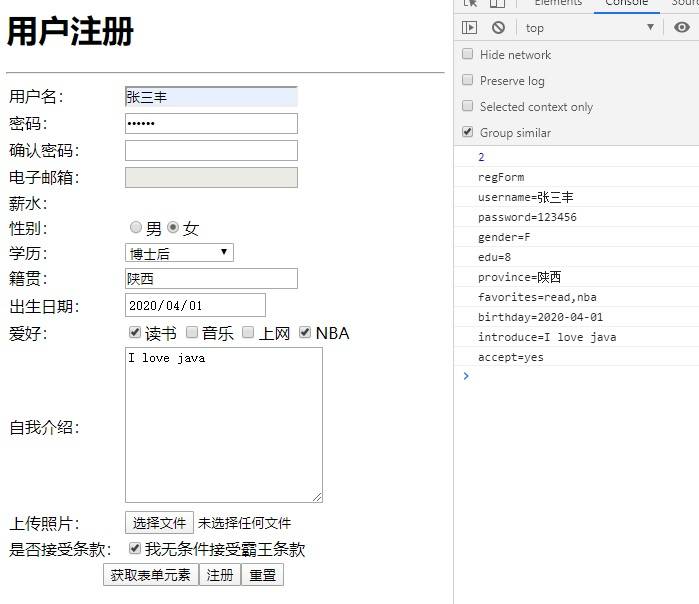
运行结果: