Javascript基础教程(二十五)
讲解Javascript之JSON
JSON是JavaScript Object Notation的缩写,它是一种数据交换格式。 JSON的特征: - JSON 是轻量级的数据交换格式 - JSON 独立于语言 - JSON 是“自描述的”且易于理解
1.JSON的语法规则
- 数据是名称/值对
- 数据由逗号分隔
- 花括号保存对象
- 方括号保存数组
例如:以下定义了对象和对象数组。
<script>

    let p = {"name":"张三丰","age":60};
    let persons = [
        p,
        {"name":"张无忌","age":45},
        {"name":"风清扬","age":70},
        {"name":"东方不败","age":30}
    ];
    console.log(p);
    console.log(persons);
</script>
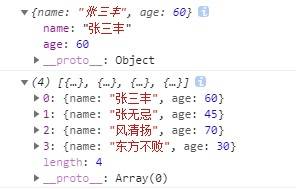
运行结果:
2.json转字符串
使用JSON.stringify(value[, replacer[, space]]); 把json对象转字符串。 value: json对象 replacer:数组,表示属性集合 space:输出格式控制
例如:
<script>

    let p = {"name":"张三丰","age":60,"gender":"男","addr":"湖北省武当山"};
    let persons = [
        p,
        {"name":"张无忌","age":45,"gender":"男","addr":"湖北省武当山"},
        {"name":"风清扬","age":70,"gender":"男","addr":"陕西省华山"},
        {"name":"东方不败","age":30,"gender":"男","addr":"黑木崖"}
    ];
    console.log(JSON.stringify(p));
    console.log(JSON.stringify(p,["name","gender"]));
    console.log(JSON.stringify(persons));
    console.log(JSON.stringify(persons,["name","age"]));
    console.log(JSON.stringify(persons,["name","age"],"\r "));

</script>
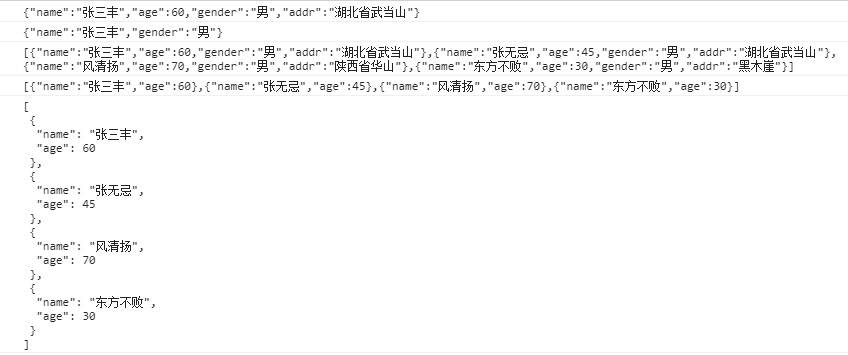
运行结果:
JSON.stringify(obj,option); 第二个参数可以用来指定哪些属性被序列化。例如:
    let person = {
        name: '郭靖',
        gender: "男",
        age : 35,
        password: '123456',  //密码作为个人隐私不想参与序列化
        address: '浙江桃花岛',
        eat :function(){
            console.log(this.name + "正在吃饭.....")
        }
    };

    //JSON对象转字符串

    let strObject = JSON.stringify(person);

    console.log(strObject);
    console.log("-----------------指定哪些属性需要转换为字符串-------------------");

    strObject = JSON.stringify(person,['name','gender','age','address']);
    console.log(strObject)
运行结果:
{"name":"郭靖","gender":"男","age":35,"password":"123456","address":"浙江桃花岛"}
-----------------指定哪些属性需要转换为字符串-------------------
{"name":"郭靖","gender":"男","age":35,"address":"浙江桃花岛"}
JSON.stringify()有以下的转换规则:
- undefined、函数以及symbol在非数组对象转换时会直接忽略。
- 布尔值、数字、字符串的包装对象会转换成原始值。
- Date 日期会被当做字符串。
- 以symbol为属性键的属性会被忽略。
3.字符串转json
JavaScript 的内建函数 JSON.parse() 来把这个字符串转换为 json 对象。
例如:
<script>

    let dog = '{"alias":"二郎犬","type":"神犬","color":"黑色","age":1000,"weight":50}';
    let json =  JSON.parse(dog)
    console.log(typeof (json));
    console.log(json);
</script>
运行结果:
object
{alias: "二郎犬", type: "神犬", color: "黑色", age: 1000, weight: 50}
4.json对象数组的CRUD
<script>

    let persons = [
        {"pid": "0001", "name": "张三丰", "age": 60},
        {"pid": "0002", "name": "张无忌", "age": 45},
        {"pid": "0003", "name": "风清扬", "age": 70},
        {"pid": "0004", "name": "东方不败", "age": 30}
    ]

    //1.遍历
    persons.forEach(function (e, index) {
        console.log("第" + (index) + "个元素是:" + JSON.stringify(e));
    })
    //2.在尾部添加新元素
    persons.push({"pid": "0005", "name": "郭靖", "age": 35});
    console.log("-------添加新元素之后------");
    persons.forEach(function (e, index) {
        console.log("第" + (index) + "个元素是:" + JSON.stringify(e));
    })

    /*
    //在头部添加新元素可以使用unshift()
    persons.unshift({"pid": "0005", "name": "郭靖", "age": 35});
    */

    //3.修改pid=3元素的名字属性
    persons.forEach(function (e, index) {
        if (e.pid == 3) {
            e.name = "黄老邪";
            return;
        }
    });
    console.log("-------修改姓名之后------");
    persons.forEach(function (e, index) {
        console.log("第" + (index) + "个元素是:" + JSON.stringify(e));
    })

    //4.删除所有姓'张'的元素

    for (let index = 0; index < persons.length; index++) {
        if (persons[index].name.startsWith('张')) {
            persons.splice(index, 1);
            index--; //注意下标向前移动一次。
        }
    };
    //或者从后向前循环。
    /*
    for (let index = persons.length-1; index >= 0; index--) {
        if (persons[index].name.startsWith('张')) {
            persons.splice(index, 1);
        }
    };*/
    /*
    persons.forEach(function(e,index){
        if (e.name.startsWith('张')) {
            persons.splice(index, 1);
            index--; //错误,forEach是只读的。并不能利用这种语句改变数组所存储的元素。
        }
    })*/

    console.log("-------删除姓'张'元素之后------");
    persons.forEach(function (e, index) {
        console.log("第" + (index) + "个元素是:" + JSON.stringify(e));
    })
</script>
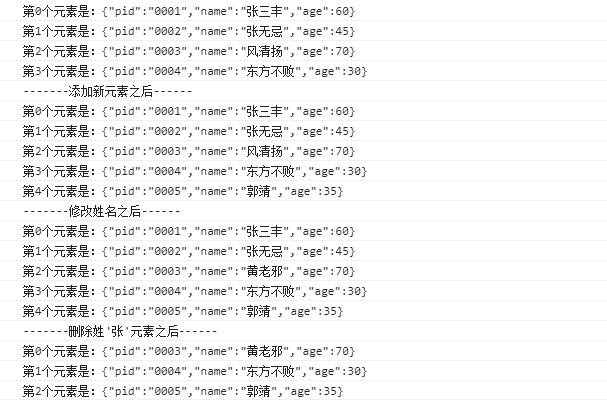
运行结果: